When Business Gets Messy
Imagine you run a growing business. Your sales team uses one spreadsheet. Your accounts department uses another. Your warehouse tracks stock on a completely separate system. Teams do not communicate instantly with each other, which leads to delayed orders, missing invoices, and managers making decisions using outdated information.
This is the reality for thousands of businesses around the world, and it costs them time, money, and customers.
Now imagine one single system that connects every part of your business. Sales, finance, inventory, HR, supply chain, and more, all working together, all sharing the same information in real time.
That system is called an ERP. In this complete guide, you will learn everything you need to know about ERP, what it is, how it works, why businesses need it, and how it can transform your operations.
What Is ERP? (Enterprise Resource Planning Explained Simply)
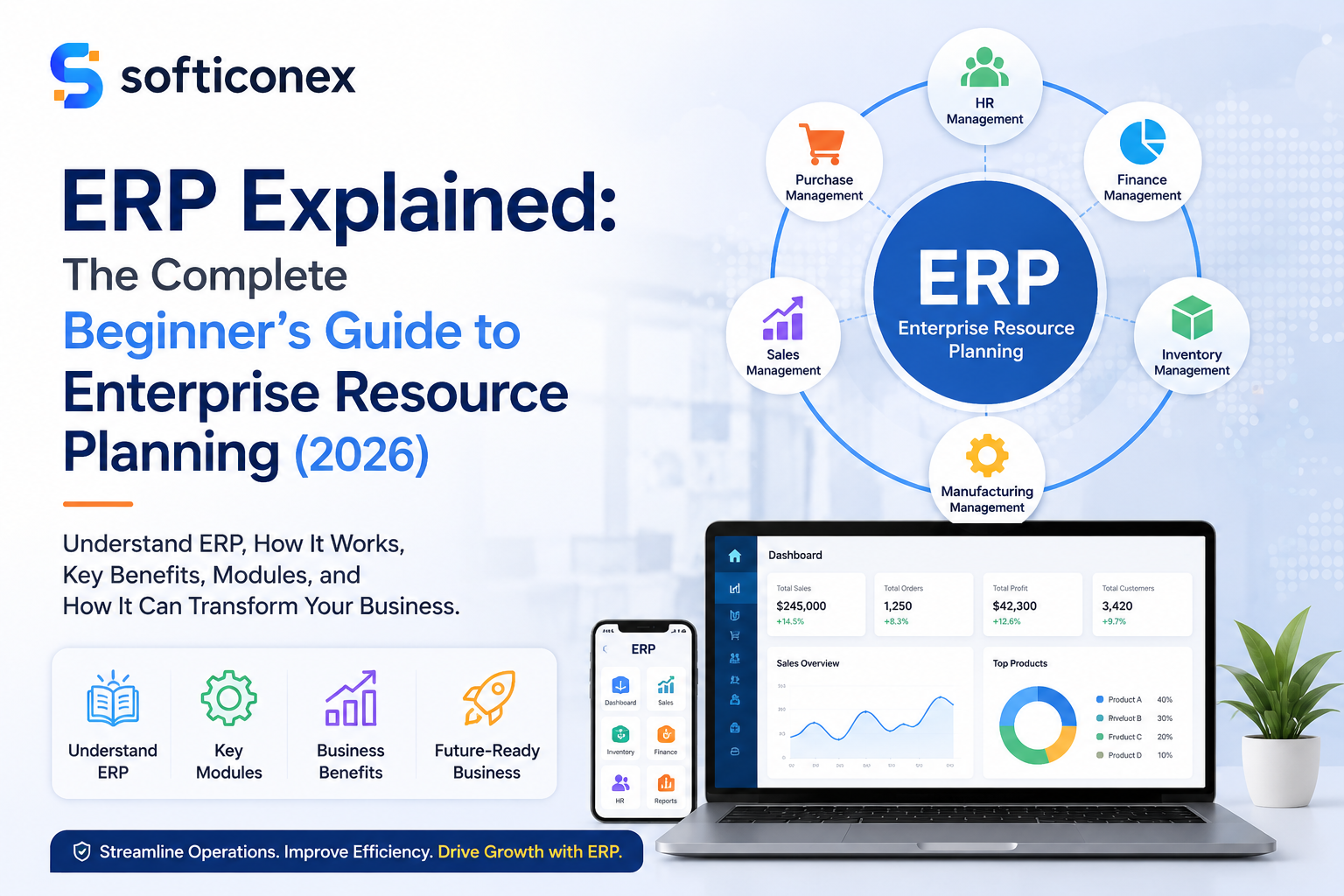
ERP stands for Enterprise Resource Planning. It is a type of business management software that brings all the core functions of a company together into one unified system.
Think of ERP Software as the central brain of your business. Just like your brain coordinates your eyes, hands, heart, and lungs, an ERP system coordinates your finance, HR, inventory, sales, and supply chain, all at the same time.
The term enterprise resource planning was first used in the 1990s, but the idea of connecting business departments through software goes back even further. Today, ERP systems are used by companies of all sizes, from small startups to multinational corporations.
ERP Meaning in Simple Words
ERP meaning: A software platform that helps businesses manage and automate their day-to-day operations by connecting all departments into one shared system with a single database.
How Does an ERP System Work?
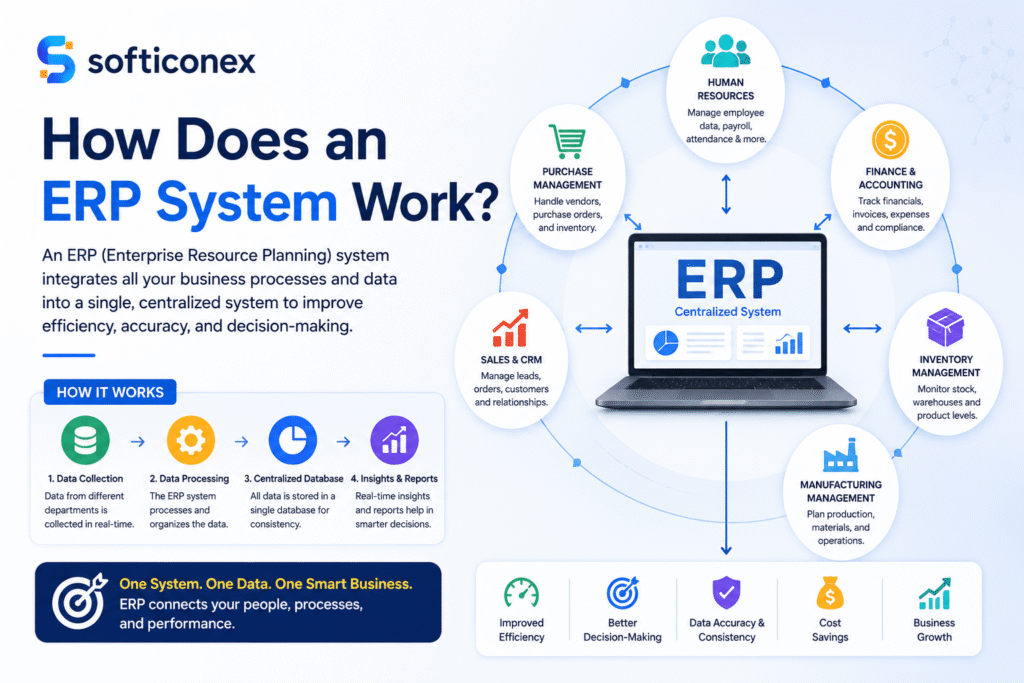
An ERP system works by collecting data from every department and storing it in one central database. As soon as one department updates any information, all other departments can view the changes immediately.
Here is a simple step-by-step example of how ERP works in a retail business:
- A customer places an order online.
- The ERP system automatically checks inventory to confirm the item is in stock.
- It notifies the warehouse team to prepare the shipment.
- The finance module generates an invoice and records the sale automatically.
- The supply chain module checks if stock needs to be reordered.
- Management can see all of this happening in real time through a reporting dashboard.
No emails back and forth. No manual data entry. No delays. Everything happens automatically through the ERP software.
Key ERP Modules: What Does an ERP System Include?
An ERP system consists of several separate parts called modules that work together. Each module handles a specific area of the business. You can choose the modules your business needs and add more as you grow.
1. Finance and Accounting
This module manages all the money matters of your business. It handles accounts payable, accounts receivable, budgeting, financial reporting, and tax management. Instead of using a separate accounting software, everything is built directly into the ERP system.
2. Human Resources (HR)
The HR module manages everything related to your employees. This includes payroll processing, attendance tracking, recruitment automation tools, recruitment, performance reviews, and employee records. It saves HR teams hours of manual work every week. Recruitment Software can further help HR teams centralize candidate information, automate hiring workflows, and streamline the recruitment process.
3. Inventory Management
This module tracks every item in your warehouse in real time. It tells you how much stock you have, where it is, and when you need to reorder. This prevents overstocking and stockouts, both of which cost businesses money.
4. Sales and CRM
The sales and customer relationship management module tracks leads, customer orders, sales pipelines, and customer history. It helps sales teams close deals faster and keep customers happy.
5. Supply Chain Management
This module manages the movement of goods from suppliers to your customers. It covers procurement, logistics, shipping, and vendor management. A good supply chain module reduces delays and lowers costs.
6. Procurement
The procurement module automates the buying process. It handles purchase orders, supplier negotiations, contract management, and payment approvals. It ensures your business always gets the best prices and terms from vendors.
Why Is ERP Important for Businesses?
Many companies still use separate tools, spreadsheets, and manual methods that are not properly connected. This leads to errors, delays, and poor decision-making. An ERP system solves all of these problems.
- Efficiency: Repetitive tasks are automated, saving hours of manual work every day.
- Automation: Workflows run automatically without human intervention, reducing errors.
- Better Decision Making: Managers get real-time data and reports to make smarter choices.
- Cost Reduction: Fewer errors, less wasted stock, and streamlined operations all lower costs.
- Real-Time Reporting: Business leaders can see exactly what is happening across the company at any moment.
- Scalability: As your business expands, your ERP system expands and adjusts to match your needs.
Types of ERP Systems
There are three main types of ERP systems available today. Choosing the right one depends on your budget, business size, and technical needs.
| Type | How It Works | Best For | Cost |
|---|---|---|---|
| On-Premise ERP | Installed on your own servers and managed by your IT team | Large enterprises with dedicated IT staff | High upfront cost |
| Cloud ERP | Hosted online and accessed through a web browser or app | Small to medium businesses, remote teams | Monthly subscription fee |
| Hybrid ERP | Combines on-premise and cloud elements for flexibility | Businesses transitioning to the cloud | Moderate cost |
Cloud ERP: The Future of Business Management
Cloud ERP is the fastest-growing type of ERP system today. Because it is hosted online, there is no need to buy expensive hardware or hire a large IT team. You simply log in through your browser and access your entire business from anywhere in the world. This makes cloud ERP especially attractive for small businesses, startups, and remote teams.
Benefits of ERP: Why Businesses Invest in ERP Software
The benefits of ERP go far beyond just saving time. Here is what businesses consistently report after implementing an ERP system:
- Centralized Data: All business information lives in one place, so there is no confusion about which number is correct.
- Reduced Manual Work: Staff spend less time on repetitive data entry and more time on valuable tasks.
- Better Productivity: Teams work faster because they have instant access to the information they need.
- Fewer Errors: Automated processes eliminate the human mistakes that come with manual data entry.
- Improved Collaboration: Every department can see and share the same data, breaking down communication barriers.
- Regulatory Compliance: Built-in reporting and audit trails make it easier to meet legal and tax requirements.
Real-World Examples of ERP in Action
Retail Companies
A retail chain with multiple stores uses ERP to manage inventory across all locations. When a product runs low in one store, the system automatically triggers a restock order. Sales data from every store feeds into one dashboard, giving managers a complete picture of performance in real time.
Manufacturing Industries
A manufacturing company uses ERP to manage its production schedule, raw material orders, and quality control. When a machine breaks down, the maintenance module logs the issue and alerts the engineering team. The production manager can see the delay immediately and adjust delivery timelines for customers.
E-Commerce Businesses
An online retailer uses ERP to connect its website, warehouse, and shipping carrier in one system. When a customer places an order, the ERP automatically reserves the item, prints a shipping label, and sends the customer a tracking number, all without a single manual step.
Large Enterprises
Global companies like Nike and Coca-Cola use enterprise-level ERP systems to manage thousands of employees, hundreds of suppliers, and millions of transactions across dozens of countries. ERP allows them to operate consistently and efficiently at a massive scale.
ERP vs Traditional Systems: A Clear Comparison
| Feature | Traditional Systems | ERP System |
|---|---|---|
| Data Access | Siloed and manual | Centralized and real-time |
| Speed | Slow due to manual processes | Fast and automated |
| Data Accuracy | High error rate from manual entry | High accuracy with automation |
| Cost Over Time | Hidden costs from inefficiency | Lower total cost of ownership |
| Scalability | Difficult to scale | Scales easily with business growth |
| Reporting | Requires manual compiling | Instant automated reports |
| Maintenance | Multiple vendors and systems | Single vendor, unified support |
ERP Implementation: How to Get Started
Implementing an ERP system is a major investment that requires careful planning. Here is a step-by-step overview of how the ERP implementation process typically works:
- Planning: Define your business goals, identify the problems you want to solve, and set a realistic budget and timeline.
- System Selection: Research and compare different ERP systems. Request demos and choose the one that best fits your industry and size.
- Customization: Work with your ERP vendor to configure the system to match your specific business processes and workflows.
- Training: Train your employees on how to use the new system. This is one of the most critical steps for a successful rollout.
- Deployment: Launch the ERP system, often starting with one department before rolling it out company-wide.
- Maintenance and Updates: Once live, monitor the system, collect feedback, and apply updates to keep everything running smoothly.
Common ERP Challenges to Know Before You Start
ERP systems are powerful, but they do come with challenges. Being aware of these up front can help you plan better:
- High Initial Cost: ERP systems, especially enterprise-level ones, can be expensive to license, implement, and maintain.
- Complexity: A full ERP deployment touches every part of your business, so the setup process can be complex and time-consuming.
- Training Issues: Employees who are used to old systems often struggle with new software and need thorough training and support.
- Integration Problems: Connecting an ERP to your existing tools and databases can sometimes be technically challenging.
- Resistance to Change: People are creatures of habit. Some employees may resist switching to a new system, even if it is better.
Popular ERP Systems in the Market Today
There are many ERP software options available. Here are four of the most widely used platforms:
- SAP ERP: One of the largest and most powerful ERP platforms in the world. It is used by many Fortune 500 companies and is ideal for large enterprises with complex operations.
- Oracle NetSuite: A leading cloud ERP solution that is especially popular among fast-growing mid-size businesses. It covers financials, CRM, e-commerce, and more.
- Microsoft Dynamics 365: A flexible ERP and CRM platform from Microsoft. It integrates seamlessly with other Microsoft tools like Office 365 and Teams.
- Odoo ERP: An open-source ERP system that is highly affordable and customizable. It is a great option for small and medium-sized businesses on a budget.
The Future of ERP: What Is Coming Next?
ERP technology is evolving rapidly. The next generation of ERP systems will be smarter, faster, and more connected than ever before.
- AI-Powered ERP: Artificial intelligence is being built into ERP systems to predict inventory needs, automate customer service, and flag financial anomalies before they become problems.
- Cloud-First Systems: More businesses are moving entirely to cloud-based ERP, eliminating the need for on-premise hardware and IT infrastructure.
- Predictive Analytics: Future ERP systems will not just report what happened, they will predict what will happen, helping businesses plan proactively.
- Mobile ERP: Business owners and managers will run their entire operations from smartphones and tablets, accessing real-time data from anywhere in the world.
- Industry-Specific ERP: Software vendors are developing ERP solutions tailored specifically for industries like healthcare, construction, retail, and education.
Conclusion
In today’s competitive world, businesses that rely on spreadsheets and disconnected tools are falling behind. The companies that grow fastest and operate most efficiently are the ones that invest in smart systems, and ERP is at the heart of that.
An ERP system brings every part of your business together into one powerful platform. It automates the repetitive work, eliminates costly errors, and gives you real-time insight into every corner of your operation. Whether you are a small business owner or a manager at a large enterprise, understanding ERP is the first step toward smarter, faster, and more profitable operations.
The question is not whether your business needs an ERP system. The question is which ERP system is right for you, and when you will start.
Frequently Asked Questions About ERP
What is ERP in simple words?
ERP, or Enterprise Resource Planning, is a software system that connects all the departments of a business, such as finance, HR, inventory, and sales, into one central platform. It helps companies manage their operations more efficiently by sharing real-time data across teams.
What are ERP systems used for?
ERP systems are used to manage and automate the core functions of a business. This includes accounting, inventory management, payroll, customer orders, supply chain operations, and reporting. The goal is to eliminate manual work, reduce errors, and give business leaders a clear view of their entire operation.
Is ERP only for big companies?
No, ERP is not only for large enterprises. While ERP was originally designed for big corporations, modern cloud ERP solutions like Odoo and NetSuite are affordable and scalable enough for small and medium-sized businesses. Even a company with just 10 to 50 employees can benefit significantly from an ERP system.
What are ERP modules?
ERP modules are individual components of an ERP system, each designed to handle a specific area of the business. Common ERP modules include Finance and Accounting, Human Resources, Inventory Management, Sales and CRM, Supply Chain Management, and Procurement. Businesses can choose which modules they need.
How does ERP improve business performance?
ERP improves business performance by centralizing data, automating repetitive tasks, and giving managers real-time visibility into operations. This leads to faster decision-making, fewer mistakes, lower costs, and better customer service. Most businesses that implement ERP report significant gains in productivity within the first year.
What is cloud ERP?
Cloud ERP is an ERP system that is hosted on the internet rather than on a company’s own servers. Users access it through a web browser or mobile app. Cloud ERP requires no expensive hardware, is updated automatically by the vendor, and can be accessed from anywhere. It is ideal for businesses that want flexibility and lower upfront costs.