Content marketing used to mean long hours spent researching, drafting, editing, and designing before a single piece ever reached an audience. AI has compressed that timeline dramatically, letting small teams produce work that once required a much larger staff.
Without AI tools, marketers still face real challenges: tight deadlines, shrinking budgets, and growing pressure to publish more content without sacrificing quality. The right AI tools address these challenges directly, handling repetitive work so marketers can focus on strategy and creativity.
This guide reviews 20 of the most useful AI tools for content marketing today, based on genuine hands-on testing rather than marketing claims. You will find honest pros, cons, pricing, and a real use case for each tool, along with guidance on choosing the right one for your team.
What Are AI Content Marketing Tools?
AI content marketing tools are software platforms that use artificial intelligence to help with writing, editing, designing, or distributing marketing content. They range from general purpose assistants like ChatGPT to specialized platforms built for SEO, video, or social media.
Most tools fall into a few categories: writing and drafting, SEO optimization, visual design, video and audio production, and workflow automation. Many modern platforms blend several of these functions together.
Why Content Marketers Are Adopting AI Tools
• Faster content creation that shortens the time from idea to published piece
• Better SEO performance through data informed content briefs and optimization scoring
• Content repurposing that turns one piece into multiple formats with less manual effort
• Workflow automation that removes repetitive scheduling and formatting tasks
• Higher productivity, allowing smaller teams to maintain a larger publishing schedule
• Improved personalization through content tailored to specific audience segments
How We Selected the Best AI Content Marketing Tools
Every tool on this list was tested using real content projects, then reviewed against seven consistent criteria to keep the comparison fair.
• Range and usefulness of core features
• Ease of use for both beginners and experienced marketers
• Actual content quality produced during testing
• Depth of SEO specific capabilities where relevant
• Integrations with common marketing and CRM platforms
• Pricing relative to the features included
• Overall value for money across different team sizes
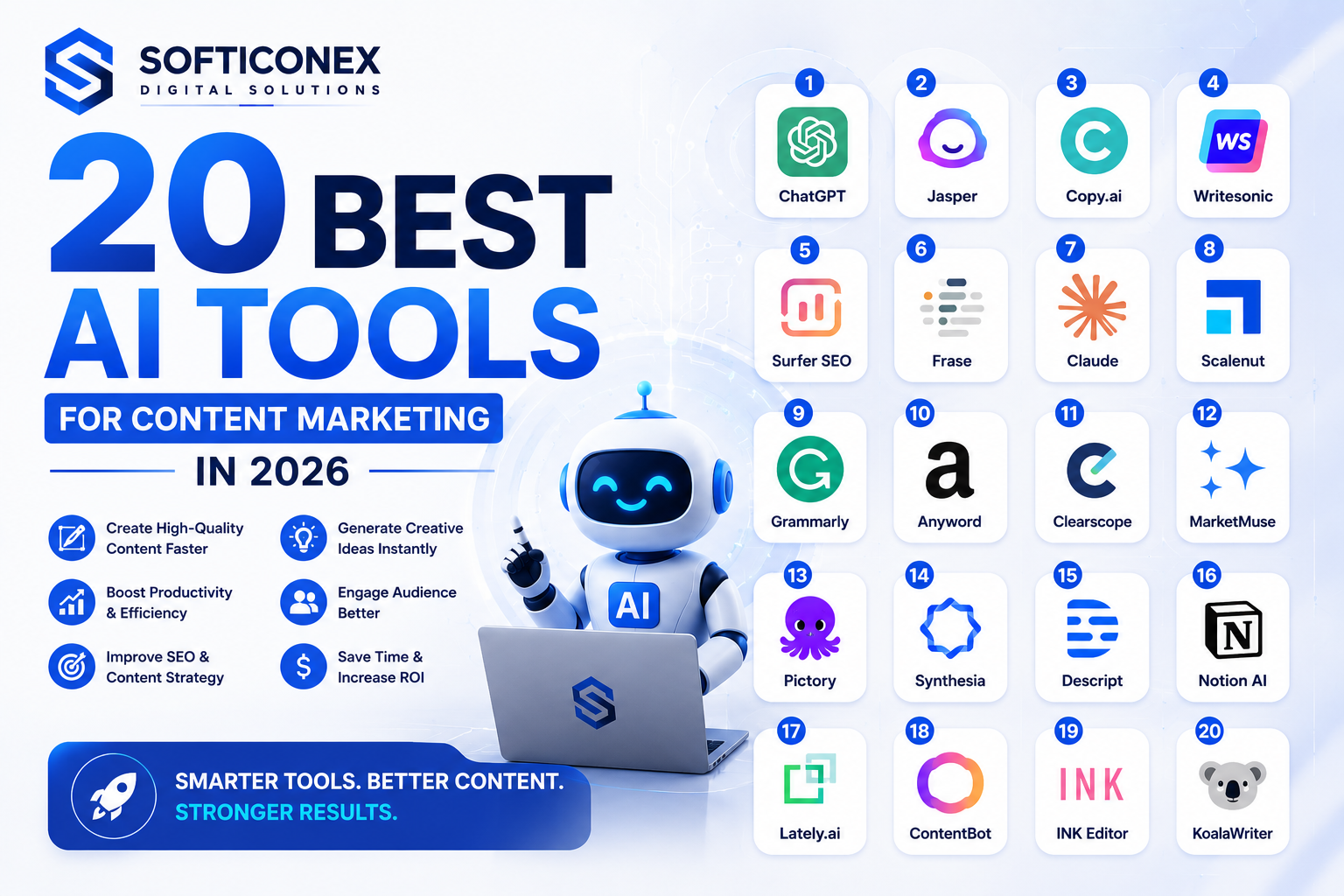
20 Best AI Tools for Content Marketing
The tools below cover writing, SEO, design, video, and distribution. Each entry includes honest strengths and weaknesses based on real testing.
1. ChatGPT
Overview: ChatGPT remains the most widely used AI assistant for content marketers, handling everything from brainstorming to full article drafts and research summaries.
Key Features:
• Conversational drafting and editing
• Custom instructions for consistent tone
• File analysis for research heavy content
• Browsing support for current information
Pros: Extremely flexible, easy to learn, useful across nearly every content task.
Cons: General purpose design means it lacks deep, built in SEO data.
Pricing: A free plan is available, with Plus starting near $20 per month.
Real World Use Case: A solo blogger used ChatGPT to turn one long form guide into five shorter posts and a full email sequence in a single afternoon.
Expert Recommendation: Start here for nearly any content task. Its flexibility makes it the strongest general purpose foundation on this list.
2. Claude
Overview: Claude handles long documents and nuanced writing with strong accuracy, making it a favorite for detailed content review and complex research summaries.
Key Features:
• Strong performance with long documents
• Careful, accurate writing on nuanced topics
• Project based memory for ongoing content series
• Shareable draft creation
Pros: Handles complex, detailed content exceptionally well and stays accurate on nuanced subjects.
Cons: Less focused on native marketing integrations than dedicated marketing platforms.
Pricing: A free plan is available, with Pro starting near $20 per month.
Real World Use Case: A content team used Claude to restructure a 30 page research report into a clear, publishable long form guide within one session.
Expert Recommendation: Choose Claude when accuracy and depth matter more than speed, especially for detailed or technical content.
3. Jasper AI
Overview: Jasper focuses on brand consistent content production for teams managing multiple campaigns, clients, or product voices at once.
Key Features:
• Brand voice training across multiple profiles
• Campaign based content workflows
• Team collaboration and approval steps
• Integrations with major marketing platforms
Pros: Strong brand consistency controls, useful for agencies managing several accounts.
Cons: Higher cost than general assistants, with a learning curve for full workflow setup.
Pricing: Plans start near $49 per month.
Real World Use Case: A marketing agency used Jasper to maintain five distinct brand voices across client accounts without writers mixing tone between projects.
Expert Recommendation: Best suited for agencies and larger teams needing strict brand consistency across many writers.
4. Copy.ai
Overview: Copy.ai specializes in fast copy generation for ads, product descriptions, and social posts, with a workflow builder for simple automation.
Key Features:
• Template library for ads and social copy
• Workflow automation for repetitive tasks
• Chat based content assistant
• Team workspace for shared projects
Pros: Fast output for short form copy, approachable for beginners, useful free plan.
Cons: Long form content often needs heavier editing compared with other tools.
Pricing: A free plan is available, with paid plans starting near $49 per month.
Real World Use Case: An ecommerce store used Copy.ai to generate product descriptions for over 200 items during a catalog expansion.
Expert Recommendation: A solid pick for small businesses needing quick, high volume short form copy.
5. Writesonic
Overview: Writesonic focuses on producing articles at scale, with built in SEO checks and bulk content generation features for growing content calendars.
Key Features:
• Bulk article generation
• SEO checker built into the editor
• Brand voice settings
• Chat search optimization scoring
Pros: Fast output for scaling content production, affordable entry plan.
Cons: Requires careful fact checking since AI drafts can include inaccurate details.
Pricing: Plans start near $39 per month.
Real World Use Case: A startup used Writesonic to produce twenty blog drafts in one week during a content calendar catch up effort.
Expert Recommendation: A strong choice for teams that need to scale content volume quickly on a limited budget.
6. Surfer SEO
Overview: Surfer SEO combines AI drafting with the same natural language scoring used in its popular content editor, aiming for drafts already aligned with search intent.
Key Features:
• AI drafting tied to SEO scoring
• Automatic outline generation from top ranking pages
• Built in readability checks
• One click publishing to WordPress
Pros: Speeds up the path from research to a publish ready draft.
Cons: Drafts still need a human editing pass for voice and factual accuracy.
Pricing: Plans start near $89 per month.
Real World Use Case: A niche blog used Surfer SEO to publish fifteen optimized articles in one month with consistent structure.
Expert Recommendation: Good for bloggers and content teams that already trust Surfer for onpage optimization.
7. Frase
Overview: Frase builds content briefs and outlines by scanning top ranking pages and extracting common questions, cutting research time significantly.
Key Features:
• AI generated content briefs
• Question extraction from search results
• Content scoring against competitors
• Answer engine optimization checklist
Pros: Affordable pricing, fast brief creation, useful question research.
Cons: Writing quality from the built in assistant still needs heavy editing.
Pricing: Plans start near $45 per month.
Real World Use Case: A freelance writer used Frase briefs to cut research time nearly in half for standard blog assignments.
Expert Recommendation: A practical choice for freelancers and small teams needing quick, structured briefs.
8. Grammarly
Overview: Grammarly checks grammar, tone, and clarity across nearly any writing surface, acting as a final quality layer before content gets published.
Key Features:
• Real time grammar and spelling checks
• Tone detection and adjustment suggestions
• Plagiarism checking on paid plans
• Browser and desktop integration
Pros: Catches errors quickly, works across nearly every writing platform, simple to use.
Cons: Does not generate original content on its own, only reviews existing writing.
Pricing: A free plan is available, with paid plans starting near $12 per month.
Real World Use Case: A content team added Grammarly as a final review step, catching tone inconsistencies before publishing that earlier proofreading missed.
Expert Recommendation: A near essential final check for any team publishing content regularly.
9. Canva AI
Overview: Canva AI adds generative design features directly into the popular design platform, helping marketers create visuals without design experience.
Key Features:
• AI image generation within designs
• Magic resize for multiple platforms
• Background removal and editing tools
• Template library with brand kits
Pros: Very approachable for non designers, fast turnaround for social and blog visuals.
Cons: Less control over fine detail compared with dedicated design software.
Pricing: A free plan is available, with paid plans starting near $15 per month.
Real World Use Case: A small business used Canva AI to create a month of social media visuals in a single afternoon without hiring a designer.
Expert Recommendation: A strong default for marketers who need fast, professional looking visuals without design training.
10. Descript
Overview: Descript uses AI to edit video and audio content by editing a transcript, making video production accessible to non technical marketers.
Key Features:
• Transcript based video editing
• AI voice cloning for corrections
• Automatic filler word removal
• Screen recording and podcast tools
Pros: Makes video editing approachable without a traditional editing background.
Cons: Advanced video effects still require more traditional editing software.
Pricing: A free plan is available, with paid plans starting near $24 per month.
Real World Use Case: A marketing team used Descript to cut webinar recording editing time from several hours to under thirty minutes per episode.
Expert Recommendation: A great fit for teams producing regular video or podcast content without a dedicated editor.
11. Notion AI
Overview: Notion AI adds content generation and summarization directly into the Notion workspace, useful for teams already planning content there.
Key Features:
• Content drafting within existing notes
• Summarization of long documents
• Action item extraction from meeting notes
• Translation and tone adjustment
Pros: Seamless for teams already using Notion for planning and documentation.
Cons: Less useful as a standalone tool outside the Notion ecosystem.
Pricing: Included as an add on starting near $10 per month.
Real World Use Case: A content team used Notion AI to summarize research documents directly inside their existing editorial calendar workspace.
Expert Recommendation: A convenient add on for teams already centered around Notion for planning.
12. Semrush Content Toolkit
Overview: Semrush Content Toolkit ties content idea generation and briefs directly to real keyword and ranking data from the broader Semrush platform.
Key Features:
• AI generated content ideas from real search data
• SEO content templates
• Content audit for existing pages
• AI Overview tracking integration
Pros: Combines content generation with trusted SEO data in one place.
Cons: Full value requires a broader Semrush subscription.
Pricing: Included in Semrush plans starting near $139 per month.
Real World Use Case: An SEO agency used the toolkit to generate content briefs for twenty client articles in a single day.
Expert Recommendation: A strong choice for SEO focused teams that want content ideas grounded in real ranking data.
13. MarketMuse
Overview: MarketMuse takes a deep approach to topical authority, mapping entire content inventories and identifying gaps across a whole website.
Key Features:
• Content inventory and gap analysis
• Topic modeling based on entity relationships
• Competitive content scoring
• Personalized content planning
Pros: Excellent for long term content strategy and entity based recommendations.
Cons: Steeper learning curve, better suited for larger content operations.
Pricing: Plans start near $149 per month.
Real World Use Case: A publisher followed MarketMuse’s cluster recommendations and saw more consistent search visibility within a few months.
Expert Recommendation: Best for publishers and enterprise sites building topical authority at scale.
14. HubSpot AI
Overview: HubSpot built AI features directly into its CRM and marketing suite, connecting content generation with real customer and campaign data.
Key Features:
• AI content assistant tied to CRM data
• Automated email and workflow suggestions
• Lead scoring supported by predictive signals
• Campaign reporting with AI summaries
Pros: Deep integration with existing customer data for teams already inside HubSpot.
Cons: Full value only appears if you already use HubSpot for CRM and marketing.
Pricing: Included within HubSpot plans starting near $20 per month.
Real World Use Case: A small business used HubSpot AI to draft follow up emails automatically based on how leads engaged with previous content.
Expert Recommendation: Ideal for teams already running marketing and sales through HubSpot.
15. ContentShake AI
Overview: ContentShake AI, built by Semrush, focuses on fast blog drafting with built in SEO guidance aimed at small businesses and solo marketers.
Key Features:
• Fast blog draft generation
• Built in SEO scoring
• Topic idea suggestions based on search data
• Simple, beginner friendly interface
Pros: Approachable for beginners, combines drafting and SEO guidance in one step.
Cons: Less depth for complex, long form content compared with dedicated writing tools.
Pricing: Plans start near $60 per month.
Real World Use Case: A small business owner used ContentShake AI to publish a consistent weekly blog post without hiring a writer.
Expert Recommendation: A practical choice for small businesses wanting simple, SEO aware blog content.
16. Perplexity AI
Overview: Perplexity AI functions as a research assistant that shows cited sources next to every answer, useful for fact checking and gathering current information.
Key Features:
• Real time search with cited sources
• Focus modes for academic or technical queries
• Follow up question threading
• Transparent source list for every answer
Pros: Clear source citations, useful for verifying facts before publishing.
Cons: Not a content generation tool on its own, better suited for research support.
Pricing: A free plan is available, with Pro starting near $20 per month.
Real World Use Case: A writer used Perplexity to verify statistics for a data heavy article, catching an outdated figure before publishing.
Expert Recommendation: A valuable research companion to pair with any content drafting tool on this list.
17. Midjourney
Overview: Midjourney generates high quality, stylized images from text prompts, popular among marketers who need distinctive visuals beyond stock photography.
Key Features:
• High quality, stylized image generation
• Fine control through detailed prompting
• Consistent character and style options
• Active community for prompt inspiration
Pros: Produces visually striking, unique images that stand out from generic stock photos.
Cons: Runs through Discord, which adds a learning curve for new users.
Pricing: Plans start near $10 per month.
Real World Use Case: A marketing team used Midjourney to create a consistent set of custom illustrations for a blog series instead of licensing stock images.
Expert Recommendation: Best for teams wanting distinctive, custom visuals rather than standard stock imagery.
18. Synthesia
Overview: Synthesia creates AI generated videos featuring digital avatars, letting marketers produce video content without cameras or on camera talent.
Key Features:
• AI avatar video generation
• Multi language voiceover support
• Template library for common video types
• Script to video conversion
Pros: Removes the need for filming equipment or on camera presenters.
Cons: Avatar based videos can feel less personal than genuine on camera content.
Pricing: Plans start near $29 per month.
Real World Use Case: A company used Synthesia to produce onboarding training videos in multiple languages without hiring voice actors for each version.
Expert Recommendation: A practical option for training or explainer videos where a real presenter is not essential.
19. Lumen5
Overview: Lumen5 turns written content into short videos automatically, helping marketers repurpose blog posts into social ready video clips.
Key Features:
• Automatic text to video conversion
• Stock media library for visuals
• Brand kit for consistent styling
• Templates sized for different social platforms
Pros: Fast way to repurpose existing blog content into video without editing skills.
Cons: Output can feel templated compared with custom produced video content.
Pricing: A free plan is available, with paid plans starting near $29 per month.
Real World Use Case: A social media team used Lumen5 to turn twelve blog posts into short video clips for a single content sprint.
Expert Recommendation: A convenient tool for teams wanting quick video repurposing without a dedicated video editor.
20. Buffer AI Assistant
Overview: Buffer AI Assistant generates social media captions and helps schedule posts, combining content creation with distribution in one workflow.
Key Features:
• AI generated social captions
• Post scheduling across platforms
• Hashtag and tone suggestions
• Performance analytics for published posts
Pros: Combines caption writing and scheduling in one simple workflow.
Cons: Caption quality still benefits from a quick human review for brand voice.
Pricing: Included in Buffer plans starting near $6 per month.
Real World Use Case: A small business used Buffer AI Assistant to draft and schedule a full month of social captions in under an hour.
Expert Recommendation: A convenient, affordable option for small teams managing social media without a dedicated social manager.
Comparison Table of the Best AI Content Marketing Tools
| Tool Name | Best Use Case | Pricing | Ease of Use | Ideal User |
| ChatGPT | General content drafting and research | Free plan available, Plus near $20 per month | Very easy | Every content marketer |
| Claude | Long form writing and detailed editing | Free plan available, Pro near $20 per month | Very easy | Content teams handling detailed drafts |
| Jasper AI | Brand consistent copy at scale | Starts near $49 per month | Easy | Marketing teams with multiple brand voices |
| Copy.ai | Fast ad and social copy | Free plan available, paid near $49 per month | Very easy | Small teams needing quick copy |
| Writesonic | Bulk article generation | Starts near $39 per month | Easy | Teams scaling content volume |
| Surfer SEO | SEO scored content drafting | Starts near $89 per month | Easy | Bloggers and SEO focused writers |
| Frase | Fast content briefs and outlines | Starts near $45 per month | Easy | Freelance writers and small teams |
| Grammarly | Grammar and tone editing | Free plan available, paid near $12 per month | Very easy | Anyone publishing written content |
| Canva AI | Quick visual content design | Free plan available, paid near $15 per month | Very easy | Marketers without design experience |
| Descript | AI video and podcast editing | Free plan available, paid near $24 per month | Easy | Teams producing video or audio content |
| Notion AI | Content planning inside a workspace | Included as an add on near $10 per month | Easy | Teams already using Notion |
| Semrush Content Toolkit | Content ideas tied to real SEO data | Included in Semrush plans from near $139 per month | Moderate | SEO driven content teams |
| MarketMuse | Deep topical authority planning | Starts near $149 per month | Moderate | Publishers building content depth |
| HubSpot AI | Content tied to CRM and campaign data | Included in HubSpot plans from near $20 per month | Moderate | Teams already using HubSpot |
| ContentShake AI | Fast blog drafts with SEO guidance | Starts near $60 per month | Easy | Small businesses needing quick blog content |
| Perplexity AI | Research with cited sources | Free plan available, Pro near $20 per month | Very easy | Writers needing verified research |
| Midjourney | High quality AI generated imagery | Starts near $10 per month | Moderate | Teams needing custom visuals |
| Synthesia | AI generated video with avatars | Starts near $29 per month | Easy | Teams producing training or marketing video |
| Lumen5 | Turning text into short videos | Free plan available, paid near $29 per month | Very easy | Social media content teams |
| Buffer AI Assistant | Social caption generation and scheduling | Included in Buffer plans from near $6 per month | Very easy | Small teams managing social media |
Best AI Tools by Content Marketing Task
Best AI Writing Tool: ChatGPT or Claude, both offer flexible, high quality drafting across nearly any content type.
Best AI SEO Tool: Surfer SEO or Semrush Content Toolkit, since both tie content directly to real search data.
Best AI Image Generation Tool: Midjourney, for producing distinctive, high quality custom visuals.
Best AI Video Tool: Synthesia for avatar based videos or Descript for editing existing footage.
Best AI Research Assistant: Perplexity AI, thanks to its transparent, cited source list for every answer.
Best All in One Platform: HubSpot AI, since it connects content generation directly with CRM and campaign data.
How to Choose the Right AI Tool for Your Content Strategy
Budget
Free tools like ChatGPT and Claude work well for testing before committing to a paid platform.
Team Size
Solo marketers often need simpler tools, while larger teams benefit from collaboration and approval features.
Content Volume
High volume publishing schedules benefit from tools built for bulk generation, like Writesonic or ContentShake AI.
Workflow Requirements
Consider whether you need a standalone tool or one that fits directly into an existing planning or CRM system.
Integration Needs
Choose a tool that connects with your existing CMS, social platforms, and analytics tools to avoid manual workarounds.
Common Mistakes to Avoid When Using AI for Content Marketing
• Publishing AI generated content without a human editing pass for accuracy and voice
• Ignoring fact checking, which risks publishing outdated or incorrect information
• Over automation that removes necessary human judgment from sensitive topics
• Weak brand voice consistency across writers or tools without clear guidelines
• Treating AI output as final instead of a strong starting draft
The Future of AI in Content Marketing
AI Agents
Expect AI agents to handle full content workflows, from research through publishing, with less manual setup than today’s tools require.
Hyper Personalization
Content will increasingly adapt to individual audience segments automatically, rather than relying on broad, one size fits all messaging.
Automated Content Workflows
Scheduling, repurposing, and distribution will continue merging into single, automated pipelines requiring minimal manual intervention.
Multimodal AI Content Creation
Tools that generate text, images, and video together from a single prompt will make cross format content production faster and more consistent.
Conclusion
No single AI tool covers every content marketing need perfectly. ChatGPT and Claude remain the strongest general purpose starting points, while Surfer SEO and Semrush Content Toolkit add deeper SEO specific value once your content strategy matures.
Small businesses and solo marketers should start with free or low cost tools like Canva AI, ContentShake AI, and Buffer AI Assistant to build momentum without a large budget. Agencies managing multiple clients benefit most from Jasper AI for brand consistency, while publishers building long term topical authority should prioritize MarketMuse.
Whichever tools you choose, always keep a human editing step in place. AI accelerates content production, but genuine expertise, accuracy, and brand voice still come from the people guiding the process.
Frequently Asked Questions
What is the best AI tool for content marketing?
There is no single best tool for every situation. ChatGPT and Claude work well as flexible starting points, while specialized tools like Surfer SEO or Semrush Content Toolkit add deeper SEO specific value.
Can AI replace content marketers?
No. AI speeds up drafting, research, and repurposing, but it still lacks the strategic judgment, brand understanding, and audience insight that experienced content marketers provide.
Which AI tool is best for SEO content?
Surfer SEO and Semrush Content Toolkit are the strongest choices for SEO specific content, since both tie content generation directly to real search data and ranking factors.
Are AI content tools worth paying for?
For most active content teams, yes. Paid tools save significant research and drafting time, though free tools like ChatGPT and Claude offer strong value for smaller or occasional needs.
How can AI improve content marketing ROI?
AI improves ROI by cutting production time, enabling more consistent publishing, and supporting better SEO targeting, all of which can increase traffic and conversions over time.
Do AI content tools hurt SEO rankings?
AI generated content does not inherently hurt rankings. Google evaluates content based on quality and usefulness, not whether AI assisted in its creation, so thin or inaccurate content is the real risk.
What is the difference between AI writing tools and AI SEO tools?
AI writing tools focus on generating text, while AI SEO tools focus on aligning that text with search intent, keyword data, and ranking factors before or after drafting.
How much do AI content marketing tools typically cost?
Costs range from free plans for tools like ChatGPT and Claude to over $100 per month for specialized platforms like MarketMuse or Semrush Content Toolkit.
Can small businesses benefit from AI content tools?
Yes. Tools like Canva AI, ContentShake AI, and Buffer AI Assistant give small businesses meaningful content production support without a large team or budget.
How do I choose between so many AI content marketing tools?
Start by identifying your biggest bottleneck, whether that is writing, SEO, visuals, or video, then choose one tool that solves that specific problem before expanding your toolset.