
Deleting Instagram isn’t as simple as tapping a button and walking away. Meta buries the option three menus deep, forces a 30-day waiting period before anything actually disappears, and gives deactivation and deletion nearly identical-sounding names even though they do completely different things.
This guide walks through the entire process on phone and desktop, with or without your password plus what actually happens to your photos, DMs, and followers once you hit confirm.
Deactivate or Delete Instagram Account ? Know the Difference First
Before you touch any settings, decide which of these you actually want:
Deactivation is a pause button. Your profile, posts, comments, and likes vanish from public view, but nothing is removed. The moment you log back in, everything returns exactly as you left it. You can only deactivate once every seven days, and there’s no time limit on how long your account can stay deactivated.
Deletion is final. Once you confirm it, your account enters a 30-day holding period during which you can still cancel by simply logging in. After those 30 days pass, your profile, photos, videos, Reels, stories, comments, likes, and follower/following lists are wiped from Instagram for good. Backup copies may linger on Meta’s servers for up to 90 days for legal and compliance reasons, but they’re no longer visible to anyone.
If you’re on the fence, deactivate first. You lose nothing by waiting, and you can always come back and delete later.
Before Delete Your Instagram Account : A Quick Checklist
Deletion can’t be undone after the grace period, so handle these first:
- Download your data. Go to Settings → Accounts Center → Your information and permissions → Download your information. This exports your photos, videos, messages, and profile history. Large archives can take up to 30 days to process, so start this well before you plan to delete.
- Save anything you want to keep to your device separately, in case the export misses something or takes longer than expected.
- Tell people who reach you mainly through Instagram DMs how to contact you elsewhere.
- Unlink any third-party apps or logins that use “Sign in with Instagram,” since those will stop working.
- Note that your username isn’t guaranteed to free up. Even after full deletion, Instagram doesn’t promise the handle becomes available again, or that you could reclaim it if it did.
How to Delete Your Instagram Account (App or Browser)
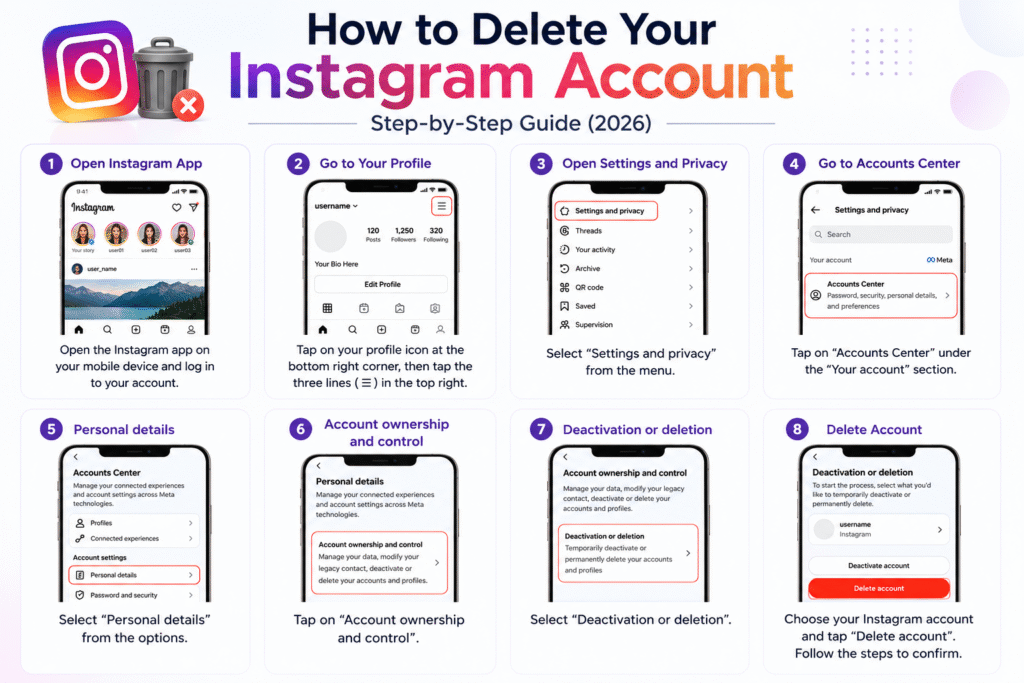
The steps are nearly identical whether you’re using the mobile app or a browser, since Instagram now routes deletion through Meta’s shared Accounts Center.
- Open Instagram and log in.
- Tap your profile picture, then go to Settings.
- Select Accounts Center.
- Tap Personal details.
- Choose Account ownership and control.
- Select Deactivation or deletion.
- Pick the Instagram account you want removed.
- Choose Delete account.
- Instagram will ask why you’re leaving, pick whichever reason fits closest.
- Enter your password to confirm.
- Tap Delete account one final time.
Your account enters the 30-day grace period the moment you finish this. If you log in at any point before day 30, the deletion cancels automatically and your account returns to normal.
Deleting Without Your Password
Instagram’s deletion flow requires password confirmation, so if you’ve forgotten yours, you’ll need to reset it first:
- On the login screen, tap Forgot password?
- Enter your email, phone number, or username.
- Follow the reset link sent to your email or phone.
- Set a new password and log back in.
- Complete the deletion steps above as normal.
If you no longer have access to the email or phone number tied to the account, you’ll need to go through Meta’s account recovery support process before you can proceed with either password reset or deletion.
How to Deactivate Instead
If you just want a break, the path is almost the same:
- Go to Settings → Accounts Center → Personal details → Account ownership and control → Deactivation or deletion.
- Choose your account, then select Deactivate account instead of delete.
- Enter your password and pick a reason.
- Confirm on the final screen.
To come back, just log in again with your username and password. You may be asked to pass a quick security check first.
What Happens to Your Data After Deletion
- Your posts, Reels, stories, comments, and likes are removed from public view immediately, and permanently erased after the 30-day window closes.
- Direct messages you sent may still appear in the recipient’s inbox, often shown as coming from a generic “Instagram user” rather than your name.
- Content others reposted, saved, or screenshotted isn’t yours to control and will remain wherever it was shared.
- Linked Facebook or Threads accounts are not deleted. You’ll just need to log into them separately going forward, since the shared login through Accounts Center no longer applies.
- Group chats you were part of typically stay intact for the remaining members.
A Cleaner Way to Say Goodbye
If you’re leaving Instagram for privacy reasons rather than just boredom, deletion alone won’t fully cover you old data brokers and cached copies elsewhere on the web are outside Instagram’s control. Pair the account deletion with a quick password audit on any accounts you keep, and turn on two-factor authentication where you can. It’s a small step that pays off long after Instagram itself is gone.
Frequently Asked Questions
Can I cancel the deletion after I’ve started it?
Yes. Logging back into your account anytime within the 30-day grace period cancels the deletion and restores everything.
How long does deletion actually take?
The visible part happens instantly and your profile disappears from public view right away. Full, permanent removal from Instagram’s systems completes 30 days later, though backend backups can take up to 90 days to fully clear.
Will I get my username back if I create a new account later?
Not necessarily. Instagram doesn’t guarantee a deleted username becomes available again, and there’s no way to reserve it for yourself in advance.
Does deleting Instagram also delete my Facebook account?
No. They’re separate accounts even when linked through the Accounts Center. Deleting one doesn’t remove the other, though you may need to re-verify login details on the accounts you keep.
What if someone hacked my account and I can’t log in?
Password reset won’t help if you no longer control the linked email or phone number. In that case, use Meta’s account recovery process to prove ownership before attempting deletion.