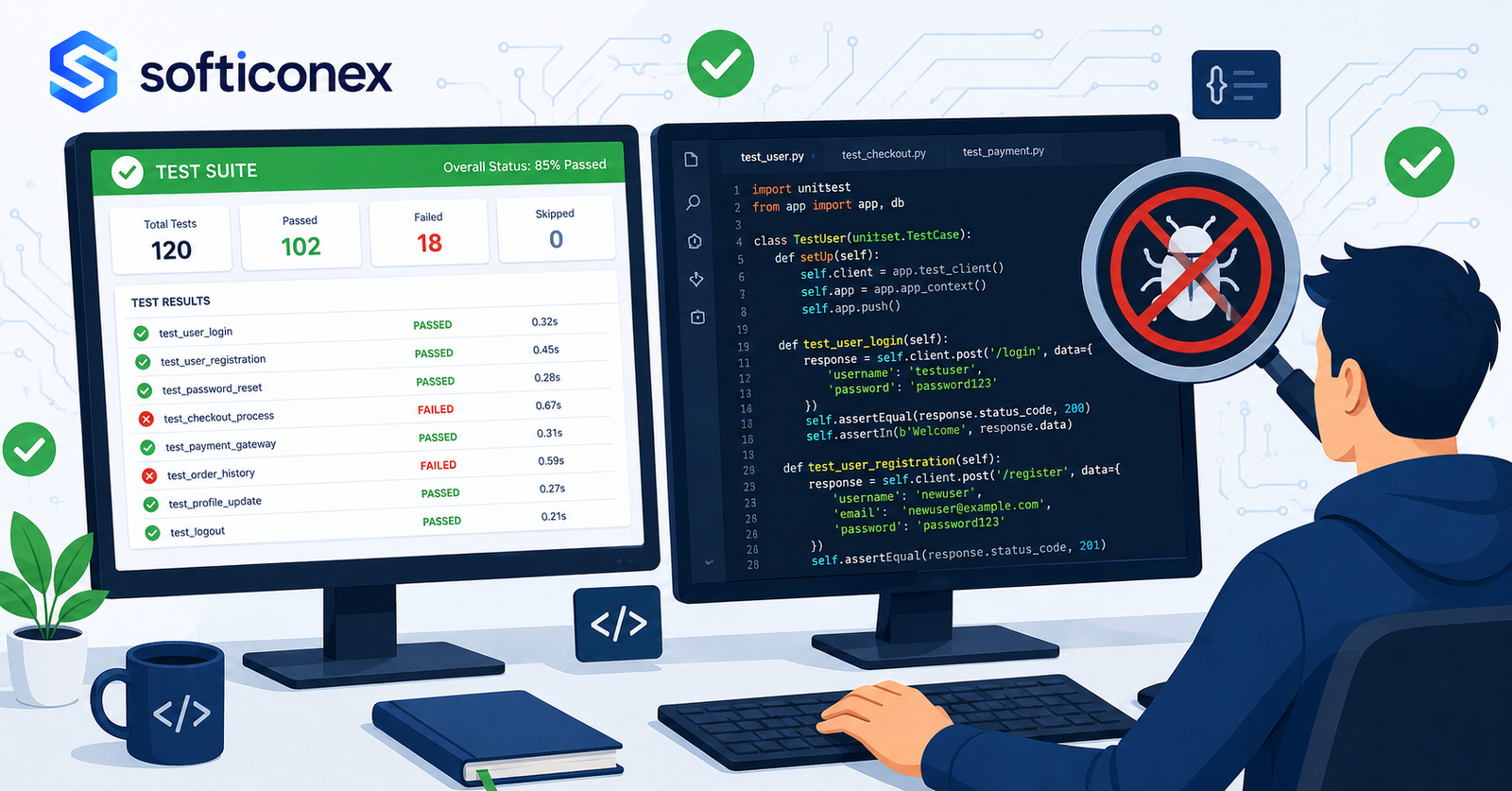
Every software project eventually faces the same question: how do you know it works? Writing code is one challenge. Proving that the code does what it is supposed to do, under every realistic condition, for every type of user, is an entirely different discipline. That discipline is software testing, and the strategy behind it determines whether your product ships with confidence or ships with fingers crossed.
Software testing is not simply the act of clicking through an application and hoping nothing breaks. A testing strategy is a deliberate plan that defines what will be tested, how it will be tested, in what order, with what tools, and with what level of automation. Organizations that approach testing strategically release software faster, catch bugs earlier, and spend far less time fixing critical issues in production than those that treat testing as an afterthought.
This guide covers the complete landscape of software testing strategies used by professional QA engineers and development teams in 2025. You will learn the foundational testing types, understand how they fit together in a layered approach, explore the shift-left philosophy that is reshaping how modern teams build software, and discover the automation strategies that make continuous testing possible at scale.
Whether you are a developer writing your first unit tests, a QA engineer building out a test framework, or a team lead evaluating your organization’s quality processes, this guide gives you the knowledge and vocabulary to make better decisions about how your software gets tested.
What Is a Software Testing Strategy?
The Difference Between a Test Plan and a Testing Strategy
Many people use these terms as if they mean the same thing, but there are important differences between them. A test plan is a document that specifies what will be tested in a particular release: which features, which test cases, which environments, and which team members are responsible. A testing strategy is broader. It defines the overall philosophy and approach to testing across an entire product or organization.
A test plan answers the question: what are we testing this sprint? A testing strategy answers the question: how do we approach testing as a discipline? Organizations with a strong testing strategy produce consistent, repeatable, high-quality test plans. Organizations without one produce inconsistent coverage, duplicated effort, and gaps that only appear in production.
The Core Components of a Testing Strategy
A well-designed testing strategy addresses several key areas. It defines which testing types will be used and when. It determines the balance between manual and automated testing. It establishes the tools, frameworks, and environments needed to execute tests. It sets expectations for test coverage and defines what coverage means for the organization. And it aligns testing activities with the development lifecycle, whether that is waterfall, agile, or continuous delivery.
“A software testing strategy is not a document you write once and file away. It is a living framework that evolves with your product, your team, and your understanding of where quality risks actually live in your codebase.”
Risk-Based Testing: The Foundation of Every Good Strategy
No team has unlimited time or resources. Every testing strategy must make decisions about where to focus effort, and the most effective decision framework is risk. Risk-based testing means identifying the areas of your software where failures would have the greatest impact on users, on the business, on data integrity, and allocating testing effort proportionally.
A payment processing module carries far more risk than a cosmetic UI change. A login flow that millions of users rely on every day demands more testing coverage than a rarely used admin utility. Risk-based testing is not about testing less. It is about testing smarter, so that the most critical paths through your software receive the deepest scrutiny.
The Testing Pyramid, Layered Testing in Practice
Understanding the Testing Pyramid
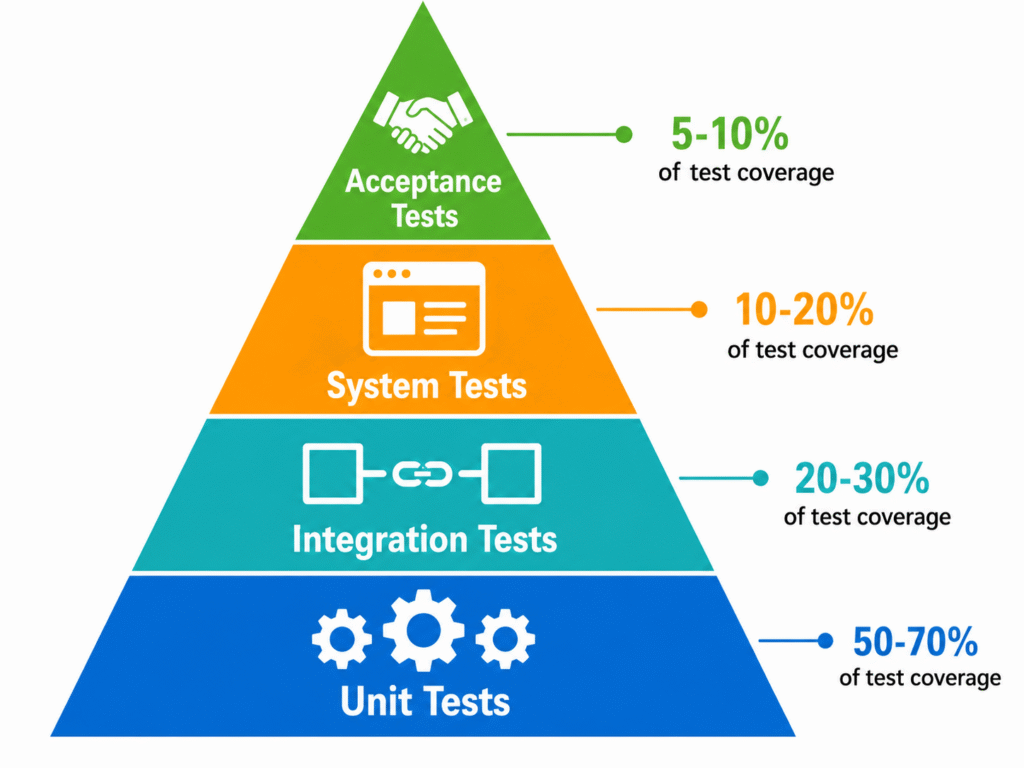
The testing pyramid is the most widely used mental model in software testing strategy. It describes how tests should be distributed across different levels of granularity. The pyramid has a wide base of unit tests, a smaller middle layer of integration tests, and a narrow top of end-to-end or acceptance tests. The shape reflects a deliberate principle: tests lower in the pyramid are faster, cheaper, and more numerous, while tests higher in the pyramid are slower, more expensive, and fewer in number.
Teams that invert the pyramid relying primarily on slow end-to-end tests with few unit tests pay the cost in slow feedback cycles, expensive test maintenance, and fragile test suites that break whenever the UI changes. Understanding the pyramid is the first step toward building a testing strategy that is both thorough and sustainable.
Unit Testing: The Foundation
Unit tests verify individual functions, methods, or components in isolation. They are the fastest type of test to write, the fastest to run, and provide the most specific feedback when they fail. A good unit test tells you exactly which line of code broke and why. In a well-tested codebase, unit tests can number in the thousands and run in seconds.
Effective unit testing requires that code be written in a testable way. Functions with clear inputs and outputs, minimal side effects, and well-defined dependencies are easy to test. Tightly coupled code with hidden dependencies is difficult. Adopting unit testing as a strategy therefore also shapes how code is written, encouraging better design patterns like dependency injection and the single responsibility principle.
Integration Testing: Verifying the Connections
Integration tests verify that multiple components work correctly together. Where a unit test checks a function in isolation, an integration test checks that a function interacts correctly with a database, an API, a message queue, or another service. These tests catch problems that unit tests cannot: incorrect data mappings, incompatible interfaces, transaction errors, and timing issues between components.
Integration tests are slower than unit tests because they involve real external dependencies, but they should still be fast enough to run in a few minutes as part of a build pipeline. The key is to scope integration tests carefully: test the boundaries between components, not the internal logic of each component, which is the job of unit tests.
System and End-to-End Testing: The Full Picture
System tests and end-to-end tests verify the entire application as a user would experience it. They simulate real user journeys, logging in, creating a record, processing a transaction, receiving a notification and confirming that all the layers of the system work together correctly from front to back.
These tests are the most expensive to write and maintain. They require a fully deployed environment, realistic test data, and careful management of test state. They are also the most prone to flakiness intermittent failures caused by timing issues, environment instability, or external dependencies. For these reasons, end-to-end tests should be reserved for the most critical user flows, not used as the primary testing mechanism for every feature.
The Core Testing Types You Need in Your Strategy
Functional Testing: Does It Do What It Should?
Functional testing verifies that the software behaves according to its requirements. It is testing against specification. When a user fills out a registration form, the system should create an account. When a user submits a payment, the system should process it and issue a receipt. Functional testing covers the entire surface of these behaviors, including happy paths, error paths, edge cases, and boundary conditions.
Functional testing can be performed manually by QA testers following test scripts, or automatically by test frameworks executing predefined scenarios. Most mature teams use a combination: automated functional tests for stable, frequently executed flows, and manual exploratory testing for new features and complex scenarios that are difficult to automate.
Regression Testing: Protecting What Already Works
Every time a codebase changes, there is a risk that something that worked before no longer works. Regression testing is the practice of re-running tests for existing functionality after every change to verify that nothing has broken. Without a regression testing strategy, teams ship changes in the dark, relying on users to report problems that automated tests could have caught before release.
Regression testing is where automation pays its greatest dividend. A comprehensive automated regression suite can run thousands of tests in minutes, providing confidence after every merge. Building and maintaining this suite is an investment, but the alternative manually regression testing an entire application before every release is neither practical nor reliable at scale.
Performance Testing: Behavior Under Pressure
Performance testing evaluates how the system behaves under load. It includes several distinct sub-types: load testing verifies behavior under expected usage levels, stress testing identifies the breaking point by pushing beyond expected load, spike testing checks how the system handles sudden bursts of traffic, and soak testing runs the system under sustained load over time to detect memory leaks and gradual degradation.
Performance testing is often neglected until a production incident makes it urgent. The better approach is to define performance benchmarks, early acceptable response times, maximum concurrent users, database query limits and include performance tests in the regular test cycle. Tools like JMeter, k6, and Gatling make it practical to include basic performance verification in a continuous integration pipeline.
Security Testing: Finding Vulnerabilities Before Attackers Do
Security testing identifies vulnerabilities in the application that could be exploited by malicious users. It includes static analysis of code for known vulnerability patterns, dynamic application security testing (DAST) against a running system, dependency scanning for libraries with known CVEs, and penetration testing by security specialists attempting to breach the system.
Security testing is not optional for applications that handle sensitive user data, financial information, or access control. Including security checks in the development pipeline, rather than running a single annual security audit is a key component of a mature testing strategy. Tools like OWASP ZAP, Snyk, and SonarQube integrate security scanning directly into CI/CD workflows.
Usability and Accessibility Testing
Usability testing evaluates whether real users can accomplish their goals with the interface efficiently and without frustration. It involves observing users interacting with the product, collecting feedback, and identifying friction points that functional tests cannot detect. Accessibility testing verifies that the application is usable by people with disabilities, following standards like WCAG 2.1, and checks for keyboard navigability, screen reader compatibility, color contrast ratios, and semantic HTML structure.
| Testing Type | What It Verifies | Primary Approach | Typical Tools |
|---|---|---|---|
| Unit Testing | Individual functions/components | Automated | Jest, JUnit, pytest |
| Integration Testing | Component interactions and APIs | Automated | Postman, REST Assured, Testcontainers |
| End-to-End Testing | Full user journeys | Automated + Manual | Cypress, Playwright, Selenium |
| Regression Testing | Nothing broken by changes | Automated | Any CI-integrated test suite |
| Performance Testing | Load, stress, and response time | Automated | JMeter, k6, Gatling |
| Security Testing | Vulnerabilities and exploits | Automated + Manual | OWASP ZAP, Snyk, Burp Suite |
| Usability Testing | User experience and friction points | Manual | UserTesting, Hotjar, direct observation |
| Accessibility Testing | WCAG compliance and screen readers | Automated + Manual | axe, WAVE, Lighthouse |
Manual vs. Automated Testing, Finding the Right Balance
What Manual Testing Does Best
Manual testing is not a legacy practice waiting to be replaced by automation. It has specific strengths that automation cannot replicate. Exploratory testing where a skilled QA engineer probes the application freely, following intuition about where problems might hide routinely surface defects that no automated script would ever check for. Usability evaluation, visual design review, and complex multi-step user scenarios involving judgment calls are also better suited to human testers than to scripts.
The mistake teams make is using manual testing for tasks that automation handles better: repetitive regression checks, data-driven form validation, API response verification. Manual testing applied to these tasks is slow, expensive, and less reliable than automation. Reserve manual effort for the work that genuinely requires human judgment.
What Automation Does Best
Test automation excels at repetition, speed, and scale. It runs the same tests in exactly the same way, every time, without fatigue or inconsistency. It can execute thousands of test cases in minutes, provide immediate feedback on every code change, and run in parallel across multiple browsers, devices, and operating systems simultaneously. Automation is the only practical approach to regression testing in a codebase that changes frequently.
The upfront investment in automation writing the tests, building the framework, integrating with CI/CD pipelines pays dividends across the lifetime of the product. Every test that runs automatically on every pull request is a test that does not require a manual tester’s time. The ROI of automation increases with the frequency of releases and the longevity of the product.
“Test automation is not about removing testers from the process. It is about freeing skilled testers from repetitive, low-judgment work so they can focus on the exploratory, analytical work that machines cannot do.”
The Automation Pyramid in Practice
When deciding what to automate, follow the testing pyramid. Automate as many unit tests as possible; they are fast, cheap, and reliable. Automate a solid layer of integration tests covering your critical API boundaries and service interactions. Automate a focused set of end-to-end tests covering your most important user journeys. Apply manual exploratory testing to new features, complex scenarios, and areas with high user experience sensitivity.
The ratio varies by product, but a healthy distribution often looks like: 70 percent unit tests, 20 percent integration tests, 10 percent end-to-end tests. This ratio is a starting point, not a rule. Some products particularly those built on third-party APIs or with complex UIs require a different distribution. Use the pyramid as a thinking tool, not a rigid formula.
Shift-Left Testing, Testing Earlier Changes Everything
What Shift-Left Testing Means
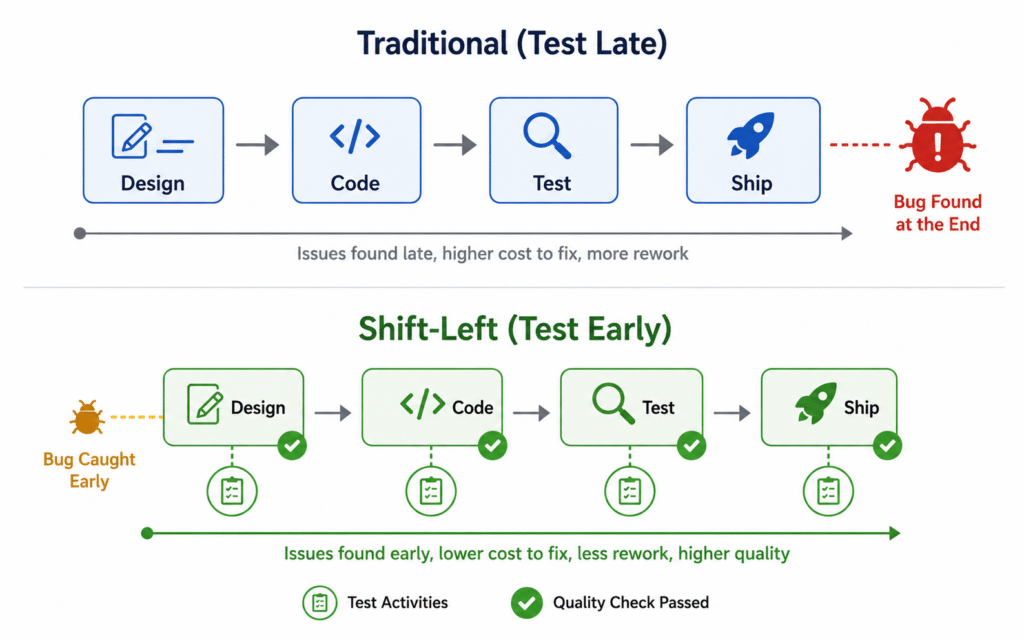
Shift-left is a philosophy and strategy that moves testing activities earlier in the development lifecycle. On a traditional project timeline, development happens on the left and testing happens on the right late, after features are built. Shift-left testing pushes quality activities toward the left side of that timeline, integrating testing with development from the earliest stages rather than treating it as a final validation step.
Shift-left encompasses a range of practices: writing tests before or alongside code, reviewing requirements for testability before development begins, running automated tests on every commit rather than at the end of a sprint, and involving QA engineers in architectural discussions where decisions affect how the system can be tested.
Why Finding Bugs Early Is So Valuable
The cost of fixing a defect grows dramatically the later it is found in the development process. A bug caught by a developer writing a unit test costs minutes to fix. The same bug found by a QA engineer in a testing sprint costs hours. The same bug found by a user in production can cost days of developer time, emergency deployments, customer support overhead, and reputational damage.
Research consistently shows that defects found in production are 10 to 100 times more expensive to fix than defects found during development. Shift-left testing is not just a quality strategy, it is a cost reduction strategy. The investment in earlier testing infrastructure pays for itself quickly in reduced production incidents and faster release cycles.
Test-Driven Development: The Most Complete Shift-Left Approach
Test-Driven Development (TDD) is a development practice where tests are written before the code they will test. The developer writes a failing test that specifies the desired behavior, then writes the minimum code needed to make that test pass, then refactors the code while keeping the test green. This red-green-refactor cycle produces code that is designed to be testable from the start.
TDD requires discipline and a change in mindset for developers accustomed to writing code first. Teams that adopt it consistently report cleaner interfaces, fewer regressions, better coverage of edge cases, and faster debugging when something breaks. TDD is not mandatory for effective testing, but it represents the most complete implementation of the shift-left philosophy.
Behavior-Driven Development: Shared Language for Quality
Behavior-Driven Development (BDD) extends shift-left testing by involving non-technical stakeholders, product managers, business analysts, and customers in defining how the software should behave. BDD uses a structured natural language syntax (Given-When-Then) to describe scenarios that then drive automated test implementation. The result is a test suite that reads like a business specification and serves as living documentation of how the system works.
Tools like Cucumber, SpecFlow, and Behave implement BDD frameworks that translate human-readable scenarios into executable tests. BDD is most valuable in domains with complex business rules, where the alignment between what the business wants and what the development team builds is a persistent challenge.
Continuous Testing in CI/CD Pipelines
What Continuous Testing Means
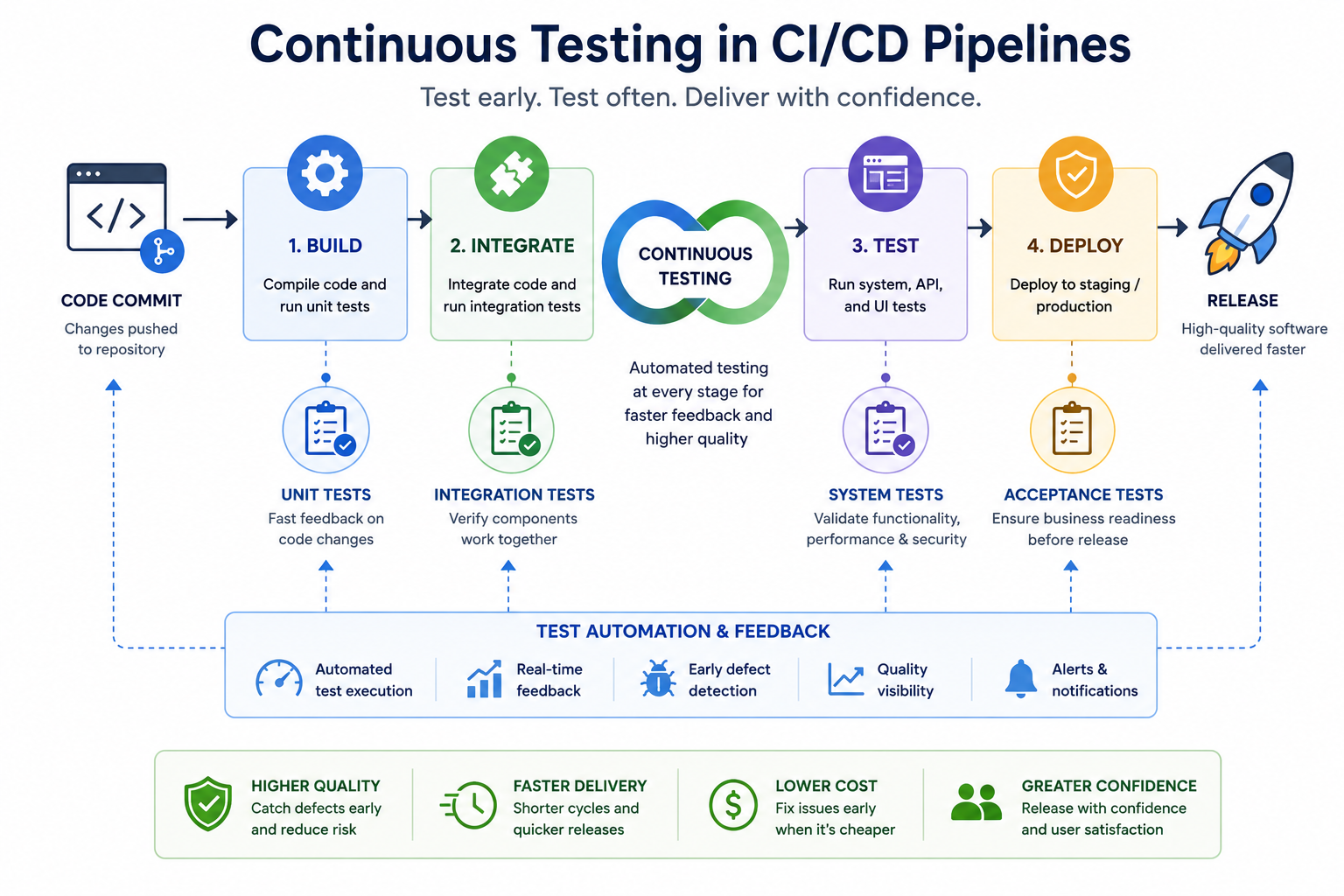
Continuous testing is the practice of running automated tests automatically and immediately as part of the software delivery pipeline. Every time a developer pushes code, a CI/CD system triggers a test run that provides feedback within minutes. Failed tests block the pipeline, preventing broken code from reaching the next stage of the release process.
Continuous testing is the operational expression of shift-left philosophy. It makes testing a constant background activity rather than a scheduled milestone. When tests run on every commit, bugs are caught within hours of introduction, before they accumulate in the codebase and become expensive to untangle.
Structuring Tests in a CI/CD Pipeline
Not all tests should run at the same stage of a pipeline. A practical structure for a modern CI/CD pipeline organizes tests into stages by speed and scope: fast unit tests run first, providing feedback in under a minute; integration tests run next; and a slower end-to-end suite runs on pull request merge or before deployment to staging. Critical security scans can be embedded at any stage.
This staged approach ensures that developers get the fastest possible feedback on code-level changes, while more comprehensive tests run in the background on a slightly longer cycle. The goal is to fail fast at the earliest possible stage without running slow tests unnecessarily.
“The best CI/CD pipeline is one where a developer gets test feedback before they have moved on to their next task. If test results take 30 minutes, developers ignore them. If they take 3 minutes, developers fix issues immediately.”
Flaky Tests: The Biggest Threat to Continuous Testing
A flaky test is one that sometimes passes and sometimes fails without any change to the code. Flaky tests are the single greatest threat to a continuous testing culture. When tests fail randomly, developers begin ignoring failures, assuming they are flakiness rather than real bugs. This erodes the value of the entire test suite.
Flakiness usually stems from timing dependencies, shared test state, reliance on external services, or environment inconsistencies. Addressing flakiness requires treating it as a first-class engineering problem. Track flaky tests, quarantine them from the main pipeline, and invest in fixing or rewriting them. A smaller suite of reliable tests is more valuable than a large suite of unreliable ones.
A Complete Quick Reference Guide
Which Testing Strategy Fits Your Development Stage?
| Development Stage | Recommended Testing Focus |
|---|---|
| Early prototype / MVP | Manual exploratory testing, basic unit tests for core logic |
| Active feature development | TDD or test-alongside for new code, integration tests for APIs |
| Pre-release stabilization | Full regression suite, performance benchmarking, security scan, and a pre-launch production readiness audit by developing teams to verify system stability before deployment |
| Continuous delivery pipeline | Automated unit + integration on commit, E2E on merge/deploy |
| Post-release / maintenance phase | Monitoring, regression protection, targeted exploratory testing |
| Legacy codebase without tests | Characterization tests first, then gradual unit test introduction |
Testing Strategy Checklist: Are You Covering the Essentials?
Use this checklist to evaluate the completeness of your current testing approach.
- Are unit tests written for all critical business logic, with coverage tracked over time?
- Are integration tests in place for all significant component boundaries and external API dependencies?
- Is there an automated regression suite that runs on every pull request or merge?
- Are performance benchmarks defined and tested against regularly, not just before a launch?
- Is security scanning integrated into the CI/CD pipeline at the dependency and application level?
- Is there a shift-left practice: TDD, BDD, or at minimum tests written alongside code in use?
- Is the test suite free of persistent flakiness that undermines developer trust?
- Are manual testing efforts focused on exploratory work, complex scenarios, and new feature validation?
- Is there a process for reviewing and improving the testing strategy regularly as the product evolves?
“If you can honestly check every item on this list, your testing strategy is ahead of the vast majority of software teams. If you cannot, you have a clear roadmap for where to invest next.”
Common Mistakes in Software Testing Strategy
Treating Testing as a Phase Rather Than a Practice
The most pervasive mistake in software testing is treating it as a stage that happens at the end of development. This model builds everything, then tests everything, creates a bottleneck at the end of every release cycle, compresses testing time when schedules slip, and ensures that bugs are found as late and expensively as possible. Testing is not a phase. It is a continuous practice embedded throughout the entire development process.
Measuring Coverage Without Measuring Quality
Code coverage the percentage of code lines executed by tests is a useful metric but a dangerous one when treated as the primary measure of testing quality. High coverage does not mean the tests are meaningful. A codebase with 90 percent coverage and trivial tests that make no assertions is less well tested than one with 60 percent coverage and rigorous tests that verify real behavior. Measure coverage as a signal, not a goal. Complement it with defect escape rate the percentage of bugs found in production versus during testing which is a more honest measure of testing effectiveness.
Over-Investing in End-to-End Tests
End-to-end tests feel comprehensive because they test the whole system, but they are expensive, slow, and fragile. Teams that rely primarily on end-to-end tests spend significant time maintaining tests that break every time the UI changes, waiting for long test runs to complete before deploying, and debugging failures that provide little information about which specific component failed. Invest heavily in unit and integration tests, and use end-to-end tests selectively for your most critical user journeys.
Neglecting Test Maintenance
Tests are code, and code requires maintenance. A test suite written two years ago that nobody has touched since is probably full of tests that no longer reflect real requirements, tests that pass for the wrong reasons, and tests whose failure would not actually catch a real bug. Treat test maintenance as a first-class engineering activity. Review the test suite regularly, retire tests for features that no longer exist, and refactor tests when the underlying code they test has changed significantly.
Starting Automation Without a Framework
Individual automated tests written without a coherent framework quickly become a maintenance nightmare. Each test reinvents utility functions, connection handling, and test data setup. When something changes in the application, dozens of tests need to be updated individually. Before writing automated tests at scale, invest in a testing framework that standardizes how tests are structured, how test data is created and cleaned up, how test utilities are shared, and how results are reported.
Conclusion:
Software testing without strategy is just activity. You can run thousands of tests and still ship software that fails users if those tests are poorly chosen, poorly maintained, or poorly timed. The power of a well-designed testing strategy is that it transforms testing from a reactive cleanup exercise into a proactive quality system that catches problems early, prevents regressions, and gives development teams the confidence to release frequently and reliably.
The principles in this guide layered testing, shift-left practices, meaningful automation, risk-based prioritization, and continuous integration are not theoretical ideals. They are the practices used by the teams that consistently ship high-quality software, respond quickly to issues, and build the kind of user trust that comes from software that simply works.
Building this capability takes time. Start with the foundations: unit tests for your most critical logic, a regression suite that runs automatically, and a team culture that treats a failing test as information rather than an inconvenience. Layer in integration testing, performance benchmarks, and security scanning as the foundation solidifies.
The goal is not perfection. No testing strategy eliminates all bugs. The goal is to make most bugs cheap to find and fix, to ensure the most important paths through your software are thoroughly verified, and to build the organizational habit of testing continuously rather than testing late. That combination is what separates teams that dread release days from teams that ship with confidence.
Frequently Asked Questions About Software Testing Strategies
What is the most important software testing strategy for agile teams?
For agile teams releasing software in short sprints, the most important strategy is continuous automated testing integrated into every stage of the sprint. Unit tests written alongside code provide rapid feedback during development. Integration tests verify sprint deliverables at the boundary level. A regression suite runs on every merge to catch interactions between the new sprint’s work and existing functionality. The shift-left approach where testing is not a final sprint activity but a continuous one is the most compatible testing philosophy for agile development.
How much of a codebase should be covered by automated tests?
There is no universal target. Coverage requirements vary significantly by the risk profile of the codebase. For financial, medical, or safety-critical systems, very high coverage 80 to 90 percent or above may be warranted for core logic. For a marketing website with limited business logic, 50 to 60 percent may be entirely adequate. The more useful question is not what percentage is covered, but whether the critical paths, edge cases, and highest-risk areas are well covered. Focus coverage efforts on those areas first, then expand broadly.
What is the difference between QA testing and software testing?
Software testing is the broader activity of evaluating software against specified requirements and quality criteria. Quality Assurance (QA) is a broader organizational function that encompasses not just testing but the entire set of processes, standards, and practices that ensure software quality across the development lifecycle. QA includes test strategy design, test environment management, defect tracking, process improvement, and release quality governance. Testing is the hands-on activity within the QA function of finding defects and verifying behavior.
When should you use exploratory testing versus scripted testing?
Scripted testing following predefined test cases is most effective for verifying known requirements, running regression checks, and ensuring consistent coverage of stable features. Exploratory testing where the tester investigates the software freely without a predetermined script is most valuable for new or recently changed features, complex user flows with many branching paths, and areas where the requirements are ambiguous or incomplete. The most effective testing strategies use both: automation handles scripted regression, and skilled human testers perform exploratory testing on the areas where judgment and creativity add the most value.
How do you start building a testing strategy for a product with no tests?
The most pragmatic approach is to start with characterization tests. Rather than attempting to write tests for how you think the code should behave, write tests that capture how the code actually behaves right now. These tests establish a safety net that protects existing behavior while you begin improving the codebase. Once that baseline exists, introduce unit tests for any new code written from that point forward. Gradually add tests to the highest-risk areas of the existing codebase as you touch them. Over time, coverage grows organically without requiring a separate testing project that competes with feature development.