The Warning That Scares Your Visitors Away
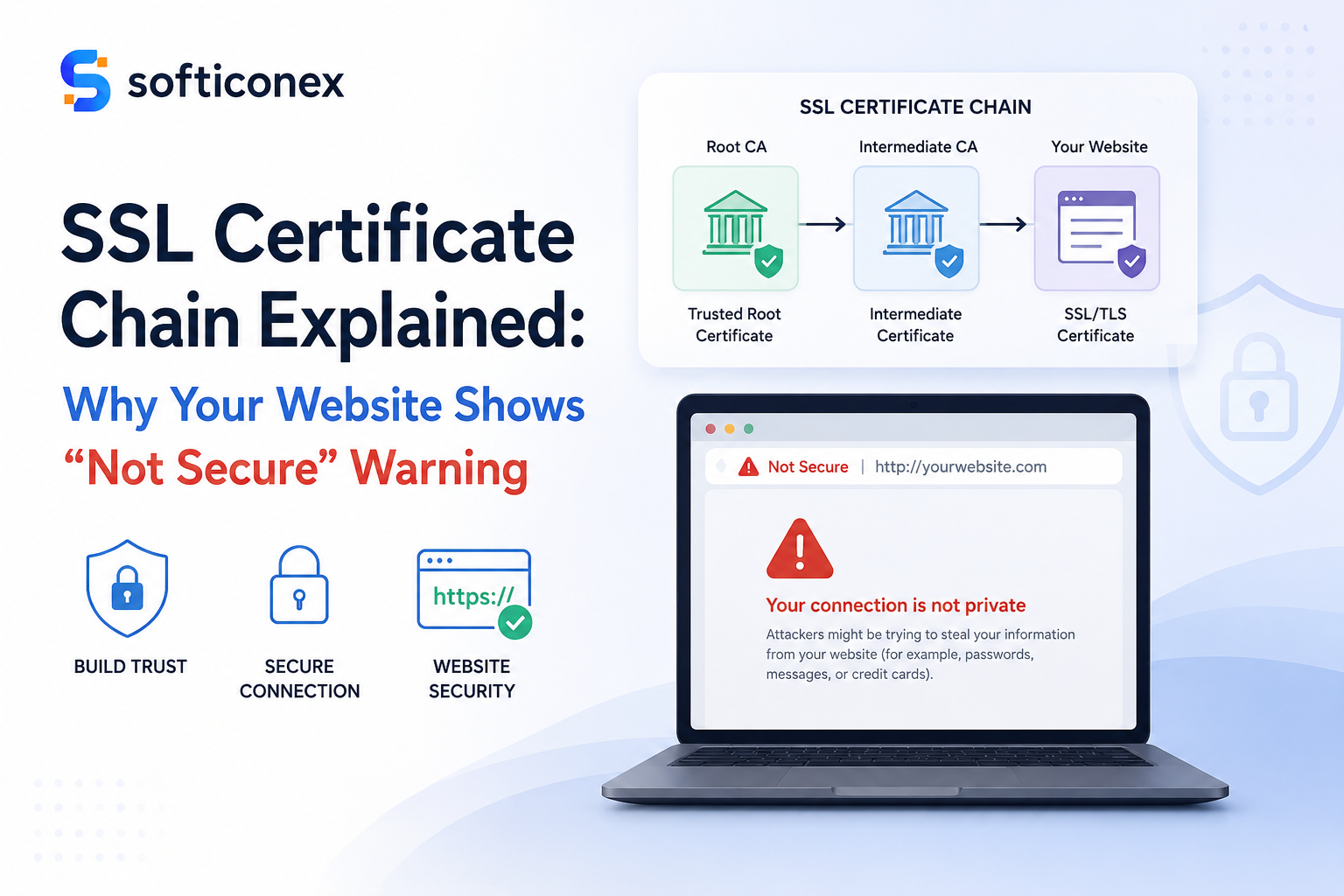
You open a website and suddenly see a red alert saying, “Your connection is not private.” In most cases, people quickly close the page and don’t come back again.
This warning appears because of a broken or missing SSL certificate chain. It is one of the most common website security problems, and it directly costs businesses visitors, conversions, and search rankings.
In this guide, you will learn exactly what an SSL certificate chain is, how it works step by step, why it matters for your website security and SEO, and how to fix the most common errors that cause browser warnings.
Quick Answer: An SSL certificate chain is an ordered series of digital certificates that links your website’s certificate back to a globally trusted root authority, allowing browsers to verify your site is safe and legitimate.
What Is an SSL Certificate Chain?
An SSL certificate chain, also called the certificate chain of trust, is a sequence of digital certificates that browsers use to confirm your website’s identity before allowing a secure HTTPS connection.
Your website has its own SSL certificate. But browsers do not automatically trust it just because it exists. They need proof that a recognized and trustworthy authority issued that certificate. The chain provides that proof.
Think of it as a system that works like a job reference guide. You provide a reference. That reference comes from a manager. A company director vouches for the manager. The hiring organization already knows and trusts that director. Remove any part of that chain, and the trust breaks completely.
Every major browser, including Chrome, Firefox, Safari, and Edge, comes with a pre-installed list of trusted root certificates. The SSL certificate chain connects your website’s certificate to one of these trusted roots through a series of verified links.
Simple rule: No complete chain means no trust. No trust means browser warnings. Browser warnings can cause you to lose visitors and reduce your revenue.
Why Is the SSL Certificate Chain Important?
The certificate chain is the foundation of all secure communication on the web. Here is why every website owner must get it right:
- Universal Browser Trust: A complete chain guarantees your site is trusted by Chrome, Firefox, Safari, Edge, and all mobile browsers equally.
- Protection Against Fake Websites: The chain system makes it nearly impossible for attackers to fake a trusted certificate for a domain they do not own.
- Enabling HTTPS Encryption: Your HTTPS padlock only appears when the browser validates the full chain successfully. Without it, user data travels unencrypted.
- Google SEO Rankings: Google uses HTTPS as a ranking signal. A broken chain breaks HTTPS, which can lower your position in search results.
- Legal Compliance: Privacy regulations like GDPR require that personal data be transmitted securely. A broken SSL chain may put you in legal violation.
How Does an SSL Certificate Chain Work? Step by Step
The chain verification process happens automatically every time someone visits your website. It completes in milliseconds but involves several precise steps:
- The visitor’s browser sends a connection request to your web server to begin a secure HTTPS session.
- Your web server responds by sending its SSL certificate along with any intermediate certificates in the chain.
- The browser reads your server certificate and checks which Certificate Authority signed it.
- The browser then looks for that Certificate Authority’s own certificate, either sent by your server or cached locally.
- The browser keeps following the chain of signers upward, certificate by certificate.
- Eventually, the browser reaches a root certificate. It checks whether this root is in its own pre-installed trust store.
- If the root is trusted, every cryptographic signature in the chain is verified, and the connection is approved.
- The padlock icon appears, HTTPS is confirmed, and the visitor can browse your site securely.
If any certificate in the chain is missing, expired, or invalid, the process stops, and the browser shows a security warning instead of allowing the connection.
The Three Components of Every SSL Certificate Chain
1. Root Certificate
The root certificate sits at the very top of the trust chain. It belongs to a top-level Certificate Authority whose certificates come pre-installed inside every browser and operating system worldwide. Root certificates are self-signed, meaning the CA vouches for itself, and browser vendors accept this because CAs must pass rigorous independent security audits to earn root status.
2. Intermediate Certificate
Intermediate certificates sit in the middle, between the root and your website. Certificate Authorities never use their root certificates directly to sign website certificates, because exposing the root creates enormous risk. Instead, they create intermediate certificates signed by the root, then use those intermediates to sign your website certificate. This way, if an intermediate is ever compromised, only it needs to be revoked without touching the root.
3. Leaf Certificate (Server Certificate)
The leaf certificate is the one that belongs directly to your website. It contains your domain name, your organization details, the certificate validity period, and your server’s public encryption key. This is what your server presents to every browser that connects to your site. It is the starting point of the chain, but it only becomes trusted when the full chain above it is valid and complete.
What Is a Certificate Authority (CA)?
A Certificate Authority is an organization authorized to issue SSL certificates. CAs verify the identity of websites and businesses before issuing certificates, acting as the gatekeepers of web trust.
There are three certificate types based on verification level:
- Domain Validated (DV): CA confirms only that you own the domain. Issued in minutes. Free through Let’s Encrypt.
- Organization Validated (OV): CA verifies domain ownership plus your business identity. It takes one to three days.
- Extended Validation (EV): Full legal and organizational verification. Highest trust level.
The most widely used Certificate Authorities include DigiCert, Let’s Encrypt, GlobalSign, and Sectigo. Let’s Encrypt is the most popular for small websites because it provides free, automated certificates that are trusted by all major browsers.
Common SSL Certificate Chain Errors and What They Mean
Certificate Not Trusted
This error means the browser cannot find a valid path from your server certificate to a trusted root. The most common cause is a missing intermediate certificate. Your server is presenting its own certificate but not sending the intermediate that bridges the gap to the root.
Incomplete Certificate Chain
An incomplete chain error means your server is only sending the leaf certificate without the intermediate certificates. The chain ends before reaching a trusted root, so the browser rejects it.
Certificate Has Expired
Every certificate in the chain has an expiry date. If any one of them has expired, including intermediate certificates, the browser rejects the entire chain. Let’s Encrypt certificates expire every 90 days, so automated renewal is strongly recommended.
Self-Signed Certificate Warning
A self-signed certificate is one where the owner signed their own certificate rather than obtaining one from a trusted CA. Browsers do not trust self-signed certificates and will always show a warning, because there is no verified authority backing the certificate’s claims.
How to Fix SSL Certificate Chain Issues
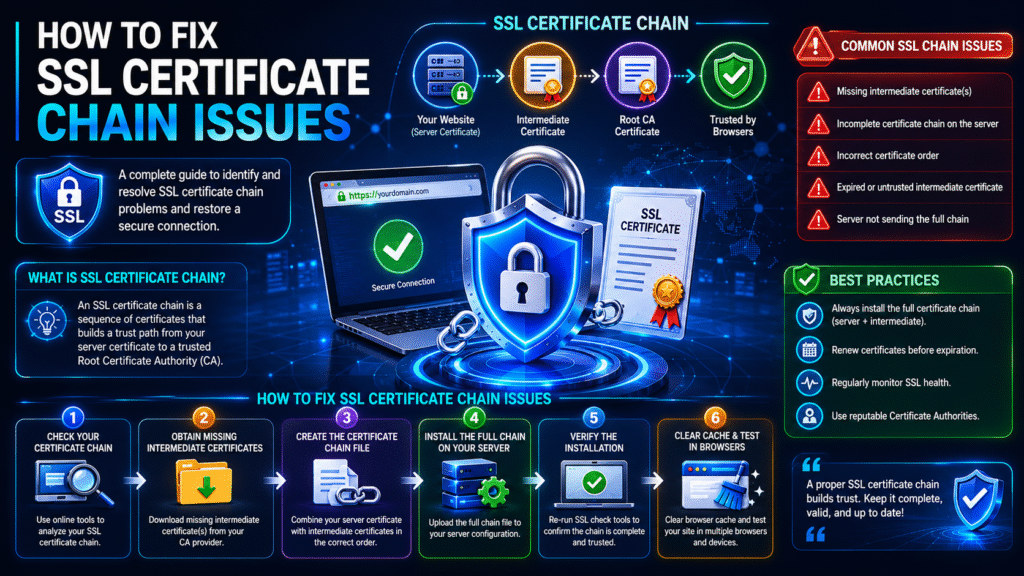
Most SSL chain errors can be resolved by following these steps in order:
- Run an SSL test first. Use the free SSL Labs Server Test at ssllabs.com/ssltest to identify exactly what is missing or misconfigured before touching anything on your server.
- Download the full CA bundle. Log in to your certificate provider’s account and download the complete bundle file, which includes your server certificate plus all intermediate certificates.
- Install certificates in the correct order. Your server certificate goes first, then intermediate certificates below it. Wrong order causes chain errors even when all files are present.
- Configure your web server correctly. For Nginx, combine your server certificate and intermediate certificates into one file. For Apache, use the SSLCertificateChainFile directive to point to your intermediate certificate file.
- Restart your web server. SSL configuration changes only take effect after restarting Apache, Nginx, or whichever server software you use.
- Test again after fixing. Run the SSL Labs test once more and check your site in Chrome, Firefox, and Safari to confirm the padlock appears in all browsers.
Pro tip: If you are using Let’s Encrypt, set up Certbot for automatic renewal so your certificates never expire without you noticing.
SSL Certificate Chain vs Single Certificate
| Feature | Single Certificate Only | Full Certificate Chain |
|---|---|---|
| Browser Trust | Fails in Firefox, Safari, and mobile | Trusted across all browsers |
| Security Level | Incomplete and unreliable | Complete verified trust path |
| Error Risk | Very high | Minimal with correct setup |
| SEO Impact | Loses the HTTPS ranking signal | Full HTTPS SEO benefits |
| Recommended | Never for live websites | Always required |
Best Practices for SSL Certificate Management
- Always install the full CA bundle provided by your certificate authority, never the server certificate alone.
- Test your SSL setup immediately after every installation or renewal using an online SSL checker tool.
- Automate your certificate renewal using Certbot for Let’s Encrypt or your hosting control panel’s built-in renewal feature.
- Set a reminder at least 30 days before any commercial certificate expires so you have plenty of time to renew.
- Test your website in multiple browsers and on mobile devices after every SSL configuration change.
- Keep your web server software updated to avoid compatibility issues with newer certificate formats.
Why SSL Certificate Chain Matters for SEO
A properly configured SSL certificate chain has a direct impact on your search engine rankings and user behavior:
- Google Ranking Factor: Google confirmed HTTPS as a ranking signal. A broken certificate chain breaks HTTPS and weakens your SEO position against competitors.
- Lower Bounce Rate: Security warnings cause visitors to leave immediately. High bounce rates signal to Google that your page is untrustworthy, further lowering your rankings.
- E-Commerce Conversions: Customers will not enter payment details on a site showing a security warning. A valid SSL chain is essential for any online store.
- Faster TLS Handshakes: Modern, properly configured certificate chains using TLS 1.3 load faster, contributing to better Core Web Vitals scores.
How Softiconex Helps Fix SSL Certificate Chain Issues?
A broken or incomplete SSL certificate chain is one of the most common reasons websites display a “Not Secure” warning in browsers. Softiconex helps businesses identify and resolve SSL/TLS configuration issues by installing the correct certificate chain, configuring intermediate certificates, fixing HTTPS errors, and ensuring full browser compatibility. Our experts perform a complete SSL audit to eliminate security warnings, improve user trust, and protect sensitive data across your website.
Need help fixing SSL certificate errors? Contact Softiconex today for professional SSL setup, troubleshooting, and website security services.
Conclusion
Understanding what an SSL certificate chain is is one of the most practical things any website owner, developer, or IT student can learn. It is the foundation of every trusted HTTPS connection on the internet.
Every certificate in the chain must be present, valid, and in the correct order. From your server certificate at the bottom, through intermediate certificates in the middle, all the way to a trusted root at the top, the chain must be unbroken.
Install the complete CA bundle. Test across all browsers. Automate your renewals. Check your SSL configuration regularly. These four habits will keep your website secure, trusted, and ranking well in search engines for years to come.
Frequently Asked Questions About SSL Certificate Chain
What is an SSL certificate chain in simple words?
An SSL certificate chain is a series of connected digital certificates that prove your website’s identity to browsers. It links your site’s certificate through one or more intermediate certificates up to a root certificate that browsers already trust. Without this complete chain, browsers show a security warning instead of the padlock.
What causes SSL certificate chain errors?
The most common causes are missing intermediate certificates that were not installed on the web server, certificates installed in the wrong order, any certificate in the chain that has expired, or a self-signed certificate that no browser trusts by default.
Is the SSL certificate chain important for SEO?
Yes. Google uses HTTPS as a ranking factor, and a broken certificate chain prevents proper HTTPS from working. Security warnings also increase bounce rates, which Google interprets as a sign that your content is not reliable, resulting in lower search rankings.
What is the difference between a root and an intermediate certificate?
A root certificate belongs to a top-level CA and is pre-installed in browsers worldwide. It sits at the top of the chain and is self-signed. An intermediate certificate sits between the root and your server certificate. CAs use intermediates to sign website certificates, so the root is never directly exposed or put at risk.
How do I fix an incomplete SSL certificate chain?
Download the full CA bundle from your certificate provider, install it on your web server in the correct order with your server certificate first and intermediates after it, restart your server, and verify the fix using the free SSL Labs Server Test at ssllabs.com/ssltest.
What is cloud ERP, and what does it have to do with SSL?
Cloud ERP systems like Oracle NetSuite and Microsoft Dynamics 365 are accessed through web browsers and rely entirely on valid SSL certificate chains to secure the connection between users and the application. A broken SSL chain on a cloud ERP platform would prevent users from logging in securely and would expose sensitive business data to risk.