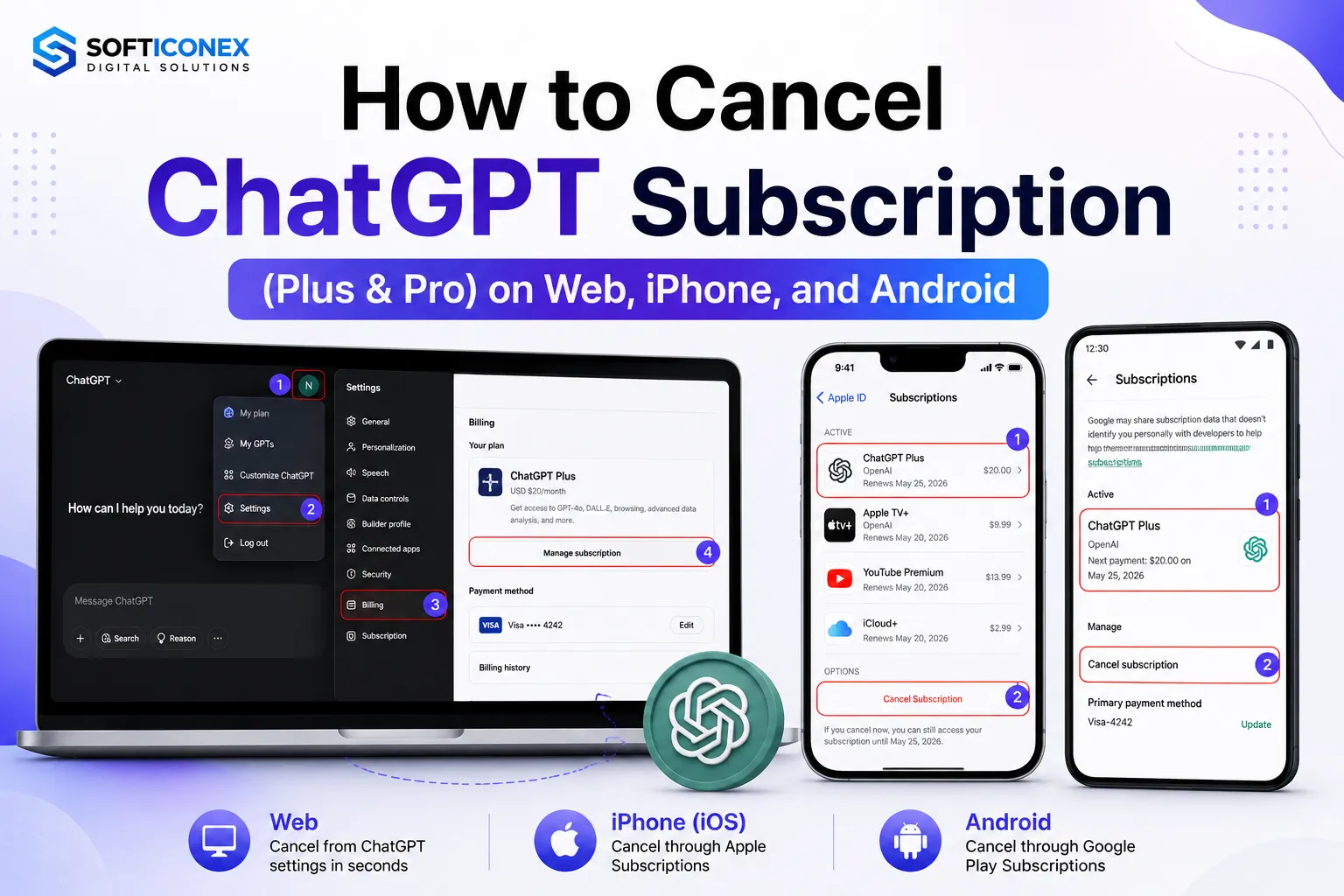
Canceling your ChatGPT subscription is a straightforward process, and it takes just a couple of minutes once you know where to look. Whether you’re on Plus, Pro, Team, or Enterprise, the cancellation itself is simple; the part that trips people up is finding the right menu, since OpenAI’s cancellation flow depends entirely on where you originally subscribed.
A few things worth knowing before you start:
- You’ll keep full access to paid features until the end of your current billing period, cancelling doesn’t cut you off immediately.
- The steps differ depending on whether you subscribed through the ChatGPT website, the Apple App Store, or the Google Play Store, because each platform handles its own billing.
- Your account, chat history, and custom GPTs are not deleted when you cancel only the paid features are removed once your billing cycle ends.
This guide walks through every cancellation path, what to expect afterward, refund policies, and how to fix common issues if the cancel option isn’t showing up.
Before You Cancel Your ChatGPT Subscription
Before you hit “Cancel,” it helps to understand exactly what happens next:
- Access continues until the end of your billing cycle: You paid for the full period, so you keep Plus or Pro features until that date passes, cancelling doesn’t refund or end access early.
- Your conversations are not deleted: All existing chat history stays in your account after cancellation.
- Custom GPTs remain: Any GPTs you’ve built or saved stay associated with your account; you simply lose the ability to use premium models and features once you drop to the free tier.
- Check your renewal date first: Your billing cycle date is visible in your subscription settings: cancel a day or two before that date to be safe, since cancelling on the renewal day itself can sometimes be too late to stop that cycle’s charge.
How to Cancel ChatGPT Plus Subscription on the Website
If you signed up directly on chatgpt.com, this is the path for you.
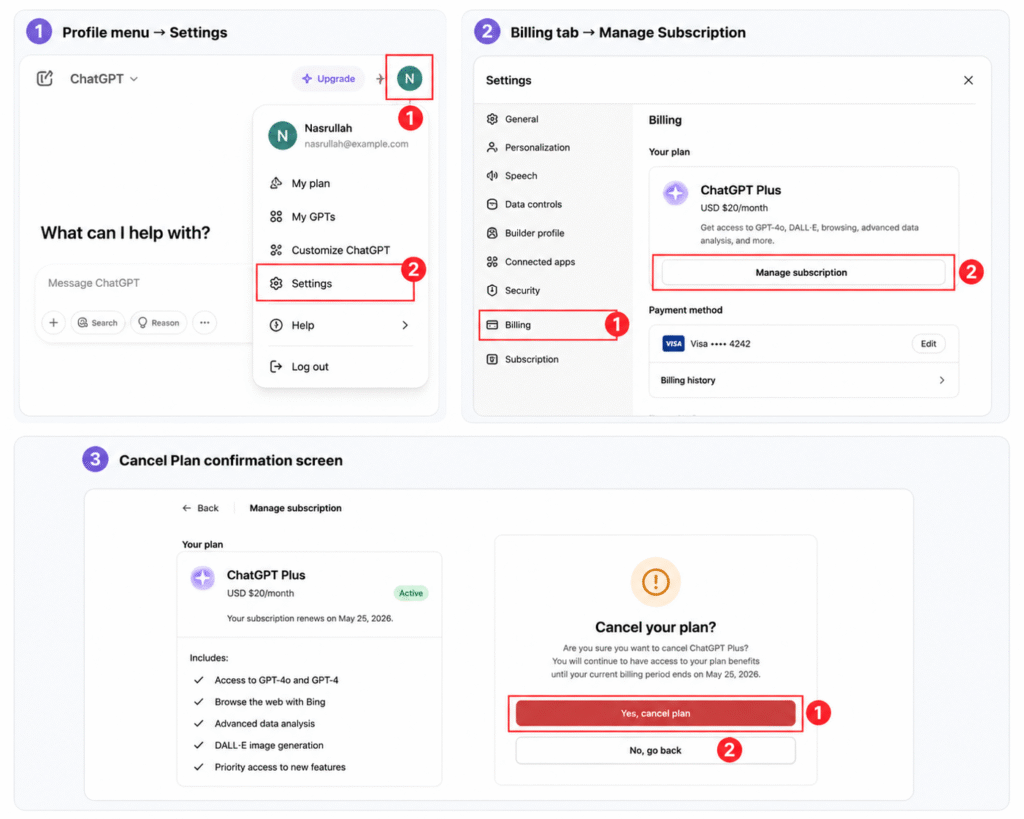
Step-by-step:
- Open ChatGPT in your browser and sign in to the account tied to your subscription.
- Click your profile icon in the bottom-left corner.
- Select Settings.
- Go to the Billing (or “My Plan”) tab.
- Click Manage Subscription this redirects you to OpenAI’s billing portal (powered by Stripe).
- Click Cancel Plan.
- Confirm your cancellation when prompted.
You’ll receive a confirmation email once the cancellation is processed.
How to Cancel ChatGPT Pro Subscription
The process for cancelling ChatGPT Pro is identical to cancelling Plus. Both are billed through the same web-based Stripe portal, and the menu path (Settings → Billing → Manage Subscription → Cancel Plan) doesn’t change based on tier.
The only real difference is what you lose access to afterward: Pro unlocks higher usage limits and access to the most advanced models, so downgrading to Free is a bigger drop in capability than downgrading from Plus. Otherwise, there’s no separate cancellation flow to learn.
How to Cancel ChatGPT on iPhone (Apple)
If you subscribed through the App Store, you must cancel through Apple ChatGPT’s own in-app settings and won’t have a working cancel button for Apple-billed accounts.
Step-by-step:
- Open Settings on your iPhone.
- Tap your name at the top to open your Apple ID.
- Tap Subscriptions.
- Find and tap ChatGPT.
- Tap Cancel Subscription.
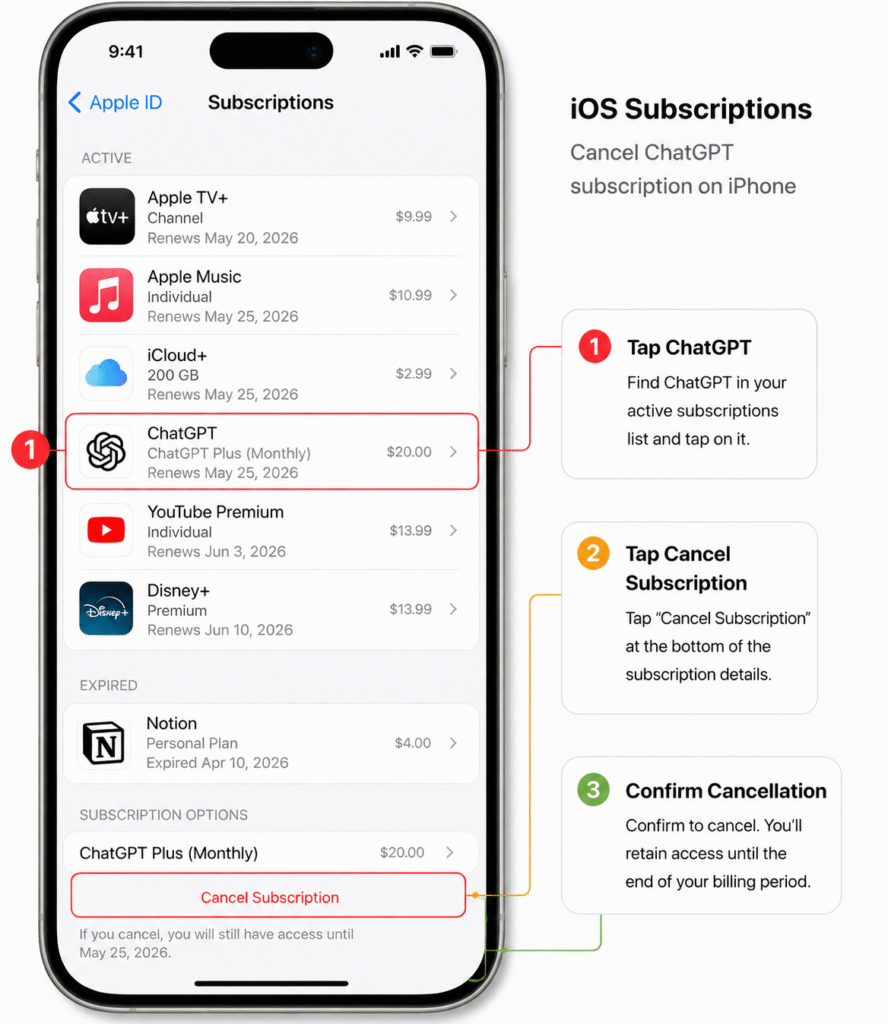
Your access remains active until the current billing period ends, exactly as it would on the web.
How to Cancel ChatGPT on Android
If you subscribed through Google Play, cancel from there.
Step-by-step:
- Open the Google Play Store app and make sure you’re signed into the correct Google account.
- Tap your profile icon, then go to Payments & subscriptions.
- Tap Subscriptions.
- Select ChatGPT.
- Tap Cancel Subscription and follow the confirmation prompts (Google may ask why you’re cancelling).
How to Cancel ChatGPT Team Subscription
Team plans are managed at the workspace level, not by individual members.
- Only a Workspace Owner (or an Admin with billing permissions) can cancel a Team subscription.
- If you’re a regular member, you won’t see a cancel option. You’ll need to ask your workspace owner to do it from the workspace billing settings.
- Once cancelled, the whole workspace loses Team features at the end of the current billing cycle, and members revert to individual free accounts (or whatever plan they had before joining).
How to Cancel ChatGPT Enterprise
Enterprise plans aren’t self-service. If your organization wants to cancel:
- Contact your designated account administrator, or
- Reach out to your OpenAI sales representative or account manager directly.
Enterprise contracts typically involve custom terms, so cancellation timing and any notice requirements should be confirmed with your OpenAI contact rather than assumed.
Can You Get a Refund?
Refund eligibility depends on where you were billed:
- OpenAI (web) billing: Generally no refunds for partial months. Once you’re charged, you keep access for the rest of that billing cycle even if you cancel immediately after but you won’t get money back for unused days.
- EU, UK, and Turkey residents are an exception: consumer protection laws in these regions typically grant a 14-day cancellation and refund window after a new purchase.
- Apple App Store billing: Refund requests go through Apple, not OpenAI. You can request one via Apple’s “Report a Problem” page or through Apple Support.
- Google Play billing: Refund requests go through Google Play’s own refund policies and support channels.
If you believe you were charged in error on a web subscription, contact OpenAI support with your account and payment details.
What Happens After Cancelling?
- Access until renewal date: You keep paid features until the current billing period ends there’s no early cutoff.
- Downgrade to Free plan: Once the paid period ends, your account automatically reverts to the Free tier (lower message limits, no access to premium models, no advanced features like Voice mode or Agent mode).
- Chats remain: Your conversation history is preserved and accessible after downgrading.
- Custom GPTs remain: GPTs you created or saved stay in your account, though usage may be limited by Free-tier restrictions.
- Files and history: Uploaded files and past interactions aren’t deleted by cancellation alone.
- Data: Your account data stays intact unless you separately delete your account. Cancelling a subscription and deleting an account are two different actions.
Why Can’t I Cancel My ChatGPT Subscription?
If you’re stuck, it’s usually one of these:
- No cancel button showing: This almost always means you’re looking in the wrong place; the “Cancel Plan” button only appears for subscriptions billed directly by OpenAI on the web. Apple- and Google-billed accounts won’t show it.
- Wrong account: You may be logged into a different account than the one holding the subscription. Check the receipt email to confirm which account is billed.
- Apple billing: Web-based cancellation won’t work for App Store subscriptions you must cancel through iPhone Settings → Apple ID → Subscriptions.
- Google billing: Similarly, Android subscriptions must be cancelled through Google Play, not the ChatGPT app itself.
- Payment failed: If a recent payment failed, your subscription may already be in a grace period or expired state, which can change what options are shown.
- Subscription expired: If it already lapsed, there may be nothing left to “cancel” you’re likely already on the Free plan.
- Multiple accounts: Having more than one OpenAI account is a common source of confusion; double-check which one your receipt matches.
- Browser cache issues: Occasionally a stale browser session hides updated billing options, try refreshing, logging out and back in, or using a different browser.
- Workspace account: If your account was added to a Team or Enterprise workspace, only the workspace owner or admin can manage or cancel the subscription individual members can’t.
How to Restart Your Subscription Later
Changed your mind? Reactivating is quick and comes with no penalty:
- Sign in to your account.
- Go to your Plan or Settings page.
- Click Upgrade Plan and select the tier you want.
Your billing cycle restarts from the new purchase date, and your chat history, memories, projects, and custom GPTs return to full functionality within minutes. There’s no reactivation fee.
Alternative Plans
If you’re cancelling because you’re moving to a different tool altogether, check out our guide to the best ChatGPT alternatives.
| Plan | Best For |
| Free | Casual use |
| Plus | Individuals |
| Pro | Heavy users |
| Team | Small businesses |
| Enterprise | Large organizations |
Final Thoughts
Cancelling your ChatGPT subscription is quick regardless of tier the key is cancelling through the same platform you originally subscribed on, whether that’s the ChatGPT website, Apple, or Google Play. Keep an eye on your renewal date and cancel a day or two ahead of it to avoid an unwanted charge, and remember that your chats, custom GPTs, and account data all stay intact even after you downgrade to the Free plan.
Frequently Asked Questions
1. How do I cancel ChatGPT Plus?
Go to Settings → Billing → Manage Subscription → Cancel Plan on the website (if billed by OpenAI), or through Apple/Google Subscriptions if billed there.
2. Can I cancel anytime?
Yes. There are no lock-in periods or cancellation fees you can cancel whenever you like.
3. Will I lose my chats?
No. Your conversation history stays in your account after cancellation.
4. Will I get a refund?
Generally no for partial months on OpenAI billing, except for EU/UK/Turkey residents within a 14-day window. Apple and Google have their own separate refund policies.
5. Why can’t I find the cancel button?
You’re most likely looking in the wrong billing system to check whether you were billed by OpenAI, Apple, or Google.
6. Can I cancel from the app?
The ChatGPT mobile app itself doesn’t process cancellations directly for App Store or Google Play subscriptions; you’re redirected to Apple or Google’s subscription management instead.
7. How do I stop automatic renewal?
Cancelling your subscription before the renewal date stops the next automatic charge; access continues until that date.
8. Can I subscribe again later?
Yes, anytime. Reactivation is instant and restores full access to your paid features.
9. Does deleting my account cancel my subscription?
Not necessarily, and it’s not the recommended way to always cancel the subscription first through the correct billing platform, since account deletion and subscription cancellation are handled separately.
10. Can I cancel on my iPhone? Yes, through Settings → Apple ID → Subscriptions → ChatGPT → Cancel Subscription.
11. Can I cancel on Android?
Yes, through Google Play → Payments & Subscriptions → ChatGPT → Cancel.
12. How long does cancellation take?
The cancellation action itself takes about two minutes; your access then continues until the end of the current billing cycle.
13. Does cancelling ChatGPT Plus affect my custom GPTs?
No, your GPTs remain in your account, though building or using certain GPTs may require a paid plan.
14. What’s the difference between cancelling Plus and Pro?
No difference in process, both use the same billing portal and menu steps.
15. Who can cancel a Team or Enterprise plan?
Only a workspace Owner or Admin can cancel Team plans; Enterprise cancellations go through your account administrator or OpenAI sales contact.