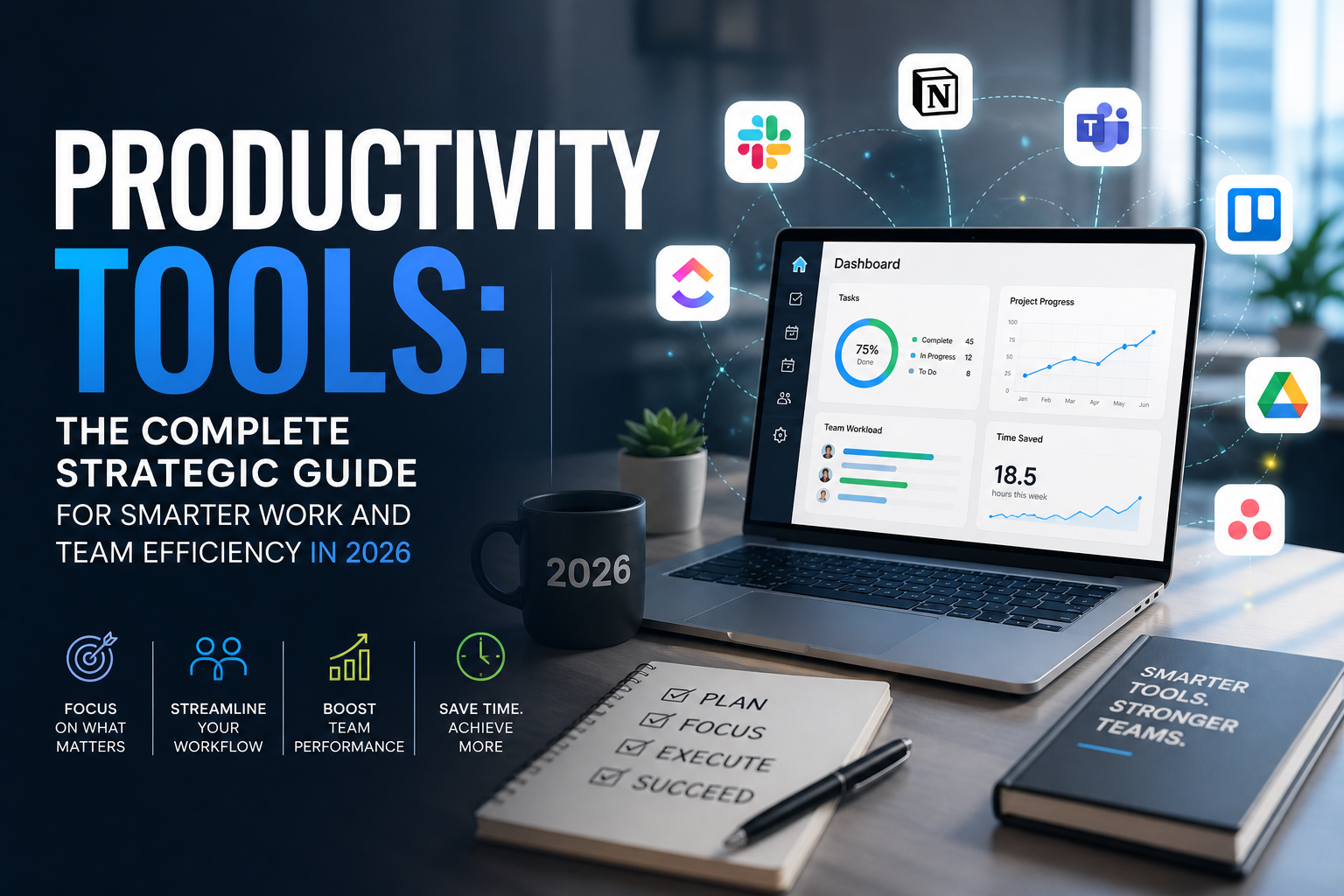
What Are Productivity Tools?
Productivity tools are software systems designed to improve the efficiency, organization, and output of individuals and teams. The category is broad by design because the sources of productivity loss are diverse. A startup founder losing time to manual invoicing has a different problem than a remote support team whose knowledge is fragmented across email threads, yet both problems are solved by tools that belong in the productivity category.
At the individual level, productivity tools include task managers, note-taking applications, calendar systems, focus timers, and personal automation tools. At the team level, they include project management platforms, team communication systems, workflow automation engines, shared documentation tools, and analytics dashboards. At the enterprise level, they include integrated productivity suites, resource management platforms, and AI-powered operations systems.
Why Productivity Tools Matter in Modern Business?
The business case for investing in productivity tool is no longer a matter of debate. The data is unambiguous, and the competitive pressure is structural.
The cost of unproductive work is quantifiable: IDC research estimates that poor knowledge management and information inefficiency cost large enterprises $31.5 billion annually. Forrester has found that ineffective communication costs companies with 100 or more employees an average of $523,000 per year. These are not abstract numbers; they represent real revenue that is consumed by friction rather than generated by output.
Remote and hybrid work created new coordination costs: The physical office provided natural coordination mechanisms: visual cues about who was working on what, overheard conversations that transferred context, and impromptu collaboration that happened without scheduling. Distributed teams lost all of that. Without deliberate investment in productivity infrastructure, distributed teams default to email and meetings, two of the least efficient coordination mechanisms available. Productivity tools restore the coordination capacity that distributed work removed.
The pace of business has accelerated beyond what manual systems can support: Companies ship products faster, serve more complex customer needs, and operate across more channels than at any point in the past. Teams that rely on manual task coordination, informal communication, and spreadsheet-based project tracking cannot maintain the pace that competitive markets now require. Productivity tools are the operational infrastructure that enables organizational speed.
AI has changed the productivity ceiling: The productivity tools of 2020 helped you organize your work. The productivity tools of 2026 help you do your work. AI-powered task management, automated workflow creation, intelligent meeting summaries, and AI-assisted writing have raised the ceiling on what a single person or small team can produce. Recent studies show that 89% of the workforce has already used an AI tool as part of their job. Organizations that integrate AI productivity capabilities are not just more efficient they are increasingly more capable, full stop.
Talent retention is increasingly linked to quality: A 2024 Salesforce State of the Workforce report found that 76% of employees say the quality of tools their employer provides affects their decision to stay or leave. Employees who spend their days fighting bad software, hunting for information, and doing manual work that should be automated are not just less productive, they are less satisfied and less likely to remain.
How Productivity Tools Work (Step-by-Step)
Understanding how productivity tools function operationally not just what they do, but how they do it makes you a more effective evaluator and implementer.
Step 1
Task and Project Capture: The foundation of any productivity system is a reliable capture mechanism. Whether it’s a task manager that integrates with email, a project board where work items are created from support tickets, or a note-taking tool where ideas are recorded before they evaporate, productivity tools begin with the discipline of capture. Work that isn’t captured isn’t managed.
Step 2
Structure and Organization:
Captured work is organized into projects, categories, sprints, or boards depending on the methodology the team uses (GTD, Kanban, Scrum, OKR-based planning). Productivity platforms provide the structural containers lists, boards, timelines, and hierarchies that give captured work context and priority.
Step 3
Assignment and Accountability:
Tasks are assigned to owners with due dates, priority levels, and relevant context. This is where individual accountability is established; the platform makes visible who is responsible for what, by when, and in what priority order.
Step 4
Communication and Collaboration: Work doesn’t happen in isolation. Productivity tools, including instant messaging softwares, facilitate the communication that surrounds work: comments on tasks, @mentions that draw attention to blockers, real-time collaboration on shared documents, and threaded discussions that keep context attached to the work rather than buried in email.”
Step 5
Workflow Automation: Modern productivity platforms automate the routine coordination work that previously required manual effort: notifying a manager when a task moves to “in review,” triggering a Slack message when a project milestone is complete, or automatically assigning tasks based on workload and availability. Automation tools like Zapier and the native automation features in platforms like Monday.com and ClickUp eliminate the administrative overhead that accumulates around even simple workflows.
Step 6
Time Tracking and Resource Management: Time is the resource being managed. Productive organizations track where time goes not as surveillance, but as strategic intelligence. Time tracking data reveals which projects are consuming more than their allocated resources, which team members are over-capacity, and where estimation accuracy can be improved. Working with time tracking tools gives teams greater visibility into billable and non-billable hours, project budgets, and resource allocation, enabling more informed planning and decision-making.
Step 7
Reporting and Analytics: Productivity platforms aggregate activity data into dashboards that give managers and executives visibility into project health, team performance, workload distribution, and goal progress. The best platforms make this reporting automatic, removing the time cost of compiling status reports while improving the accuracy and frequency of visibility.
Step 8
Continuous Improvement: The productivity systems that compound in value are those that are treated as living infrastructure reviewed regularly, optimized based on usage data, and updated as team needs evolve. The tool is not the strategy. The tool enables the strategy.
Core Features of Productivity Tools
Task Management
The ability to create, assign, prioritize, and track discrete units of work is the foundational capability of any productivity platform. Strong task management includes subtasks, dependencies, recurring task automation, priority levels, custom fields, and bulk editing. The quality of task management UX directly determines whether teams adopt the tool consistently or revert to informal systems.
Team Collaboration
Collaboration features transform productivity tools from individual organizers into team operating systems. Look for real-time co-editing, in-context commenting, @mention notifications, and file attachment capabilities. The best collaboration tools eliminate the round-trip communication: the Slack message asking for the document, the email thread reviewing the draft, the meeting to align on the plan by placing communication directly at the point of work.
Project Planning
Project planning features timelines, Gantt charts, milestone tracking, dependency mapping, and capacity planning give teams the ability to see how work connects across time. This visibility is what allows project managers to identify bottlenecks before they become crises and to communicate realistic timelines to stakeholders.
Workflow Automation
Automation is where modern productivity platforms differentiate themselves most dramatically. The ability to create rules, triggers, and automated actions without writing code eliminates the repetitive coordination work that consumes significant time in manual operations. Well-designed workflow automation doesn’t just save time. It enforces consistency, reducing the variation in process execution that leads to quality issues and rework.
Communication Tools
Integrated communication whether through native messaging, Slack/Teams integration, or email keeps conversation attached to the work it concerns. This is the antidote to the email thread that becomes impossible to search, the Slack message that gets buried, and the meeting that was called because nobody could find the decision that had already been made.
File Sharing and Document Management
Productivity is destroyed by file chaos: wrong versions, unclear storage locations, and access permission confusion. Productive platforms either include native document management or integrate seamlessly with tools like Google Drive, Dropbox, and SharePoint ensuring that files are findable, correctly versioned, and accessible to the right people.
Time Tracking
Time tracking provides the raw material for productivity intelligence. At the individual level, it builds awareness of where time actually goes versus where people assume it goes, a gap that is almost universally surprising. At the team level, it provides the data needed for accurate project estimation, resource allocation, and profitability analysis.
Reporting and Analytics
Dashboards and reports turn activity data into operational insight. High-value reporting capabilities include workload visualization (who has capacity, who is over-allocated), project health scoring, goal progress tracking, and custom report builders. The platforms that make reporting automatic pulling data from actual work activity rather than requiring manual status updates deliver the most accurate and actionable intelligence.
AI-Powered Productivity
AI capabilities in productivity platforms now span drafting assistance, meeting summaries, task creation from natural language, intelligent workload balancing, risk flagging on at-risk projects, and conversational interfaces for querying project status. Organizations that integrate AI productivity capabilities systematically rather than as novelty features are documenting 20–40% reductions in time spent on administrative coordination.
Integrations
A productivity platform is only as valuable as its ability to connect with the rest of your operational ecosystem. The highest-value integrations are with communication tools (Slack, Teams), CRMs (Salesforce, HubSpot), development tools (GitHub, Jira), time tracking (Toggl, Harvest), and billing/invoicing systems. Evaluate integration depth not just the number of integrations, but whether they are bidirectional, real-time, and actually useful for your workflows.
Types of Productivity Tools
Team Productivity Tools
Designed for collaborative work across multiple contributors, team productivity tools prioritize visibility, accountability, and shared workspace. Examples: Asana, Monday.com, Teamwork, Wrike. Core value: everyone on the team can see what’s being worked on, who owns it, and where it stands.
Personal Productivity Apps
Individual-focused tools that help people manage their own tasks, time, and focus. Examples: Todoist, Notion (personal), Things 3, Obsidian. Core value: personal clarity and execution discipline that makes individual contributors more effective regardless of team tools.
Project Management Tools
Full-featured platforms designed to plan, execute, and monitor complex multi-person projects. Examples: Jira, Microsoft Project, Smartsheet, ClickUp. Core value: end-to-end project visibility from planning through delivery, with resource management and reporting capabilities.
Remote Work Tools
Platforms specifically optimized for distributed team collaboration: asynchronous communication, virtual workspaces, timezone management, and documentation-first workflows. Examples: Notion, Loom, Miro, Coda. Core value: enabling the coordination and collaboration that physical co-location provides by default.
Employee Productivity Software
Enterprise-oriented platforms that measure, optimize, and support employee performance and output at scale. Examples: Microsoft 365, Viva Insights, Lattice, Workday. Core value: organizational-level visibility into productivity patterns and performance trends.
Workflow Automation Platforms
Tools that connect applications and automate repetitive processes without code. Examples: Zapier, Make (formerly Integromat), n8n, Microsoft Power Automate. Core value: eliminating the manual work that accumulates between systems and the humans who use them.
Communication and Collaboration Tools
Platforms built primarily around team communication, with productivity features layered on top. Examples: Slack, Microsoft Teams, Google Workspace, Zoom. Core value: real-time and asynchronous communication that keeps distributed teams aligned.
AI Productivity Tools
Platforms that use large language models, machine learning, and AI automation to actively assist with work, not just organize it. Examples: Notion AI, ClickUp AI, Copilot in Microsoft 365, Claude, ChatGPT Enterprise. Core value: drafting, summarizing, analyzing, and automating at a level that amplifies individual and team output.
Productivity Tools vs. Project Management Software vs. CRM vs. Collaboration Tools
| Dimension | Productivity Tools | Project Management Software | CRM | Collaboration Tools |
| Primary Focus | Efficiency + output across work types | Planning + executing defined projects | Managing customer relationships + revenue | Team communication + real-time coordination |
| Primary User | Individuals + teams broadly | Project managers + cross-functional teams | Sales, CS, marketing teams | All teams |
| Core Capability | Task, time, workflow management | Project planning, resource management | Pipeline, contact, deal management | Messaging, video, document sharing |
| AI Features | Task assist, automation, insights | Resource optimization, risk flagging | Lead scoring, forecasting | Meeting summaries, drafting |
| Reporting Focus | Personal + team output | Project health, milestones, budget | Revenue, pipeline, customer metrics | Engagement, message analytics |
| Best For | Operational efficiency across all work | Managing complex, multi-phase projects | Revenue operations | Remote team communication |
| Typical Integration | CRM, communication, dev tools | Productivity tools, resource systems | Marketing, billing, support | Productivity, project tools |
| Examples | ClickUp, Notion, Asana | Jira, Microsoft Project, Smartsheet | Salesforce, HubSpot | Slack, Teams, Google Meet |
The strategic framing: these categories overlap and complement each other. The highest-performing organizations don’t choose between them; they architect a deliberate stack where each tool plays a defined role, integrates with adjacent tools, and doesn’t duplicate capabilities that create confusion.
Top Benefits of Productivity Tools
Measurable reduction in time spent on low-value work: McKinsey research suggests that work automation and productivity tools can recapture 1.5–2.5 hours per employee per day. At scale, this compounds dramatically.
Improved project delivery rates: Organizations using dedicated project management and productivity platforms consistently show higher on-time, on-budget project delivery rates than those relying on informal coordination. PMI research puts the difference at 28% better project performance for organizations with mature project tools.
Higher team alignment and reduced miscommunication: When tasks, decisions, and status are visible in a shared platform, the number of “I didn’t know that” conversations drops sharply. Alignment is a byproduct of transparency, and transparency is a byproduct of well-implemented productivity tools.
Faster onboarding for new team members: Teams with well-documented workflows, organized project histories, and clear task structures onboard new contributors faster. The knowledge is in the system not locked in the heads of senior employees.
Reduced meeting load: Counterintuitively, better productivity tools reduce the need for status-update meetings, the most common form of meeting that everyone agrees is mostly avoidable. When status is visible on the platform, the meeting becomes unnecessary.
Improved employee experience and reduced burnout: Employees who work in chaotic, disorganized environments report higher stress and lower satisfaction. Clear task ownership, visible priorities, and predictable workflows reduce the anxiety of unclear expectations and the cognitive overhead of constant context-switching. However, when a toxic workplace environment escalates beyond mere disorganization into severe hostility or bullying, a worker may need to consult an experienced harassment attorney to protect their well-being and rights.
Scalable operations: Manual coordination systems that work for a 5-person team break down at 25 and collapse at 100. Productivity tools provide the infrastructure that allows operations to scale without proportional increases in coordination overhead.
Data-driven decision making: The analytics layer of modern productivity platforms gives managers objective data on team performance, project health, and resource utilization replacing gut-feel decisions with evidence-based operational management.
Real-World Productivity Tool Examples
Startups
A 15-person SaaS startup uses ClickUp as their central operating system combining product roadmap management, sprint planning, customer feedback tracking, and team communication in a single platform. They run weekly OKR reviews from a ClickUp dashboard that automatically pulls goal progress from linked tasks. Zapier connects ClickUp to their CRM, so closed deals automatically create customer onboarding projects. The result: a 15-person team operating with the coordination discipline typically seen in teams twice their size.
SaaS Companies
A mid-market SaaS company with 200 employees uses Jira for engineering sprint management, Notion for internal documentation and knowledge management, Slack for team communication, and Loom for asynchronous video updates that replace weekly status meetings. Zapier ties them together. The stack was designed with one principle: every piece of work has a home, and that home is findable within 60 seconds.
Remote Teams
A fully distributed marketing agency with 40 team members across 11 countries uses Asana as their project hub, Miro for collaborative visual planning, Loom for client briefings and internal updates, and Notion for their operations wiki. Every client project follows a templated workflow in Asana from brief intake through final delivery ensuring consistency regardless of which team members are involved.
HR Departments
An enterprise HR team manages the full employee lifecycle using a combination of Workday (HRIS), Notion (HR knowledge base and policy documentation), Asana (recruiting pipeline and onboarding project management), and Microsoft Teams (communication). Their onboarding workflow, built in Asana, automatically assigns tasks to new hires, their managers, and IT on day one reducing the administrative burden of onboarding by 40% compared to their previous email-based process.
Marketing Teams
A B2B marketing team of 12 uses Monday.com as their campaign management hub, HubSpot for marketing automation and performance reporting, Notion for content strategy documentation, and Buffer for social scheduling. Campaign briefs, asset creation, review cycles, and launch checklists all run through Monday.com giving the CMO real-time visibility into campaign status across all active programs without a single status meeting.
Customer Support Teams
A SaaS customer support team uses Zendesk for ticket management, Guru for internal knowledge management, Slack for team communication, and Notion for documentation. Zapier routes specific ticket types to dedicated Slack channels, where senior agents review and respond. The team leads SLA performance and agent workload from a Zendesk dashboard, intervening proactively when the data shows queue pressure building before it becomes a customer experience problem.
Enterprises
A global professional services firm with 8,000 employees uses Microsoft 365 (Teams, SharePoint, Planner) as its productivity backbone, supplemented by Salesforce for client relationship management, Workday for HR and resource management, and Power Automate for workflow automation across its Microsoft ecosystem. The stack is governed by IT, with standardized templates and playbooks that ensure consistency across 40 global offices while allowing teams to adapt to local needs.
Freelancers
An independent strategy consultant uses Notion as their all-in-one operating system: client project management, meeting notes, deliverable drafting, invoicing tracker, and personal task management all live in a single Notion workspace. Toggl tracks time against client projects for accurate billing. Calendly manages meeting scheduling without email back-and-forth. The stack eliminates the operational overhead that typically causes freelancers to spend 30–40% of their working time on non-billable administrative work.
Best Productivity Tools in 2026
| Tool | Best For | AI Features | Free Plan | Starting Price | Notable Strength |
| Asana | Team project management | Strong (AI summaries, task creation) | Yes | ~$10.99/user/mo | Workflow automation + reporting |
| ClickUp | All-in-one productivity | Very Strong (AI across all features) | Yes | ~$7/user/mo | Highest feature density |
| Monday | Visual project management | Strong | No | ~$9/user/mo | Dashboard visibility |
| Notion | Docs + wiki + tasks | Strong (Notion AI) | Yes | ~$8/user/mo | Flexibility + documentation |
| Trello | Simple Kanban boards | Moderate | Yes | ~$5/user/mo | Ease of use |
| Jira | Engineering + agile teams | Growing | Yes (up to 10) | ~$7.75/user/mo | Agile depth + dev tool integration |
| Slack | Team communication | Strong (AI summaries) | Yes | ~$7.25/user/mo | Ecosystem + integrations |
| Microsoft Teams | Enterprise communication | Very Strong (Copilot) | Yes | Bundled with M365 | Microsoft ecosystem integration |
| Wrike | Marketing + enterprise | Strong | Yes | ~$9.80/user/mo | Proofing + approval workflows |
| Airtable | Flexible database-driven projects | Moderate | Yes | ~$20/user/mo | Relational data + custom apps |
| Todoist | Personal task management | Moderate | Yes | ~$4/user/mo | Simplicity + natural language input |
| Zapier | Workflow automation | Growing | Yes | ~$19.99/mo | Breadth of integrations (6,000+) |
| HubSpot | Marketing + sales productivity | Very Strong | Yes | Free (paid from ~$15/mo) | CRM-native productivity |
| Teamwork | Client-facing project management | Moderate | Yes | ~$10.99/user/mo | Time tracking + client billing |
| Buffer | Social media productivity | Moderate | Yes | ~$6/user/mo | Social scheduling simplicity |
Pricing as of early 2026. Verify current pricing directly with vendors before purchasing decisions.
Top Productivity Tools Comparison by Use Case
Enterprise
Top picks: Microsoft 365 + Teams, Asana Business/Enterprise, Monday.com Enterprise, Wrike, Jira Premium
Enterprise selection criteria centers on security compliance (SOC 2, ISO 27001, GDPR), SSO and identity management, enterprise-grade admin controls, audit logging, and dedicated customer success support. Microsoft 365 dominates organizations already in the Microsoft ecosystem. Asana and Monday.com are the leading independent platforms for enterprise project and portfolio management.
SMB (Small and Medium Business)
Top picks: ClickUp, Asana, Monday.com, Teamwork, Notion
SMBs need platforms with strong free tiers or affordable per-seat pricing, low implementation overhead, and broad capability to avoid the fragmentation that comes from managing too many specialized tools. ClickUp’s feature density at accessible price points makes it a frequent choice. Teamwork excels for service businesses that need client billing tied to project management.
Startups
Top picks: Notion, ClickUp, Linear (for engineering), Slack, Zapier
Startups need tools that scale from 5 to 50 people without requiring platform migrations. Notion’s flexibility makes it a particularly strong early-stage operating system; it can serve as wiki, project manager, roadmap tool, and documentation platform simultaneously. Linear has become the standard for engineering-heavy startups that need lightweight but powerful sprint management.
Remote Teams
Top picks: Notion, Asana, Miro, Loom, Slack, ClickUp
Remote teams need productivity tools that compensate for the absence of physical co-location: strong asynchronous communication, excellent documentation practices, visual collaboration, and timezone-aware task management. Loom has become essential for remote teams that want to reduce synchronous meeting load while maintaining high-context communication.
Freelancers
Top picks: Todoist, Notion, Toggl, Clockify, HoneyBook, Calendly
Freelancers need lean, affordable stacks that cover task management, time tracking, client communication, and invoicing without the complexity overhead of enterprise tools. Notion’s free tier and flexibility make it a natural anchor. Toggl provides accurate time tracking for billing. HoneyBook manages the client relationship lifecycle from proposal through payment.
Customer Support Teams
Top picks: Zendesk (with Asana integration), ClickUp, Teamwork, Notion, Guru
Support team productivity is a function of knowledge access speed, ticket routing efficiency, and workload visibility. The strongest support productivity stacks integrate a ticketing system with a knowledge base and a project management tool for tracking cross-functional issues; the customer problem that requires a product fix requires a project, not just a ticket.
Marketing Teams
Top picks: Monday.com, Asana, Wrike, HubSpot, Airtable, Buffer
Marketing productivity is campaign-centric: the ability to manage complex, multi-phase campaigns with many contributors, assets, review cycles, and launch dependencies. Wrike’s proofing and approval workflow features are particularly valuable for teams managing high volumes of creative assets. Airtable’s relational database structure is powerful for editorial calendars and content operations.
How to Choose the Right Productivity Tools?
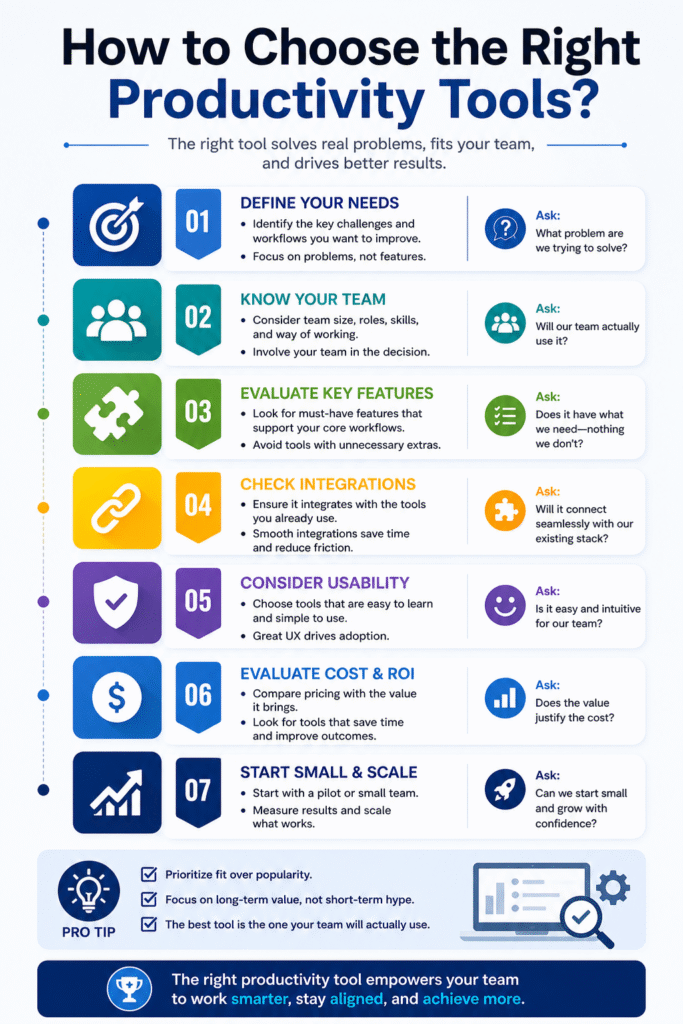
The most common productivity tool selection mistake is choosing based on features rather than fit. Here is a disciplined framework.
Step 1
Identify your primary productivity bottleneck: Before evaluating tools, diagnose the problem. Where is productive time actually being lost? If the answer is “we don’t know where projects stand,” the solution is project visibility. If it’s “we spend too much time in meetings,” the solution is better async communication. If it’s “work falls through the cracks,” the solution is reliable task management. Tool selection should follow problem diagnosis, not replace it.
Step 2
Map your existing stack: Audit the tools your team is already using and the integrations they require. A productivity platform that doesn’t integrate with your CRM, your support system, or your development tools will create more friction than it eliminates. The goal is an integrated ecosystem, not the best standalone tool.
Step 3
Define your non-negotiable requirements: Security certifications, mobile experience quality, offline capability, SSO support, and minimum number of seats establish the hard requirements before evaluating options. This eliminates a large portion of the market quickly and focuses evaluation energy on genuinely viable options.
Step 4
Prioritize adoption over capability: The best productivity tool is the one your team actually uses. A platform with a slightly narrower feature set but a dramatically better user experience will outperform a feature-rich platform that your team finds confusing or frustrating. Evaluate ease of use, quality of onboarding resources, and mobile experience with the same rigor you apply to features.
Step 5
Run a structured 30-day pilot: Define success criteria before the pilot begins. What would a successful pilot look like in measurable terms? Evaluate search quality, workflow friction, adoption rate among pilot participants, and qualitative feedback. The pilot decision should be made from evidence, not from the impressions formed during a vendor demo.
Step 6
Calculate total cost of ownership: Licensing is only part of the cost. Implementation time, data migration effort, training investment, and ongoing administration overhead are all real costs. Platforms that promise 15-minute setup rarely deliver on that promise for teams with existing systems and complex workflows.
Step 7
Plan for scale: Choose tools that will work for your team at twice its current size. Migration costs both technical and human are high. A platform that is right for your current state but wrong for your state in two years is an expensive short-term decision.
Common Mistakes Companies Make
Adopting too many tools simultaneously: The most common productivity tool failure is tool proliferation. Organizations that adopt five new tools in a quarter find themselves managing tools instead of work. Introduce new productivity tools incrementally, with defined integration into existing workflows and clear expectations for adoption.
Choosing tools for individuals rather than teams: Productivity tools deliver team-level value only when they are consistently used across teams. A project management platform used by some team members and ignored by others creates a two-tier information environment that is often worse than no system at all.
Neglecting change management: Technology adoption is a human behavior change problem first and a software problem second. Tools fail when they are selected by leadership and imposed on teams without involvement, training, or ongoing support. The teams that achieve the highest productivity tool ROI are those that co-design their workflows with the people who will use them.
Underinvesting in onboarding and training. Most productivity platforms have a meaningful learning curve. Organizations that allocate budget for licensing but not for training consistently see lower adoption rates and slower time-to-value.
Using productivity tools to add complexity instead of removing it: The goal is fewer decisions per task, not more. Productivity platforms that require elaborate customization, complex tagging systems, and multi-step workflows for simple tasks are adding overhead rather than removing it. Start simple and add complexity only where it demonstrably creates value.
Measuring activity instead of output: The most dangerous misuse of productivity analytics is using them to measure how busy people look rather than what they produce. Time tracking and task completion data are useful for operational optimization not for surveillance. Organizations that conflate measurement with monitoring create cultures of performance theater rather than actual productivity.
Common Challenges and Solutions
| Challenge | Solution |
| Low team adoption after launch | Identify friction points causing resistance such as unclear benefits, poor UX, or missing integrations. Address them directly. Treat adoption as a design problem, not a compliance issue. Make the tool the easiest path for completing existing work. |
| Data fragmented across too many tools | Audit your tech stack for redundancy. Assign a “system of record” for each category (projects, tasks, documents, communication). Consolidate tools where possible and use automation tools like Zapier or Make to sync remaining systems. |
| Tool becomes outdated as team processes evolve | Treat your productivity stack as a living system. Assign an operations owner to review configurations quarterly, collect feedback, and implement improvements continuously. |
| Remote team members not using tools consistently | Integrate tool usage into team rituals. Use tools during meetings, dashboards in reviews, and documentation in discussions. Reinforce usage culturally rather than forcing compliance. |
| Difficulty measuring ROI from productivity tools | Set pre-implementation benchmarks (meeting hours, delivery time, ticket resolution, onboarding duration). Compare post-implementation results and calculate ROI based on time saved × employee hourly cost. |
Future Trends in Productivity Tools
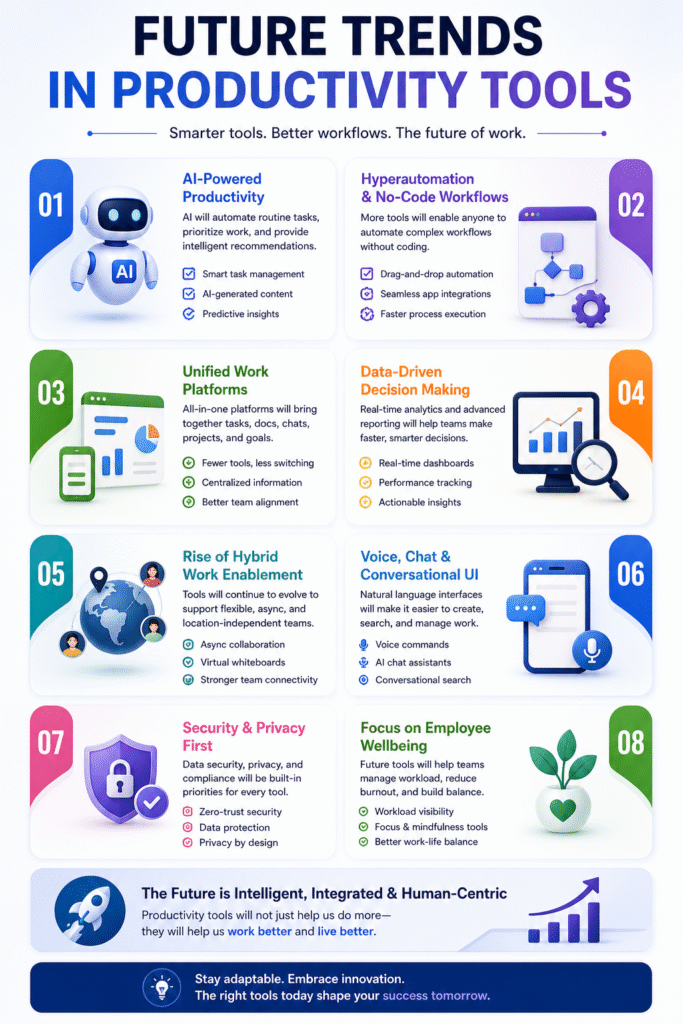
AI Agents Will Manage Routine Work: The most significant shift underway is the transition from AI-assisted productivity to AI-genetic productivity. Rather than suggesting task titles or summarizing meeting notes, AI agents will autonomously handle routine work: scheduling meetings, creating and assigning tasks from email, drafting status updates, and flagging at-risk projects all without human initiation. Gartner predicts that by 2027, AI agents will handle 20–30% of routine knowledge work tasks in organizations that have deployed modern AI-enabled platforms.
Workflow Automation Will Become No-Code Standard: The barrier to automation has already fallen dramatically. Zapier, Make, and native automation features in project management platforms have put workflow automation within reach of non-technical users. By 2027, building automated workflows will be as routine as building a spreadsheet. Organizations that treat automation literacy as a core operational skill will compound efficiency advantages over competitors who don’t.
Predictive Productivity Intelligence: The next generation of productivity analytics will shift from descriptive (what happened) to predictive (what’s likely to happen). AI systems will flag projects at risk of missing deadlines before they miss them, identify which team members are approaching burnout before it affects output, and predict which workflow bottlenecks are likely to recur based on historical patterns.
Unified Workspaces Will Consolidate the Stack: Tool proliferation is a known productivity problem. The market is responding with “superapp” platforms Notion, ClickUp, and Monday.com are all moving toward more unified workspaces that reduce the need for specialized tools. Over the next two years, the winning platforms will be those that eliminate the context-switching cost of a fragmented stack while delivering sufficient depth in each capability area.
Smart Collaboration Systems Will Replace Static Documents: Documents and presentations are increasingly being replaced by dynamic, collaborative artifacts: interactive wikis, live dashboards, collaborative whiteboards, and AI-enhanced knowledge bases. These artifacts evolve with the work they describe rather than becoming instantly outdated the moment they are published.
Asynchronous-First Design Will Define Remote Work Productivity: The synchronous bias of most productivity tools designed for office environments where everyone works at the same time is being replaced by asynchronous-first design. Features like contextual video messaging (Loom), timed responses, and timezone-aware scheduling are becoming table stakes for tools serving distributed teams.
Final Thoughts
The conversation about productivity tools often gets trapped at the tool level: which platform has the best AI, which interface is cleanest, which integration library is deepest. These are legitimate questions. But they are the wrong starting point.
The right starting point is a more fundamental question: what does it mean for your organization to be genuinely productive? Not busy. Not active. Productive moving the right work forward at the right pace with the right people and the right information.
Productivity tools are the infrastructure that makes organizational productivity achievable at scale. The best platforms in 2026 are remarkable. They can manage projects across 100 people with the clarity of a 10-person team’s whiteboard. They can surface information faster than the most experienced colleague can retrieve it from memory. They can automate coordination work that previously consumed hours of every manager’s week. They can use AI to draft, analyze, summarize, and suggest in ways that meaningfully amplify what individuals and teams can produce.
FAQs
How many productivity tools should a team use?
There is no universal answer, but the principle is: as few as needed to cover your core workflows with minimal redundancy. A useful heuristic is to have a single system of record for tasks/projects, one platform for team communication, one for documentation/knowledge, and one for automation. Additional specialized tools should clear a high bar: they should provide demonstrably better capability in their domain than your existing platforms, and they should integrate well enough that they don’t create new fragmentation.
What productivity tools work best for remote teams?
Remote teams benefit most from tools with strong asynchronous features: Notion or Confluence for documentation, Loom for video communication, Asana or ClickUp for task and project management, Miro for visual collaboration, and Slack or Teams for communication. The defining characteristic of a remote-optimized tool is that it allows high-context communication without requiring synchronous presence.
How long does it take to implement productivity tools?
Basic setup for a small team can be completed in days. Meaningful adoption where the tool is consistently used as intended across the team typically takes four to eight weeks with deliberate onboarding and change management. Full optimization, where workflows are refined based on actual usage data and the tool is delivering measurable productivity gains, typically takes three to six months.
What is the ROI of productivity tools?
ROI varies significantly by use case, implementation quality, and team size. The most conservative estimates based on Forrester and IDC research suggest that well-implemented productivity platforms deliver 3–5x ROI over three years through time savings, faster project delivery, and reduced coordination costs. Organizations with high manual coordination overhead, large teams, or complex project portfolios typically see higher ROI than those with simpler operations.
Should executives use the same productivity tools as their teams?
Yes and this is more important than it might appear. Executive adoption signals that the tool is an organizational priority, not an optional experiment. It also gives executives direct visibility into work in progress rather than requiring manual status reporting. The most successful productivity tool implementations are those where leadership uses the same system as their teams.
“This guide was written as an independent, comprehensive resource for organizations evaluating productivity tools in 2026. Platform information is based on publicly available data as of early 2026. Pricing and features should be verified directly with vendors before purchasing decisions are made.”