What is Knowledge Base Software?
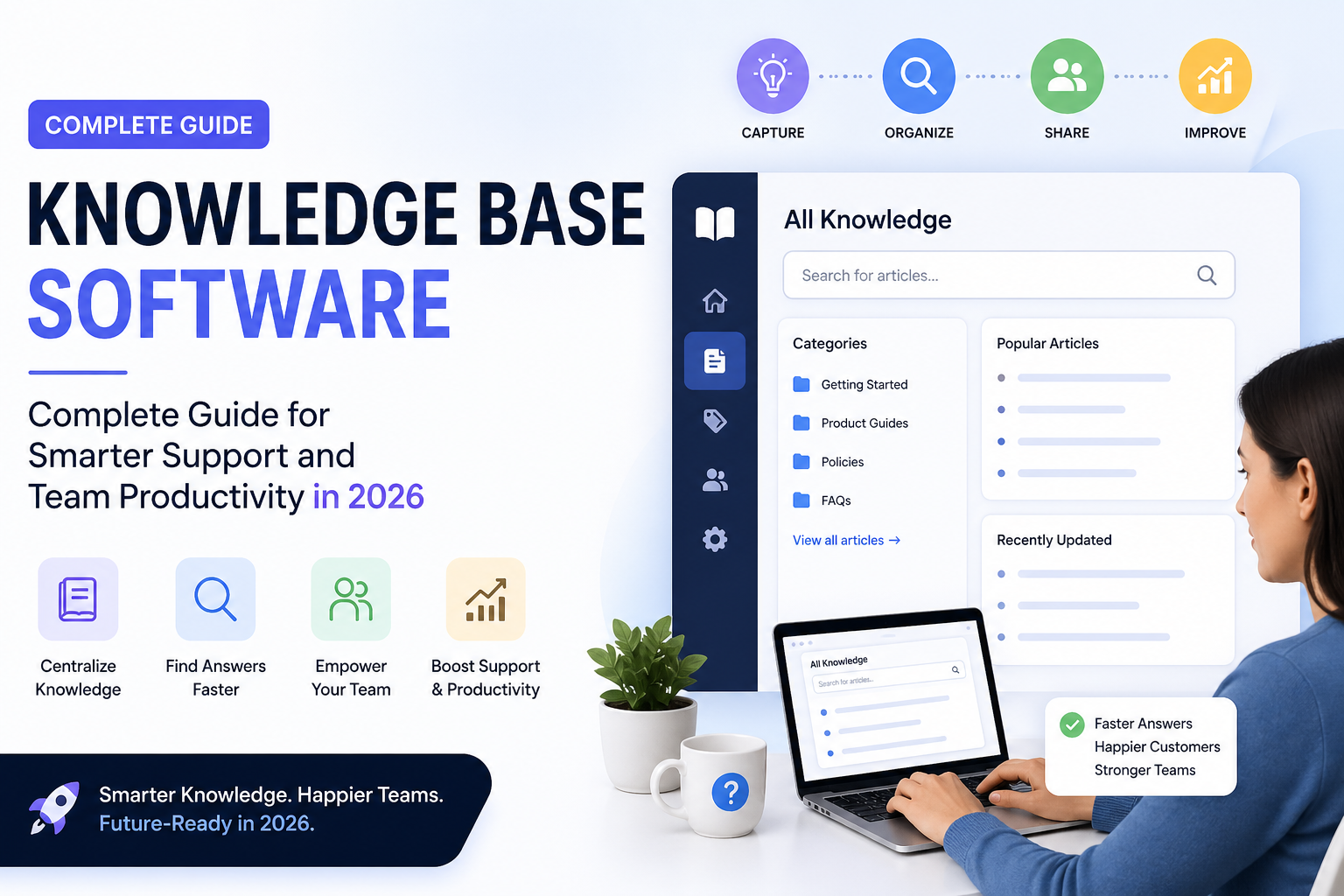
Knowledge base software is a structured information management system that enables teams to create, store, maintain, and retrieve institutional knowledge at scale. At its core, it is a searchable repository but the best modern platforms go well beyond static document libraries.
Think of it as the operating system for organizational intelligence. A well-deployed knowledge base software platform captures what your team knows, makes it searchable by anyone who needs it (subject to permissions), and continuously improves through analytics that show what people search for, what they find, and where they get stuck.
The term encompasses a wide range of tools: from lightweight internal wikis designed for small engineering teams, to enterprise-grade knowledge management systems integrated with ticketing platforms, CRMs, and AI engines. What distinguishes knowledge base software from generic file storage or project management tools is its emphasis on discoverability, structure, and maintenance workflows.
Three pillars define modern knowledge base software:
Structure: Articles are organized into categories, collections, and hierarchies not dumped into a flat folder tree. Good platforms use tagging, templates, and version control to keep content accurate and navigable.
Search: The quality of search separates functional platforms from transformational ones. AI-powered semantic search, in particular, allows users to find answers even when they don’t know the exact terminology.
Feedback loops: The best platforms tell you when content is outdated, what searches return no results, and which articles drive ticket deflection. This feedback loop is what transforms a knowledge base from a static resource into a living, self-improving system.
Why Knowledge Base Software Matters More Than Ever
The case for knowledge base software has never been stronger and the forces driving adoption are structural, not temporary.
The remote and hybrid work shift: Dismantled the informal knowledge transfer that happened in hallways, at desks, and during team lunches. When a new hire can’t tap someone on the shoulder, their only recourse is documentation. Organizations without mature knowledge systems are paying a steep price in onboarding time, productivity loss, and employee frustration.
Customer expectations have fundamentally changed: Salesforce’s State of the Connected Customer report consistently shows that a majority of customers now prefer to find answers themselves before contacting support. Self-service isn’t a cost-cutting measure, it’s a customer experience requirement. Organizations that can’t deliver accurate, fast self-service are losing customers to competitors who can.
The volume of knowledge has exploded: SaaS products ship faster, regulations change more frequently, and product lines grow more complex. Support teams and customers can’t keep up without a system purpose-built to organize and surface that volume of information.
AI has raised the floor and the ceiling: AI-powered knowledge base software can now auto-generate draft articles from resolved tickets, suggest related content, identify knowledge gaps, and power conversational search. Teams that deploy these capabilities aren’t just more efficient, they’re building a compounding knowledge asset that gets more valuable over time.
The financial case is unambiguous: Forrester has found that self-service deflection can reduce support costs by 30 to 40% when paired with a well-structured knowledge base. For a mid-market SaaS company running a 20-person support team, that can translate to millions of dollars in annual savings.
How Knowledge Base Software Works?
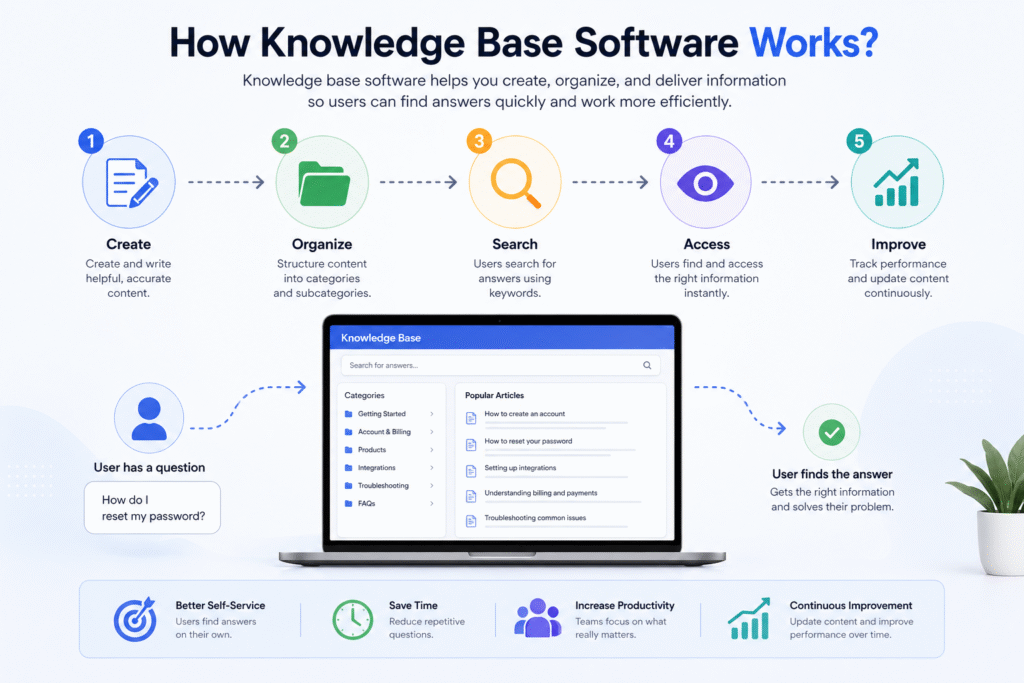
Understanding the operational mechanics of knowledge base software helps you evaluate platforms more critically and implement them more effectively.
Step 1:
Content Creation Authors support agents, subject matter experts, technical writers, or HR managers create articles using a structured editor. Most modern platforms offer rich text editors with templates, media embedding, and formatting tools optimized for documentation rather than general writing.
Step 2:
Categorization and Taxonomy: Articles are assigned to categories, tagged with relevant keywords, and placed within a logical hierarchy. Good platforms enforce consistent taxonomy through templates and style guides, reducing the entropy that causes knowledge bases to become disorganized over time.
Step 3
Review and Approval Workflows Enterprise and mid-market platforms include workflow automation for content review. A subject matter expert reviews a draft, a manager approves it, and it publishes automatically with version history preserved at every stage.
Step 4
Publishing and Access Control Articles are published to specific audiences: all employees, specific departments, customers with specific subscription tiers, or the public. Permissions and access controls ensure sensitive information stays protected while broadly useful content remains accessible. To manage these complex permissions and data privacy obligations, many firms work with a SaaS attorney to ensure their internal documentation policies comply with global data protection laws.
Step 5
Search and Discovery Users access the knowledge base through a search interface, category browsing, or contextual suggestions embedded in other tools (like a chat widget, help center, or support ticket sidebar). AI-powered search engines increasingly interpret user intent rather than matching keywords literally.
Step 6
Feedback Collection Most platforms allow users to rate articles (“Was this helpful?”), submit corrections, or flag outdated content. This feedback populates dashboards that editors and managers use to prioritize updates.
Step 7
Analytics and Continuous Improvement Platform analytics reveal search queries that return no results (knowledge gaps), articles with high views but low satisfaction scores (quality issues), and content that successfully deflects support tickets (proven value). This data drives the editorial roadmap.
Step 8
Integration with Adjacent Systems Modern knowledge base platforms connect to ticketing systems, CRMs, live chat tools, AI chatbots, and communication platforms. This integration is what allows knowledge to surface automatically in the workflow of support agents and customers, rather than requiring active navigation.
Core Features of Knowledge Base Software
Article Management
The foundation of any knowledge base platform is its content management layer. Look for version history, draft management, article expiration dates, and bulk editing capabilities. Templates are particularly important at scale; they enforce consistency and reduce the time needed to create new articles.
Search Functionality
Basic keyword search is table stakes. Competitive differentiation now lives in search quality: typo tolerance, synonym recognition, multi-language support, and most importantly the ability to understand what a user means when they search, not just what they literally typed. Faceted search (filtering results by category, date, or content type) adds additional precision for large knowledge bases.
AI-Powered Search
AI search transforms the knowledge base from a passive library into an active answer engine. Modern platforms use natural language processing to parse conversational queries, vector embeddings to find semantically similar content, and large language models to synthesize answers from multiple articles. The practical result: a user types “why is my invoice showing the wrong amount” and gets a direct answer, not a list of vaguely related articles.
Internal Wiki
The internal wiki component serves employees rather than customers. It houses company policies, SOPs, onboarding materials, team playbooks, product documentation, and institutional memory. The best internal wiki implementations are collaborative, edited by many, maintained by editorial owners, and integrated with communication tools like Slack, Microsoft Teams, or top Slack alternatives so knowledge surfaces where work happens.
Customer Self-Service Portal
The customer-facing knowledge base is your first line of support. A well-designed self-service portal reduces inbound ticket volume, accelerates time-to-resolution for customers who prefer not to wait for an agent, and positions your brand as expert and transparent. Key features include branded design customization, multilingual content, feedback mechanisms, and integration with your live chat or ticketing system for seamless escalation.
Permissions and Access Control
Role-based access control (RBAC) allows organizations to publish different content to different audiences: a public help center, an internal-only employee wiki, a partner portal, and a premium customer knowledge base can all exist within the same platform. Granular permissions at the article, category, and section level are essential for organizations with complex information governance requirements.
Analytics and Reporting
Analytics is what separates organizations that have a knowledge base from organizations that have a knowledge strategy. Core metrics include search success rate, article satisfaction scores, ticket deflection rate, most-viewed articles, failed search queries, and time-to-find. Platforms that surface these metrics clearly and tie them to business outcomes like support cost reduction deliver the most strategic value.
Workflow Automation
Content governance is an unsolved problem for most organizations. Articles go stale, experts leave, and nobody notices until a customer gets the wrong answer. Workflow automation addresses this by triggering article review notifications based on age, change in related product areas, or declining satisfaction scores. Automation also accelerates publishing routing drafts to the right reviewers without manual coordination.
Integrations
A knowledge base that exists in isolation is less valuable than one embedded in your operational ecosystem. High-value integrations include: Zendesk, Freshdesk, and Intercom (for support ticket deflection), Salesforce (for CRM-connected knowledge), Slack and Teams (for real-time knowledge surfacing), and REST APIs that allow custom integrations with proprietary systems.
Collaboration Features
Documentation is a team sport. Look for simultaneous co-editing, inline commenting, @mentions, and content assignment workflows. The platforms that make collaboration frictionless are the ones where knowledge base maintenance actually becomes a team habit rather than a single contributor’s burden.
Types of Knowledge Base Software
Internal Knowledge Base
Designed exclusively for employees, internal knowledge bases house the operational backbone of an organization: HR policies, engineering runbooks, sales playbooks, finance procedures, and product documentation. The goal is to eliminate the “ask your neighbor” reflex and replace it with confident self-service. Strong internal knowledge bases also serve as critical onboarding infrastructure. A new hire who can navigate your internal knowledge base independently is productive weeks faster than one who can’t.
External Knowledge Base
Customer-facing knowledge bases (also called help centers or support documentation portals) serve your users directly. They must be optimized for findability, clarity, and design quality because they are a direct reflection of your brand and product quality. The best external knowledge bases rank on Google, reducing both support costs and customer acquisition costs simultaneously.
Customer Support Knowledge Base
A specialized variant of the external knowledge base designed to deflect support tickets. It is typically built in close collaboration with support teams, who use ticket data to identify the most common questions and build authoritative answers. Integration with support ticketing systems allows the platform to recommend relevant articles to both agents (during case resolution) and customers (before they submit a ticket).
Enterprise Knowledge Management Systems
Enterprise-grade platforms serve organizations with thousands of employees, complex permission hierarchies, regulatory compliance requirements, and global content needs. They typically offer advanced governance tools, SSO integration, audit logging, multi-language support, and dedicated APIs. Enterprise platforms must scale both in content volume and concurrent user load without degrading search performance.
AI Knowledge Base Software
The fastest-growing category in the market. AI knowledge base platforms use large language models and retrieval-augmented generation (RAG) to answer questions conversationally drawing from your existing documentation rather than generic training data. This means customers and employees get accurate, organization-specific answers rather than generic responses. AI platforms also assist in content creation, flagging outdated articles, and identifying knowledge gaps.
SaaS Documentation Platforms
SaaS-specific documentation platforms focus on the unique needs of software companies: API documentation, product changelogs, feature guides, developer references, and release notes. They often include developer-specific features like code syntax highlighting, versioning tied to product releases, and OpenAPI specification rendering.
Knowledge Base Software vs. Help Desk vs. CRM vs. Wiki
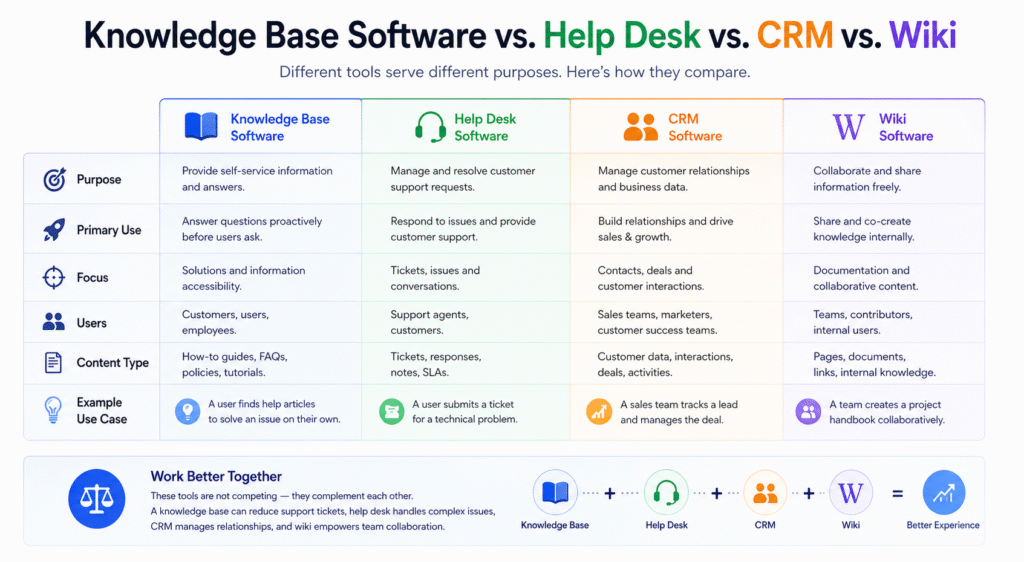
Understanding where knowledge base software fits relative to adjacent tools prevents both over-investment and capability gaps.
| Feature / System | Knowledge Base Software | Help Desk / Ticketing | CRM | Internal Wiki |
| Primary Purpose | Store and surface information | Manage support cases | Manage customer relationships | Collaborative team documentation |
| Primary User | Customers + employees | Support agents | Sales + CS teams | Employees |
| Content Structure | Articles, categories, search | Tickets, queues, SLAs | Contacts, deals, activities | Pages, spaces, nested docs |
| Self-Service Capability | Core feature | Limited / add-on | Minimal | Not designed for it |
| AI-Powered Search | Central feature | Emerging | Rare | Emerging |
| Customer-Facing | Yes | Yes (via portal) | No | Rarely |
| Analytics Focus | Content quality, deflection | Resolution time, CSAT | Revenue, pipeline | Engagement, usage |
| Typical Integration | Ticketing, chat, CRM | Knowledge base, chat | Marketing, billing | Slack, project tools |
| Best For | Deflection + documentation | Case management | Revenue operations | Internal collaboration |
The strategic insight: these systems are complementary, not competitive. The highest-performing support organizations use a knowledge base to deflect routine questions, a help desk to manage escalated cases, and a CRM to maintain the customer relationship context all integrated into a unified information ecosystem.
Top Benefits of Knowledge Base Software
Dramatic reduction in support ticket volume: When customers can find accurate answers on their own, they don’t open tickets. Companies with mature self-service knowledge bases consistently report 20–40% reductions in inbound support volume.
Faster support resolution when tickets do arrive: Even when customers do contact support, well-trained agents with access to a rich internal knowledge base resolve cases faster and more consistently. Agent-facing knowledge reduces handle time and eliminates escalations caused by knowledge gaps.
Accelerated employee onboarding: New hires who have access to comprehensive, searchable internal documentation become productive faster. This is particularly impactful for rapidly growing companies and remote-first organizations.
Reduced dependency on individual experts: When critical knowledge is documented, the departure of a key employee doesn’t create an operational crisis. The knowledge stays with the organization.
Improved customer satisfaction: Customers who resolve their issues quickly on their terms, at their preferred time report higher satisfaction scores than those who wait in a queue. Self-service, when done well, is not a downgrade in service quality, it is often a preference.
SEO and organic visibility: A well-structured public knowledge base ranks in search engines. Users searching for answers to product-related questions may land on your help center before they ever reach your marketing site making the knowledge base a customer acquisition channel as well as a retention tool.
Compounding returns on knowledge investment: Unlike one-to-one support interactions, every article written in a knowledge base can serve thousands of customers indefinitely. The return on each knowledge investment compounds over time.
Compliance and audit readiness: For regulated industries, documented policies and procedures stored in a governed knowledge management system provide audit trails and compliance evidence.
Real-World Knowledge Base Software Examples
Customer Support Teams
A B2B SaaS company with a 50-person global support team implements a customer-facing knowledge base integrated with their ticketing system. The platform suggests relevant articles to customers before they submit a ticket, deflecting approximately 35% of inbound volume. Agents use an internal knowledge base sidebar within the ticketing system to find answers during live conversations, reducing average handle time by 22%.
SaaS Companies
A product-led growth SaaS company with a self-serve business model uses their knowledge base as the primary customer success vehicle. Product updates automatically trigger notifications to content owners, who update documentation before the feature ships. The result: customers adopt new features faster and support tickets related to new releases drop by half.
HR Departments
An enterprise HR team replaces a fragmented collection of PDFs, SharePoint folders, and email threads with a searchable internal knowledge base. Employees can find answers to benefits questions, PTO (Paid Time Off) policies, and onboarding requirements independently. HR ticket volume drops 40%, freeing HR business partners to focus on strategic work rather than answering the same questions repeatedly.
IT Teams
A corporate IT department uses a knowledge base to document common issues, solutions, system configurations, and security protocols. Level 1 support agents resolve more issues without escalation because the knowledge base surfaces step-by-step guides for the most common problems. New IT staff ramp up faster using the documented runbooks.
Healthcare Organizations
A regional healthcare network uses a HIPAA-compliant knowledge management platform to standardize clinical protocols, onboarding materials for nursing staff, and administrative procedures. Consistent, searchable documentation reduces procedural errors and accelerates credential verification for new clinical staff.
Enterprises
A Fortune 500 company with 40,000 employees across 20 countries deploys an enterprise knowledge management system with department-specific access controls, multilingual content, and integration with their enterprise search platform. Knowledge that previously existed only in the heads of long-tenured employees is systematically captured and made searchable across the organization.
Remote Teams
A fully distributed software company with 200 employees across 12 time zones uses their internal knowledge base as the operational backbone of the organization. Because no employee can casually ask a colleague a question in real time, documentation quality is treated as a first-class engineering and operations priority. Onboarding, processes, product decisions, and architectural rationale are all documented making the team more resilient and less dependent on synchronous communication.
Best Knowledge Base Software in 2026
The platforms below represent the leading options across different use cases, team sizes, and technical requirements.
| Platform | Best For | AI Features | Customer-Facing | Internal Wiki | Starting Price |
| Guru | Enterprise internal knowledge | Strong (AI answers, suggestions) | No | Yes | ~$10/user/mo |
| Confluence | Engineering + enterprise teams | Growing (AI assist) | Limited | Yes | ~$5.75/user/mo |
| Notion | Flexible team wikis | Growing | Limited | Yes | Free / ~$10/user/mo |
| Helpjuice | Customer-facing help centers | Moderate | Yes | Limited | ~$120/mo flat |
| Document360 | SaaS documentation | Strong | Yes | Yes | ~$149/project/mo |
| Zendesk Guide | Support-integrated KB | Strong (with AI add-on) | Yes | Limited | Bundled with Zendesk |
| Intercom Articles | Chat-integrated KB | Strong | Yes | No | Bundled with Intercom |
| Tettra | SMB internal wikis | Moderate | No | Yes | ~$4/user/mo |
| Bloomfire | Knowledge sharing + search | Strong | Optional | Yes | Custom |
| Shelf | AI knowledge retrieval | Very Strong | Yes | Yes | Custom |
| Slite | Remote team wikis | Growing | No | Yes | Free / ~$8/user/mo |
| HelpScout Docs | SMB customer support | Moderate | Yes | No | Bundled with HelpScout |
| Freshdesk Knowledge | SMB support + KB combo | Moderate | Yes | Limited | Bundled with Freshdesk |
| ServiceNow Knowledge | ITSM + enterprise | Strong | Yes | Yes | Enterprise pricing |
| Stonly | Interactive guided KB | Strong | Yes | No | ~$49/mo+ |
Pricing as of early 2026. Always verify current pricing with vendors directly.
Top Knowledge Base Software Comparison by Use Case
Enterprise
Top picks: ServiceNow Knowledge Management, Guru, Bloomfire, Confluence (with Enterprise plan)
Enterprise selection criteria centers on security (SOC 2, SSAE 18 compliance), SSO integration, role-based access at granular levels, audit logging, and API extensibility. ServiceNow is the dominant choice for organizations with existing ITSM infrastructure. Guru leads for organizations prioritizing AI-powered knowledge retrieval across large teams.
SMB (Small and Medium Business)
Top picks: Helpjuice, Document360, HelpScout Docs, Tettra
SMBs need platforms that are fast to implement, require minimal IT involvement, and offer transparent flat-rate pricing. Helpjuice is a frequent choice for customer-facing help centers. Tettra excels for internal wikis in small teams with Slack-heavy workflows. Document360 bridges internal and external needs effectively.
SaaS Startups
Top picks: Document360, Intercom Articles, Notion, HelpScout Docs
SaaS startups need platforms that scale with product complexity and support rapid documentation iteration. Integration with their support and chat stack is typically the top priority. Intercom Articles is particularly powerful for companies already on the Intercom platform. Document360 is the most feature-complete standalone documentation solution for growing SaaS products.
IT Teams
Top picks: Confluence, ServiceNow, Shelf, Guru
IT teams need platforms that support technical content well: code blocks, diagrams, API documentation, configuration references. Confluence remains the standard for engineering and IT documentation. ServiceNow is the enterprise ITSM standard. Shelf’s AI retrieval capabilities make it powerful for IT service desks where speed of knowledge retrieval is critical.
HR Teams
Top picks: Guru, Notion, Tettra, Confluence
HR knowledge bases require strong access controls (sensitive policy documents, compensation information), user-friendly editing for non-technical contributors, and integration with HRIS (Human Resources Information System) systems. Guru’s card-based format with AI-powered surfacing in Slack makes it particularly effective for HR use cases. Notion’s flexibility works well for HR teams building comprehensive employee portals.
Customer Support Teams
Top picks: Zendesk Guide, Intercom Articles, Document360, Freshdesk Knowledge Base
Support-oriented knowledge bases must integrate tightly with ticketing and chat platforms. The ability to surface relevant articles during active conversations both for agents and customers is the defining capability. Zendesk Guide is the default choice for Zendesk customers. Document360 is the strongest standalone option with deep integration capabilities across support stacks.
How to Choose the Right Knowledge Base Software
The right knowledge base software is a function of your use case, team structure, technical environment, and strategic goals, not just the feature list in a vendor comparison table. Here is a disciplined framework for making the decision.
Step 1
Define your primary use cases: Are you building a customer-facing help center, an internal employee wiki, or both? This determines whether you prioritize customer-facing design, internal collaboration features, or a platform capable of serving both audiences effectively.
Step 2
Audit your existing tech stack: The platforms your support team, sales team, and engineering team already use should heavily influence your knowledge base selection. A knowledge base that integrates deeply with your ticketing system, CRM, and communication tools will deliver faster time-to-value and higher adoption than an isolated best-of-breed solution.
Step 3
Assess your content volume and growth trajectory. A startup with 50 articles has different needs than an enterprise with 50,000. Evaluate search performance, organizational tools, and content governance capabilities relative to where you’ll be in two years — not just today.
Step 4
Evaluate search quality directly. Don’t rely on vendor marketing for search quality claims. During your trial, use real search queries from your team and customers. Does the platform find the right answer? Does it handle typos and synonyms? Does it understand intent?
Step 5
Assess AI capabilities critically. AI features in knowledge base software range from genuinely transformational to marketing veneer. Evaluate whether the AI search is actually powered by semantic understanding (not just keyword matching with an AI label) and whether AI-generated content suggestions actually reduce editorial workload.
Step 6
Consider the total cost of ownership: Licensing is only part of the cost. Factor in implementation time, migration effort, training, and ongoing editorial maintenance. Platforms that require significant IT involvement to maintain are often more expensive in practice than their licensing costs suggest.
Step 7
Prioritize adoption potential: The best knowledge base software is the one your team actually uses. Ease of contribution for both technical and non-technical users is often more important than advanced features that create high barriers to participation.
Step 8
Run a structured pilot: A 30–60 day pilot with real content, real users, and defined success metrics is worth more than any vendor demo. Use the pilot to measure search quality, publishing workflow friction, and employee/customer satisfaction with findability.
Common Mistakes Companies Make
Treating the knowledge base as a launch-and-leave project: The most common failure mode. Organizations invest in a platform, migrate legacy content, announce it to the company, and then stop. Without ongoing editorial governance, content becomes stale within months. A knowledge base is a product, not a project. It requires an owner, a maintenance rhythm, and a continuous improvement process.
Migrating bad content at scale: Bulk-importing existing documentation regardless of quality creates a knowledge base full of outdated, inaccurate, and poorly structured information. The result is worse than starting from scratch because users learn not to trust the platform. Be ruthless about content auditing before migration.
Optimizing for content quantity over findability: More articles do not mean more value. A knowledge base with 200 high-quality, well-structured articles will outperform one with 2,000 articles that are hard to find and inconsistently written.
Neglecting search analytics: The failed search query report is one of the most actionable data sources in your entire support operation. Organizations that don’t review it regularly are flying blind on their most urgent knowledge gaps.
Building internal knowledge bases without executive sponsorship: Internal knowledge initiatives stall without visible leadership commitment. If leadership doesn’t contribute to and visibly use the knowledge base, contributors don’t prioritize it either.
Over-engineering the taxonomy before you have enough content: Elaborate category structures built before sufficient content exists create complexity without value. Start simple, let usage patterns reveal the natural structure, and refine the taxonomy iteratively.
Ignoring mobile experience: A significant percentage of both customer and employee knowledge base access happens on mobile devices. Platforms with poor mobile experiences, slow loading, unresponsive layouts, unusable search deliver a fraction of their potential value.
Future Trends in Knowledge Base Software
Retrieval-Augmented Generation (RAG) will become standard: The next generation of knowledge base platforms will use RAG architectures to combine the accuracy of your internal documentation with the natural language capabilities of large language models. The result: customers and employees ask questions in plain language and receive synthesized, accurate, source-cited answers not just a list of articles.
Agentic AI knowledge management: AI agents will not just answer questions from your knowledge base they will actively maintain it. By monitoring support tickets, customer feedback, and product changelogs, AI agents will identify knowledge gaps, draft new articles, flag outdated content, and propose taxonomy improvements dramatically reducing the editorial burden on human content owners.
Proactive knowledge delivery: Rather than waiting for users to search, knowledge base platforms will increasingly push relevant information at the moment of need surfacing the right article in the CRM as a sales rep prepares for a call, or delivering a how-to guide to a customer the moment they land on a page they frequently find confusing.
Knowledge graphs and semantic relationships: Next-generation platforms will model relationships between knowledge objects understanding that “invoice discrepancy” and “billing error” and “incorrect charge” are semantically connected, and surfacing all relevant content regardless of the exact terminology used.
Unified internal and external knowledge. The artificial separation between internal and customer-facing knowledge bases will erode. Platforms will manage a single content repository with permission-based publishing the same article visible to support agents in its full technical detail and to customers in a simplified version, maintained as a single source of truth.
Knowledge as a revenue metric: Forward-thinking organizations will tie knowledge base performance directly to revenue metrics measuring how knowledge quality affects customer retention, expansion revenue, and product adoption. The knowledge base will increasingly be viewed as a strategic asset rather than a support cost center.
Expert Recommendations for Building a Winning Knowledge Base Strategy
Start with your ten most common support tickets: The fastest path to knowledge base ROI is documenting solutions to your highest-volume support questions. Rank your support tickets by frequency, write comprehensive articles for the top ten, publish them, and measure deflection. This creates a quick win that builds organizational momentum for the broader initiative.
Write for the user’s vocabulary, not your internal vocabulary: The most common knowledge base failure is writing articles in the language your team uses internally which is often different from the language your customers use to search for help. Run your search queries through analytics tools and write titles and content that match actual user search behavior.
Treat content quality as a product quality metric: Organizations with the highest knowledge base effectiveness treat documentation quality with the same rigor they apply to product quality. Broken knowledge is a product bug. Outdated documentation is a product defect. Building this mindset is more important than any specific platform feature.
Build contributor culture, not just contributor processes: Processes tell people how to contribute. Culture tells people why it matters. The most effective knowledge operations make contribution visible, celebrate accuracy and clarity, and make the knowledge base a source of organizational pride rather than an administrative obligation.
Use your knowledge base as a competitive intelligence asset: Your public knowledge base reveals your product depth, your support quality, and your organizational maturity to every prospect who visits it. Treat it as a competitive differentiator invest in design quality, content depth, and search experience as seriously as you invest in your marketing site.
Integrate AI assistance into the editorial workflow from the start: AI-assisted drafting, quality checking, and gap identification are now widely available in leading platforms. Organizations that embed these capabilities into their editorial workflow from launch will compound efficiency advantages over time.
Final Thoughts
The organizations winning in competitive markets in 2026 share a common operational discipline: they treat knowledge as a strategic asset, not an administrative byproduct. They document systematically, surface intelligently, and continuously refine what they know and how they share it.
Knowledge base software is the infrastructure that makes this possible. But infrastructure without strategy produces empty databases and stale articles. The platforms reviewed in this guide give you the capability the strategy is yours to build.
The highest-leverage move any support leader, operations manager, or founder can make today is not choosing between Guru and Document360 or debating AI search configurations. It is deciding that knowledge quality is a first-class organizational priority and then choosing the platform that makes executing on that priority as frictionless as possible.
Every dollar invested in a well-maintained, intelligently organized knowledge base compounds. Every customer who finds their answer without waiting for an agent is a retention win. Every employee who onboards faster because the knowledge is there adds to the organization’s competitive velocity. Every question your knowledge base answers is one your team doesn’t have to answer again.
FAQs
What industries benefit most from knowledge base software?
SaaS companies, healthcare organizations, financial services firms, e-commerce businesses, and technology companies derive the greatest measurable value from knowledge base software but the value case exists for any organization where information is distributed, customers have repetitive questions, or employees need to find and apply institutional knowledge to do their work.
Is knowledge base software the same as a help center?
A help center is the customer-facing application, the website or portal where customers search for answers. Knowledge base software is the platform that powers the help center. The terms are often used interchangeably, but technically, the knowledge base is the back-end system and the help center is the front-end customer experience it delivers.
Can small teams use knowledge base software effectively?
Absolutely. Some of the highest-ROI knowledge base implementations are in small teams where every support interaction is high-cost and every hour of documentation work pays dividends across many customer interactions. For small teams, simplicity and low editorial overhead are more important than advanced features.
What is a knowledge management system vs. knowledge base software?
Knowledge management system (KMS) is a broader term encompassing all tools and processes used to capture, organize, and distribute organizational knowledge. Knowledge base software is a specific tool within the knowledge management ecosystem focused on creating searchable, accessible repositories of documented knowledge. A KMS may include knowledge bases, expertise directories, collaboration tools, and learning management systems.
How do I migrate content to a new knowledge base platform?
Start with a content audit review of all existing documentation for accuracy, relevance, and quality. Export content in a common format (HTML or Markdown is usually most portable). Map your existing category structure to your new taxonomy before importing. Use bulk import tools provided by the new platform where available. Plan for a manual review and editing phase after import automated migrations rarely produce publication-ready content without human refinement.