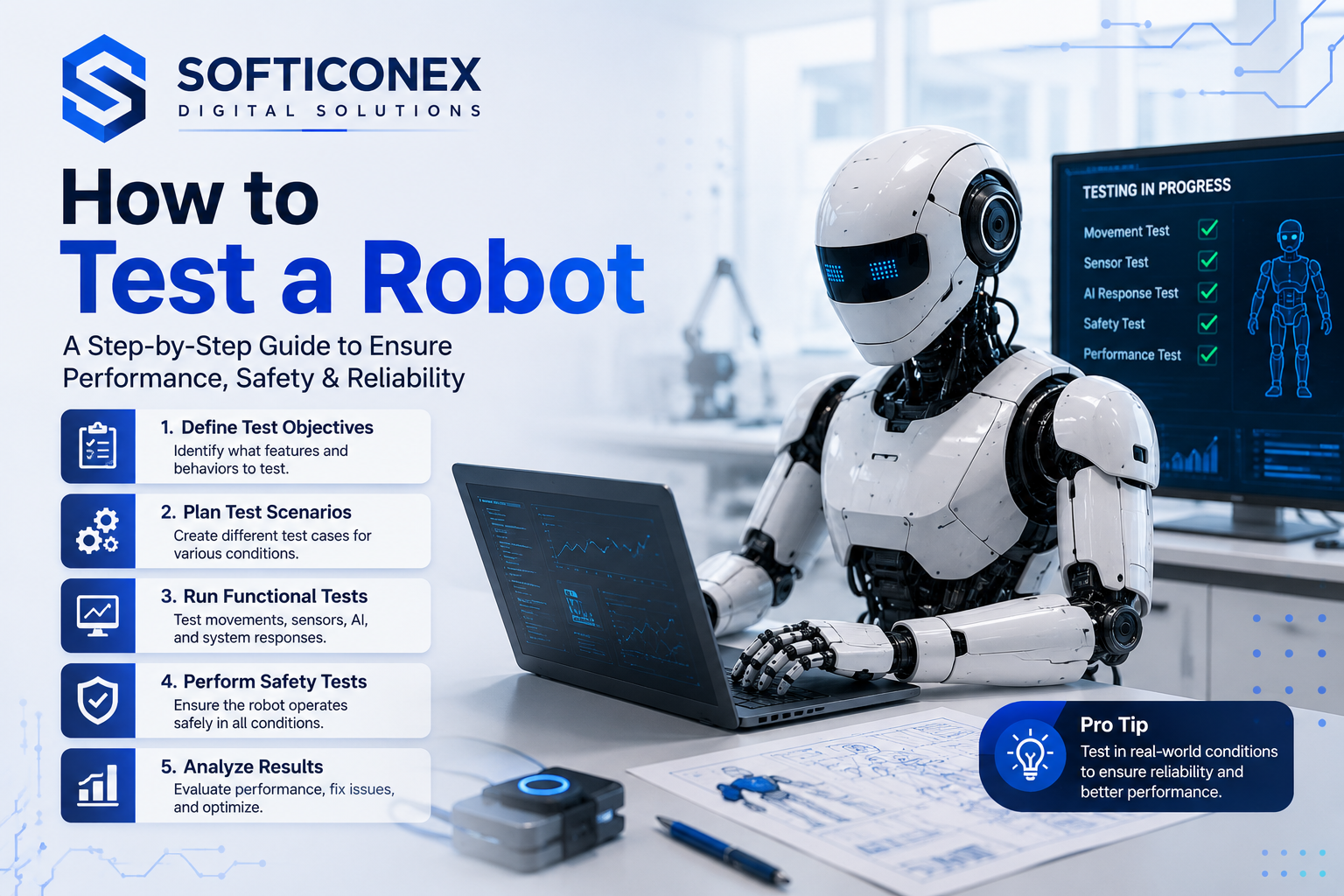
Robot testing is the process of systematically checking every part of a robot, including hardware, software, sensors, actuators, safety systems, and AI behavior, to confirm that it performs as designed under real operating conditions. Testing happens in stages, starting with individual component checks and ending with a full system evaluation before the robot is approved for deployment.
Why Robot Testing Matters
A robot that passes every design requirement on paper can still fail in unexpected ways once it operates in a real environment. Surfaces change, temperatures shift, and human operators interact with equipment in ways no designer fully anticipates.
Robot quality assurance catches these gaps before they lead to accidents or costly recalls. In manufacturing, a single robot failure can halt an entire production line. In medical settings, an unvalidated robot decision can directly affect a patient. In warehouses and delivery systems, an untested navigation system creates collision risks for people and property. When automated equipment or autonomous vehicles fail and cause serious physical harm, victims often need a injury attorney to navigate complex liability claims.
Proper robot validation also builds user confidence. Operators trust a certified system far more than one that skipped formal testing stages, which improves adoption rates and long-term performance in the field.
What Is Robot Testing
Robot testing is a structured verification process that checks each part of a robot, as well as the fully integrated system, against a defined set of performance, safety, and accuracy requirements.
Robot verification confirms that the robot was built correctly according to its design. Robot validation confirms that the robot does what users actually need it to do in real conditions. Both are necessary, and neither fully replaces the other.
Robotics testing applies to every category of robot, from a simple educational arm to a fully autonomous warehouse vehicle or an advanced surgical assistance system.
Types of Robot Testing
The table below maps each testing type to what it covers and the best point in a project to apply it.
| Testing Type | What It Covers | Best Applied When |
| Functional Testing | Hardware, software, sensors, and actuators behave as designed | Before the first full system run |
| Performance Testing | Speed, accuracy, battery life, and endurance under normal load | After initial functional checks pass |
| Safety Testing | Collision response, emergency stop, and risk assessment | Before any human operator works nearby |
| Stress Testing | Behavior under extreme load, heat, or long operation hours | Before deployment in demanding environments |
| Navigation Testing | Path planning, obstacle avoidance, and positional accuracy | For mobile and autonomous robots |
| AI Decision Testing | Machine learning outputs, computer vision accuracy, and edge case handling | For autonomous and AI robot testing |
| Environmental Testing | Dust, moisture, temperature, and vibration tolerance | Before outdoor or industrial deployment |
| User Acceptance Testing | Real operator workflow and overall system usability | Final stage before full operational release |
Functional Testing
Functional testing confirms that every component does what the design specifies. Engineers check each hardware element, run software in isolation, verify sensor outputs against known values, and confirm that actuators move correctly within their rated range.
Hardware Testing
Hardware testing inspects physical components for build quality, correct assembly, correct wiring, and structural strength. Engineers check joints, fasteners, power supply connections, and chassis integrity before running any software on the robot.
Software Testing
Software testing strategies cover unit tests for individual code modules, integration tests that check how modules communicate, and system tests that run the full software stack on the actual robot or in a close simulation environment.
Sensor Testing
Sensor testing verifies that cameras, lidar, ultrasonic sensors, force sensors, and encoders produce accurate readings across their full specified operating ranges. Calibration checks happen at this stage and again after any hardware change.
Navigation Testing
Navigation testing checks path planning accuracy, obstacle avoidance, positional tracking, and recovery behavior when a robot loses its position reference. Engineers run these tests in controlled spaces and in environments that closely resemble actual deployment sites.
AI Decision Testing
AI robot testing evaluates whether machine learning models and computer vision systems produce correct outputs across a wide range of inputs, including unusual lighting, partial occlusions, and edge cases that did not appear in training data. Robotic decision-making must remain safe and predictable even when the model encounters something unfamiliar.
Performance Testing
Performance testing measures robot accuracy over many repeated cycles, cycle speed, battery consumption under real operating load, and endurance over extended shifts to confirm whether the robot consistently meets its published specifications.
Stress Testing
Stress testing pushes the robot beyond its normal operating range to find failure points. Engineers run longer duty cycles, higher loads, and faster speeds to understand how the robot degrades and where the first mechanical or software failures appear.
Environmental Testing
Environmental testing exposes the robot to dust, moisture, temperature extremes, and vibration to confirm that it remains functional in conditions that match or exceed its rated operating environment.
User Acceptance Testing
User acceptance testing brings real operators into the process to confirm that the robot fits actual workflows, that controls are intuitive, and that safety procedures make sense in practice rather than only on paper.
Step-by-Step Guide: How to Test a Robot
Step 1: Define Testing Objectives
Write down what the robot must do, the conditions it must do it in, and the minimum acceptable performance for each requirement. Clear objectives prevent wasted effort and give every engineer on the team a shared target throughout every testing stage.
Step 2: Inspect Hardware
Examine every physical component before powering the robot on. Check assembly quality, connector security, motor alignment, joint freedom, and power cable routing. Hardware problems found now take minutes to fix. The same problems found after software testing begins take hours.
Step 3: Test Sensors
Power each sensor individually and compare its output to a known reference value. Adjust calibration until readings fall within the acceptable tolerance band. Record calibration settings so the team can return to a known baseline after any future hardware change or physical impact.
Step 4: Validate Software
Run the software stack in simulation first to catch logic errors without putting hardware at risk. Then run the software on the actual robot in a controlled space, checking that each module communicates correctly and that error handling responds exactly as designed.
Step 5: Run Movement Tests
Move the robot through its full range of motion at low speed first, then at normal operating speed. Check for mechanical binding, unexpected vibration, position overshoot, and joint limit behavior. Repeat each movement test multiple times to confirm consistency across runs.
Step 6: Perform Safety Tests
Test the emergency stop from every available input method. Verify collision response by introducing controlled contact at different speeds and angles. Check proximity sensor behavior near people and confirm that all industrial robot safety features function correctly. Update risk assessment documentation at this stage before moving forward.
Step 7: Measure Performance
Run the robot through its intended task repeatedly and measure accuracy, cycle time, battery consumption, and reliability across at least several dozen cycles. Compare every result against the objectives defined in Step 1 and flag any metric that falls below its target value.
Step 8: Document Results
Record every test result, including tests that passed, tests that failed, what changes were made, and which tests were repeated after each change. Good documentation supports regulatory compliance, future audits, and new team members who need to understand the robot’s full testing history.
Robot Testing Tools
Simulation Software
Simulation platforms let engineers run full robot programs in a virtual environment. This approach catches software errors and logical problems before the first physical test session, which protects hardware during early development stages.
Sensor Diagnostic Tools
These tools read raw sensor data directly and compare it against calibrated reference values. Engineers use them to identify sensors that drift over time or return inconsistent readings under different environmental conditions.
Performance Monitoring Tools
Performance monitoring tools log speed, accuracy, power consumption, and error rates during live robot operation. Long-term logs reveal gradual degradation that short single-session tests would not detect.
Debugging Software
Debugging tools connect to the robot’s control system and display internal variable states in real time. Engineers use them to trace the exact point where a software decision produces an unexpected output.
Test Automation Platforms
Automation platforms run predefined test sequences repeatedly without manual intervention. This approach makes regression testing faster and ensures that a fix in one area has not accidentally created a new problem elsewhere in the system.
Real World Robot Testing Examples
Manufacturing Robots
Industrial arms on assembly lines go through endurance testing that runs them for thousands of cycles to confirm that welding accuracy and pick and place repeatability remain within tolerance after extended operation periods.
Warehouse Robots
Autonomous mobile robots in fulfillment centers undergo navigation testing across crowded floor plans, with human walkers introduced at random to verify that collision avoidance responds correctly and consistently every time.
Medical Robots
Surgical and rehabilitation robots face the most rigorous machine learning validation and safety testing of any category, because errors directly affect patient outcomes and regulatory approval depends on extensive documented testing evidence.
Delivery Robots
Last-mile delivery robots are tested for outdoor navigation across uneven surfaces, changing weather, pedestrian interactions, and low-light computer vision testing to confirm safe behavior across the full range of conditions they will encounter.
Educational Robots
Educational robots go through user acceptance testing with students of different ages and skill levels to confirm that controls are intuitive and that the robot remains safe during unexpected or unconventional handling.
Service Robots
Hotel and retail service robots are tested for smooth navigation in crowded spaces, clear communication with nearby people, and reliable recovery when someone blocks their path or redirects them unexpectedly mid-task.
Common Robot Testing Challenges and Solutions
Hardware Failures During Testing
Components break more often during testing than in steady operation because engineers intentionally push limits. Keep spare components stocked and log every failure with the exact conditions that triggered it to build a useful failure pattern database over time.
Software Bugs That Appear Inconsistently
Intermittent bugs are the hardest to catch because they do not appear on every run. Use detailed logging to capture system state just before each failure so the pattern becomes visible across multiple occurrences.
Sensor Calibration Drift
Sensors lose calibration accuracy over time and after mechanical impacts. Build calibration checks into a regular maintenance schedule rather than treating calibration as a one-time task completed only at the start of testing.
AI Unpredictability in New Environments
Machine learning models can behave unexpectedly when they encounter inputs outside their training distribution. Expand the test scenario library constantly and use adversarial testing that deliberately introduces inputs the model has not seen before.
Difficulty Replicating Real Environments
A test lab never fully matches a real deployment site. Whenever possible, run at least one testing phase at the actual deployment location before granting final approval for full operation.
Experience-Based Best Practices
- Test each component individually before running the full integrated system. This isolates failures quickly and prevents one broken part from masking problems in another component.
- Repeat every critical test at least three times to confirm that results are consistent rather than coincidental.
- Simulate the real deployment environment as closely as possible, including the lighting, floor surface, ambient noise, and people density the robot will actually encounter.
- Involve at least two reviewers in safety test sign-off so that no single person’s assumptions determine what counts as acceptable behavior.
- Keep testing documentation updated in real time during each session rather than reconstructing it from memory at the end of the day.
Common Mistakes to Avoid
Skipping Safety Tests
Safety testing is the stage that most commonly gets cut when schedules tighten. This is the most dangerous shortcut in robotics. Industrial robot safety testing is required by regulation in most industries, and skipping it creates both legal liability and serious physical risk.
Ignoring Edge Cases
Testing only the expected input range misses the conditions where robots most commonly fail in real environments. Include unusual scenarios, partial sensor coverage, and recovery from mid-task interruptions in every test plan from the beginning.
Inadequate Documentation
A robot that was tested thoroughly but without records is almost as problematic as one that was not tested at all, because there is no evidence of what was checked or what acceptance criteria were used to approve the results.
Limiting Testing to the Lab
Lab conditions are cleaner, quieter, and more controlled than real deployment sites. A robot that passes all lab tests but never operates in its actual environment before launch will encounter surprises that lab testing simply cannot predict.
Treating Calibration as a One-Time Step
Sensors and mechanical joints drift over time and after impacts. Build periodic recalibration into the robot’s ongoing maintenance plan from the start rather than waiting for noticeable performance degradation to appear.
Robot Testing Standards Overview
Several international bodies publish standards that guide safe and effective robotics testing across industries. These frameworks cover industrial robot safety requirements, guidelines specific to collaborative robots that work alongside human operators, and emerging standards for autonomous and AI-driven systems.
A beginner does not need to memorize every standard. The most practical starting point is to identify which standards apply to the specific industry where the robot will operate, then use those requirements as a checklist when writing the test plan. Quality assurance teams at larger organizations typically maintain a standards library and assign specific standards to each testing stage.
Following recognized standards matters for product certification, insurance coverage, and customer trust, since a robot with documented compliance to established guidelines carries far less commercial and legal risk than one tested only against internal criteria.
Fast Loading and Stable Pages
Interaction Speed
Keep page layouts responsive and avoid heavy scripts that delay click or tap responses, so readers can navigate content smoothly on any device without noticeable lag.
Visual Stability
Reserve space for images and diagrams before they load, and avoid adding or resizing elements after the page has already rendered, so the reading experience stays visually stable from the very first second.
Conclusion
Robot testing is not an optional final step. It is the structured process that determines whether a robot is ready to operate safely and effectively in the real world. Every stage, from individual sensor calibration to full system safety testing, adds a layer of confidence that design alone cannot provide.
Start by writing clear testing objectives tied to the robot’s intended use. Work through hardware inspection, sensor validation, software testing, and movement checks before advancing to safety and performance stages. Document every result and involve more than one reviewer at every critical decision point.
If you are new to robotics testing, begin with simulation tools that let you test software logic before physical hardware is involved. Build your experience through each testing type in the order this guide presents, and treat every test failure as valuable data rather than a setback.
A robot that passes thorough, documented testing earns the trust of every operator and stakeholder it serves. That trust is the real and lasting outcome of a well-executed testing process.
Frequently Asked Questions
What is robot testing?
Robot testing is a structured process that checks every part of a robot, including its hardware, software, sensors, and decision systems, to confirm that it performs correctly, safely, and reliably before it enters real-world use.
Why should every robot be tested before deployment?
An untested robot can cause physical damage, injure nearby people, produce wrong outputs, or fail during a critical task. Testing catches these problems at a stage where fixing them is far less costly than fixing them after deployment.
How long does robot testing typically take?
The timeline depends on the robot’s complexity. A simple educational robot may need a few hours. An industrial or medical robot may require weeks of staged testing before it passes all required checks.
What tools are commonly used for robot testing?
Common categories include simulation software for virtual environment testing, sensor diagnostic tools, performance monitoring platforms, software debugging tools, and dedicated test automation platforms for robotics.
What does safety testing involve?
Safety testing checks how a robot responds to unexpected contact, whether the emergency stop activates correctly, how the robot behaves near human operators, and whether its risk profile meets industrial robot safety standards.
How do you test AI and autonomous robots?
AI robot testing focuses on machine learning validation, computer vision testing across varied lighting and angles, and robotic decision-making across edge cases that the algorithm has not seen during training.
What is performance testing for robots?
Performance testing measures robot accuracy, speed, battery consumption under real load, and endurance over long operation periods to confirm the robot meets its design specifications consistently.
What are the biggest challenges in robot testing?
The most common challenges include unpredictable AI behavior in new environments, hardware failures under stress, sensor calibration drift, software bugs that appear only in specific conditions, and the difficulty of fully replicating complex real-world environments in a lab.
Can beginners learn to test robots?
Yes. Beginners can start by learning basic hardware inspection, understanding sensor output values, and running software in simulation before moving to physical testing. Following a clear step-by-step process makes robot testing accessible at any experience level.
What happens if a robot is not tested properly?
An improperly tested robot may fail unpredictably, injure nearby people, damage property, produce wrong results in critical applications, or require expensive redesigns that thorough testing could have prevented entirely.
What documentation is needed during robot testing?
Good testing documentation includes a test plan, step-by-step test cases, results for each test, failures found, fixes applied, and final sign-off records. Clear documentation also supports future audits and retest cycles.