
SaaS websites can load quickly, pass a Lighthouse audit, look polished on mobile, and still produce very little demand. The problem is often less visible than a broken form or a slow page. The site works, but the information moving through it doesn’t always keep pace with the product, the buyer, or the sales process.
That creates small gaps in the compound. A feature launches before its page is updated. Important copy appears in the browser but depends on JavaScript to become available. The page looks polished yet leaves buyers unsure how the product fits their workflow. Someone finally submits a form, then gets a generic reply that ignores what they were looking at.
A technically sound website gives a SaaS company a strong base. Demand depends on what happens after that base is in place, especially how quickly product information reaches the site, whether search systems can access it, whether buyers can understand it, and whether their intent survives the handoff to sales.
1. Product updates lose value while they wait for the website
SaaS products rarely stand still. Features and integrations change, pricing gets adjusted, and sales teams learn new ways to describe the product from real customer conversations. The website often moves on a different schedule.
Imagine a product releasing a feature on Monday while sales already have prospects asking about it. Marketing has the copy ready, but publication depends on a developer, a staging review, and a manual production release. The request joins a queue. By the time the page goes live, the launch email has already been sent and sales has built its own explanation in a deck.
The damage is easy to miss because nothing is technically broken. The public site simply describes an older version of the product for longer than it should.
Keep the controls and remove the repetitive handling
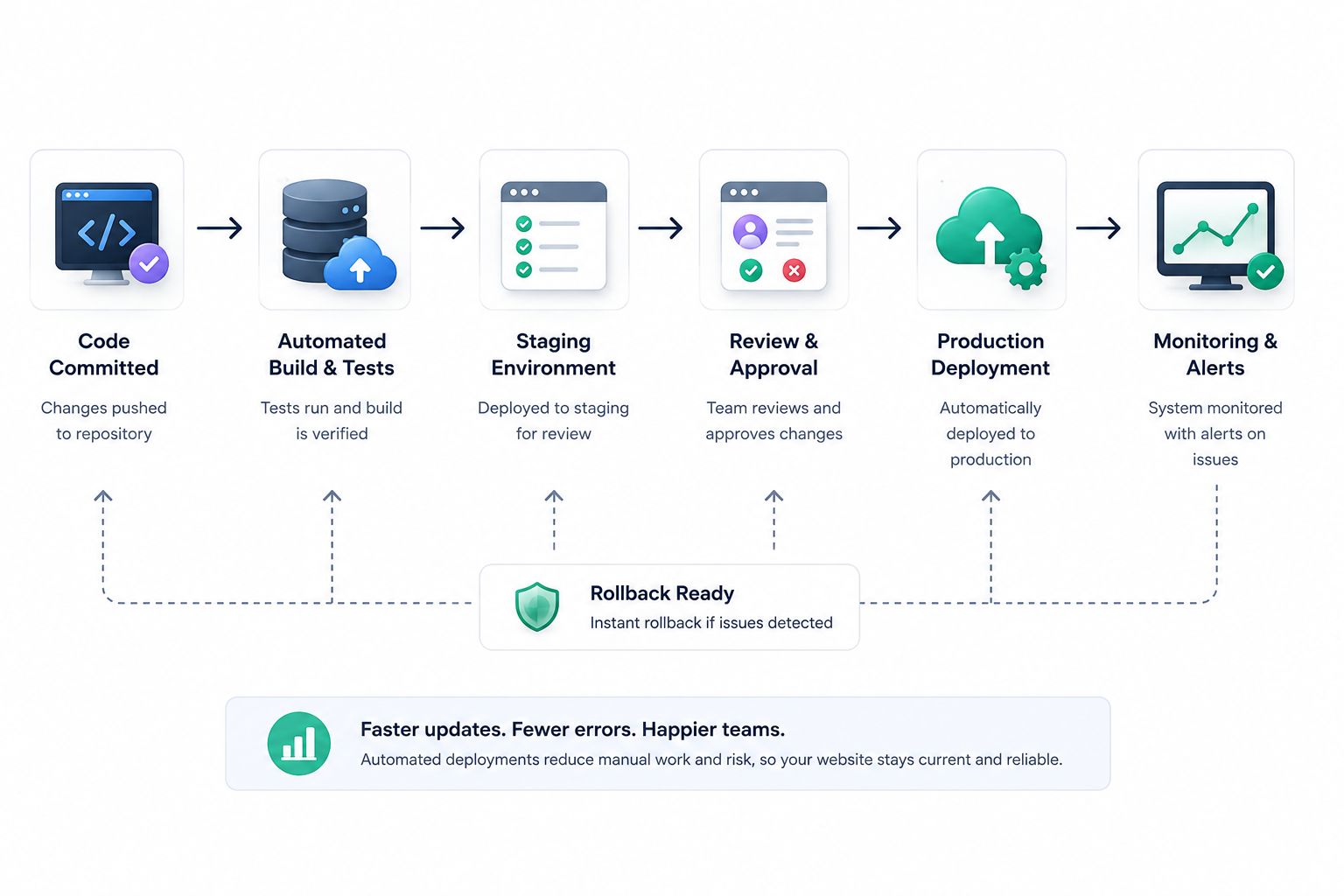
Faster publishing doesn’t mean pushing every change straight to production. Teams still need controls around staging, approval, rollback, and testing. The useful distinction is between a safeguard and a manual step that exists only because the process has always worked that way.
A routine release becomes expensive when each push triggers a chain of manual handling. Someone waits for access, repeats the same release sequence, then checks whether the right version reached the right environment. Small updates get bundled into larger releases because publishing each one feels inconvenient.
An automated deployment workflow can connect a Git repository to a configured environment and trigger a release after a push to the chosen branch. DeployHQ also supports branch-specific deployments and failure notifications, so automation doesn’t require giving up visibility into the release.
A useful metric here is approval-to-publication time. If a typo is fixed within an hour but a new use case page waits three weeks, the business probably has several publishing paths rather than one. The slower paths deserve attention because product and sales knowledge loses value while it sits in a queue.
2. JavaScript problems often survive a normal page review
A SaaS page may look completely normal in a browser while Google receives a more complicated version of the story. Interactive pricing, tabbed feature content, comparison tools, and other useful material often depend on JavaScript, which means a visual QA pass alone doesn’t tell the team what Google has processed.
Google documents JavaScript processing as three main phases, crawling, rendering, and indexing. The initial HTML may not contain the actual page content, so Google may have to render the page and execute JavaScript before that content becomes available for indexing. Google also notes that blocked JavaScript resources or blocked pages won’t be rendered. Google’s JavaScript SEO documentation gives teams a primary source for checking this behavior rather than relying on assumptions about what a crawler sees.
A marketing manager might see the headline, open a feature tab, and click through the page without noticing that descriptive copy or internal links are missing from the rendered version available to search. Structured data inserted later in the process may also differ from what the team expects.
Compare what the browser shows with what Google sees
A useful technical review looks beyond the final visual page. Check the initial HTML against the rendered version and then compare both with what Google reports for the URL. Product copy and internal links deserve particular attention, while canonical information and structured data should be checked separately.
Google’s URL Inspection tool is useful for reviewing index status and testing a live URL. The Rich Results Test serves a narrower purpose by showing which Google rich results a page’s structured data may support. They answer different questions, so a successful rich results test doesn’t tell you that Google sees every important piece of product content on the page.
Google also recommends server-side or prerendering as a good option because it is faster for users and crawlers, while confirming that Google Search does run JavaScript. The right implementation depends on the stack and the page, but the basic test stays the same. Important information shouldn’t depend on a crawler behaving like a patient human visitor before it becomes available.
3. Strong Core Web Vitals don’t explain a vague product
Performance deserves attention because slow, unstable, or unresponsive pages make every other part of the site harder to use. Problems start when a healthy performance score is treated as proof that the website is doing its commercial job.
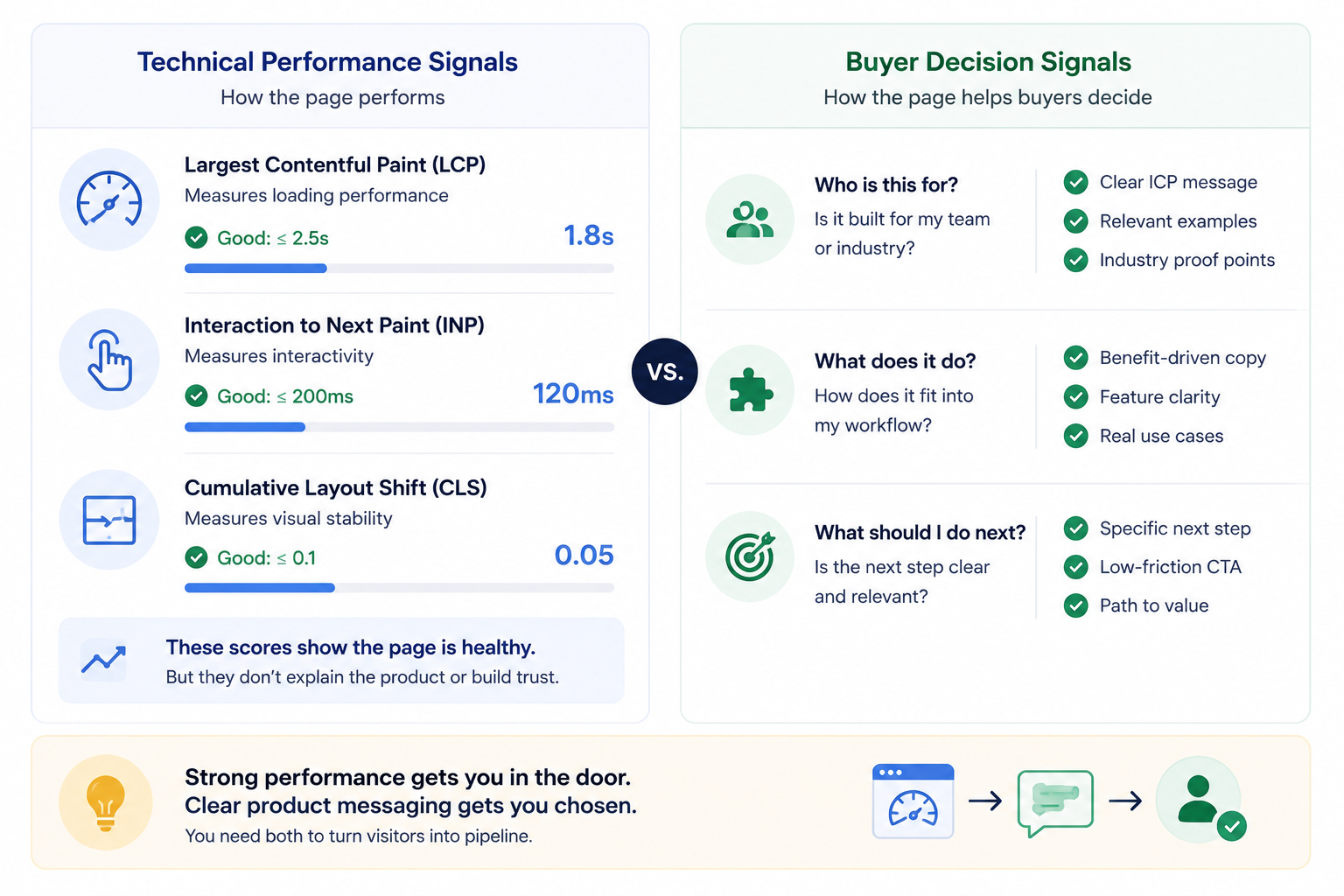
Google’s current Core Web Vitals guidance defines a good experience as Largest Contentful Paint within 2.5 seconds, Interaction to Next Paint at 200 milliseconds or less, and Cumulative Layout Shift at 0.1 or less, assessed at the 75th percentile of page loads. Google’s Web Vitals documentation is the appropriate source for those thresholds because the numbers and measurement guidance come directly from Google.
Meeting them improves the experience of using the page. It doesn’t tell a buyer what the product is for.
A SaaS homepage can load quickly and still lean on phrases such as “intelligent workflow transformation” without showing a recognizable task. Feature cards may use different headings, but describe almost the same benefit. Screenshots can display an entire interface without directing attention to the part that matters. The site feels finished, yet the visitor still has to infer how the software would fit into their day.
Once performance is in a healthy range, the next review should be commercial rather than technical. A buyer should be able to work out who the feature is for, what changes in their workflow, and what a sensible next step looks like. Another small improvement to load time has limited value if those questions are still unanswered.
4. AI search visibility still depends on ordinary search fundamentals
AI search has encouraged a new layer of technical folklore. Teams hear that they need special files, new markup, question-heavy pages, or a separate optimization process before their content can appear in AI-generated search experiences.
Google’s current guidance is much less exotic. To be eligible as a supporting link in AI Overviews or AI Mode, a page must be indexed and eligible to appear in Google Search with a snippet. Google also says there are no additional technical requirements and no special schema or AI text file required for these features. Google’s guidance on AI features and websites is the primary source worth using here.
That keeps the technical priorities familiar. Important product information should be crawlable, available in text, easy to find through internal links, and consistent with any structured data on the page. AI visibility doesn’t give a site a shortcut around unclear product pages or indexing problems.
“Work smarter with one connected platform” gives a search system very little to distinguish from hundreds of other SaaS products, and it gives a buyer very little to evaluate. A page becomes more useful when it names the team and task, then explains the workflow and expected outcome with enough detail that someone can judge whether it matches their situation.
Sales calls and support tickets are useful inputs because they reveal the questions generic website copy often avoids. Buyers want to know which team uses a feature, what happens before the software enters the process, where it fits poorly, and what they should compare across vendors. Turning recurring questions into clear public content improves the site for human research while giving search systems more specific material to interpret.
5. Buyers often want product evidence before they want a meeting
Many SaaS sites move from a broad product promise to a row of features and then straight to “Book a demo.” That works for buyers who already understand the category and have reached the vendor-call stage. Earlier research is messier.
A visitor may only want to see whether one workflow is supported or whether the product handles a particular use case. Static screenshots sometimes provide enough proof, but they often show the interface without showing the sequence of actions. A recorded demo has a similar limitation because every visitor has to follow the same route through the product.
A better question is what level of evidence the visitor is ready for. Some people want a short use case, others want to inspect a workflow, and some are ready to speak with sales. Treating all three as the same visitor puts too much pressure on the demo form.
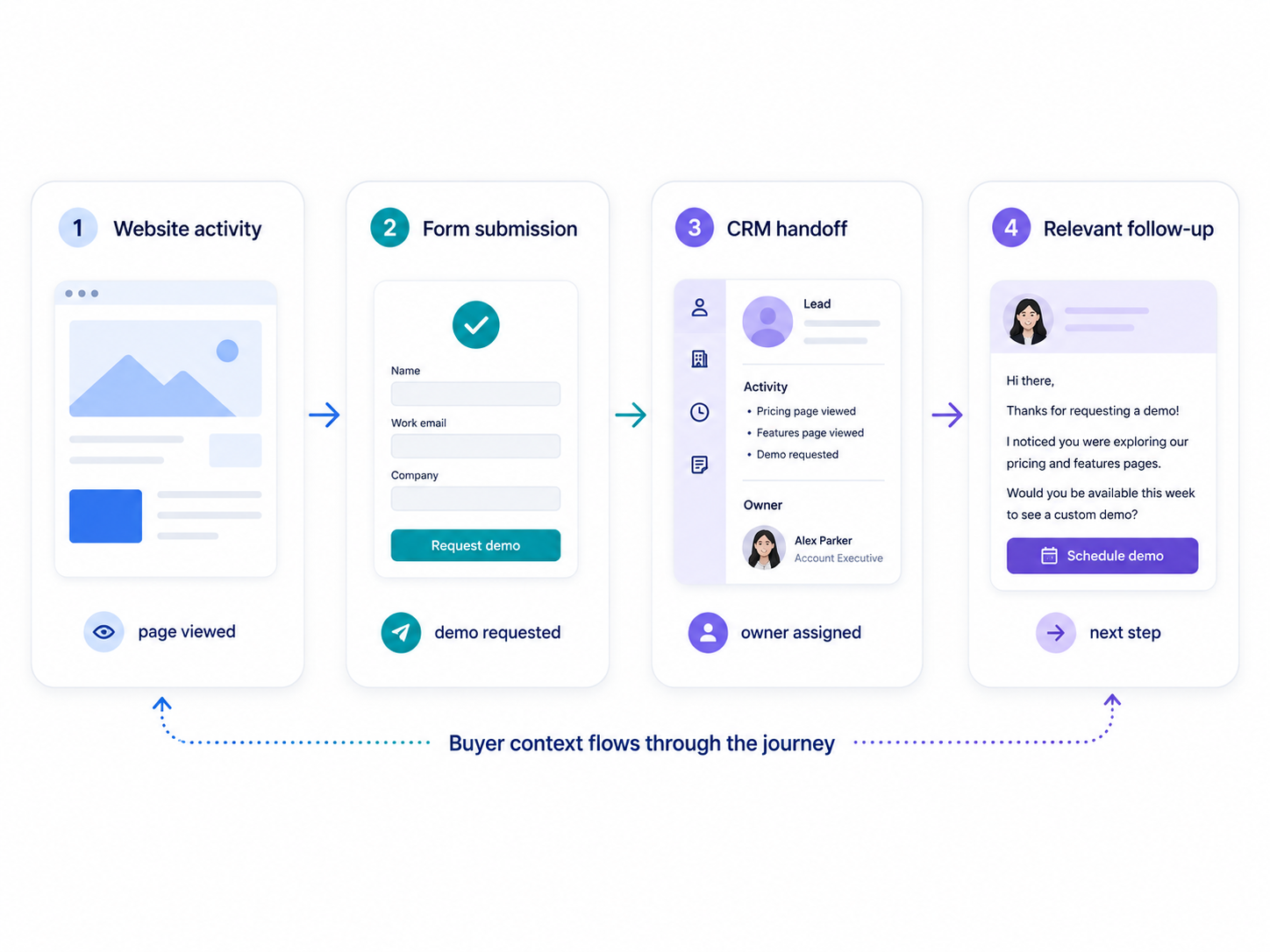
An AI-guided demo experience can give visitors a self-serve path to relevant product material before they commit to a live sales conversation. Supademo’s Demo Agent uses buyer context to surface relevant interactive demos and approved resources, then passes conversation details to sales when someone moves forward.
That type of layer is most useful when it answers a question the website already struggles with, rather than becoming another widget added because AI is fashionable. Complex security questions, implementation planning, and pricing discussions still benefit from people. The value is in giving buyers enough product evidence to decide whether that conversation is worth having.
Repeated visitor questions can also expose weaknesses elsewhere on the site. If buyers keep asking about the same workflow, that topic may deserve its own page, demonstration, or comparison section instead of remaining buried inside sales conversations.
6. A form submission is only useful if the context survives
Marketing dashboards often treat a form submission as the end of the website journey. From the buyer’s perspective, it is the beginning of a new one.
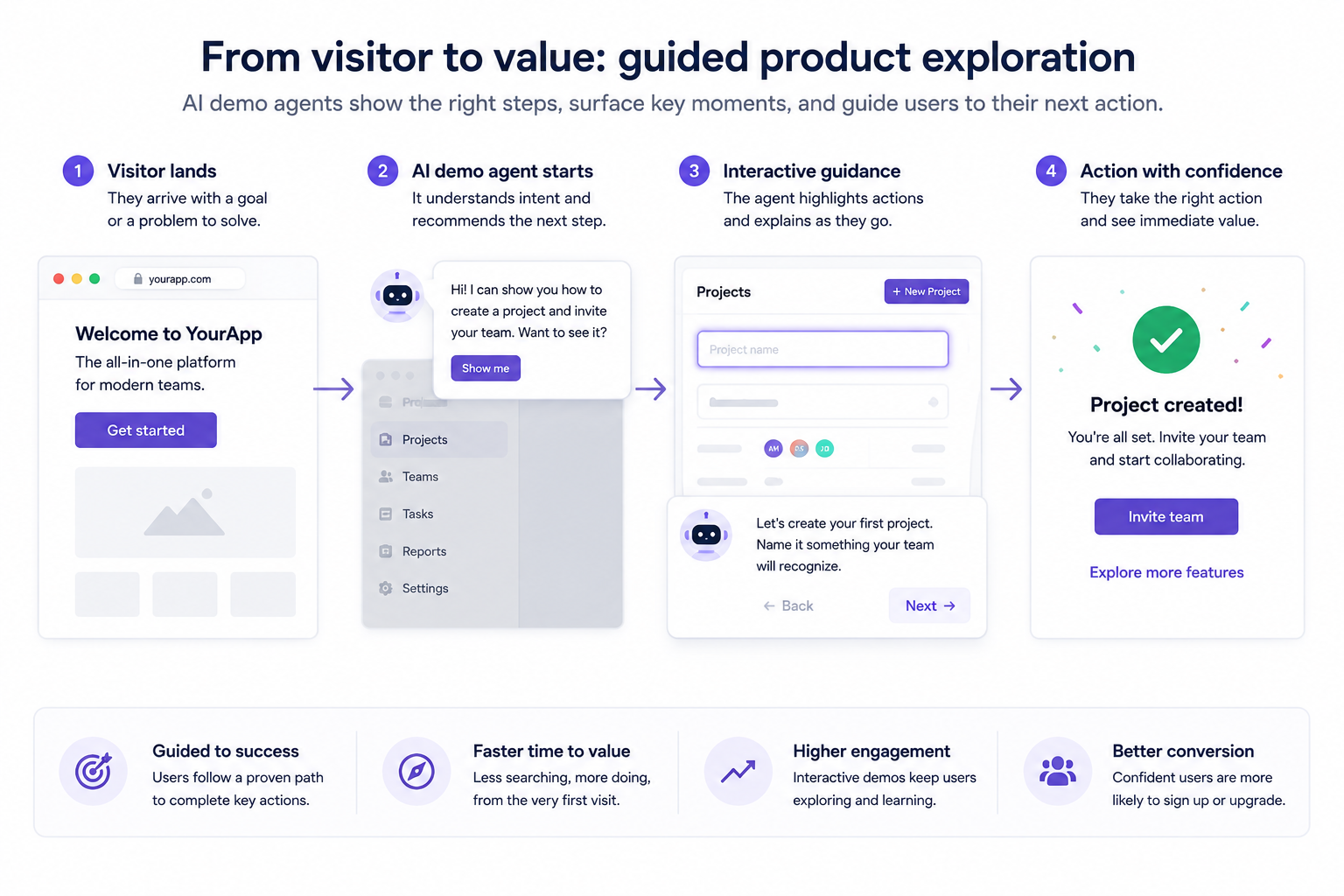
The first reply matters because the buyer has just spent time learning about the product. A response that refers to the relevant feature or use case continues that thread. A generic message several days later asks the buyer to rebuild the context from scratch.
That gap grows when website activity and sales notes live in separate places. Someone submits a form after exploring a particular product area, but sales receives little more than a name and email address. The lead exists while the reason for the lead has disappeared.
A shared sales pipeline gives teams one place to track deal stages and ownership while keeping activity history and next steps visible. Pipeline CRM also supports customizable stages, shared deal visibility, and indicators for stalled opportunities.
The CRM still depends on a defined process. An opportunity sitting in “Proposal” for three weeks without an owner or next action isn’t more organized because it appears on a Kanban board. The useful part is making the next move visible and keeping enough of the buyer’s context attached to the deal that the follow-up feels connected to what happened on the website.
The language used on the site can carry into the sales process as well. If buyers are organized by industry or use case online, those same signals can support routing and follow-up rather than forcing the sales team to start again with generic discovery.
7. Audit the handoffs instead of blaming the whole website
Poor website performance often gets turned into a large project before anyone has isolated the failing part. Low conversion becomes a redesign discussion. Weak organic traffic creates pressure for more content. Slow publishing gets blamed on resourcing. Sometimes those diagnoses are right, but one weak handoff often produces symptoms somewhere else.
Publishing deserves attention when approved pages or technical fixes keep sitting in a release queue. Look at how long routine changes wait, which steps require manual handling, and whether ownership becomes unclear between staging and production. A publishing delay is an operational problem before it becomes a content problem.
Search accessibility requires a different review. Compare the page people see with the version Google can crawl, render, and index. Google’s JavaScript documentation and URL Inspection guidance give teams a grounded way to check those assumptions rather than guessing from the browser.
Product clarity needs another test again. Ask whether a buyer who has never seen a sales deck can understand the workflow from the website alone. If traffic reaches the page but visitors still can’t picture how the product fits their work, publishing a more broad feature copy will probably create more pages with the same weakness.
Sales owns the final handoff. Review what happens in the hours after someone shows intent, how much context reaches the rep, and where opportunities tend to sit without a clear next action. None of this is as visually exciting as a redesign, but it sits much closer to the point where website demand becomes revenue.
Developers, marketers, and sales teams don’t have to run one giant audit together. Each team can examine the part it understands best, then compare where the problems overlap. That usually reveals a few specific breaks in the process rather than one mysterious “website problem.”
Treat the website as part of the demand process
A SaaS website can be technically healthy and commercially quiet at the same time. The useful response isn’t to dismiss technical work or pile more marketing tactics on top. It is to find the point where useful information or buyer intent stops moving.
Sometimes that point is a deployment queue. Sometimes Google is receiving less of the page than the team expects. In other cases, the site is fast and indexable but still too vague for a serious buyer, or sales receives an inquiry without enough context to continue the conversation well.
Fix the weakest connection first and measure what changes. A focused improvement to one handoff is usually easier to diagnose, easier to maintain, and more informative than another full redesign built on an assumption about what was wrong.