Creating a professional-quality video used to require a camera, lighting equipment, a skilled editor, a subscription to expensive software, and hours or days of production time. That barrier kept video content out of reach for most individuals, small businesses, educators, and independent creators.
In 2026, that barrier is essentially gone. AI video generators can produce high-quality videos from a text prompt, an image, or a script in minutes. They can animate still images, generate realistic scenes that were never filmed, add voiceovers automatically, create subtitles, and export finished content ready to publish. And many of the best tools offer all of this for free.
The speed of development in this space has been extraordinary. Tools that required expensive subscriptions a year ago now offer generous free tiers. New tools have launched specifically for creators who cannot afford paid software. And the quality gap between free and paid AI video generation has narrowed significantly.
This guide is your complete resource for free AI video generators in 2026. You will learn how they work, what makes some tools better than others, which specific tools deliver the best results for different use cases, and how to get the most out of free tier limitations. Whether you are a content creator, a teacher, a marketer, a small business owner, or simply curious about what AI can do with video, this guide gives you everything you need to start creating today.
What Is an AI Video Generator
A Clear Definition
An AI video generator is a software tool that uses artificial intelligence, specifically large generative models trained on vast amounts of video, image, and text data, to create or edit video content automatically. You provide an input, which might be a text description, an image, a script, an audio file, or an existing video clip, and the tool produces a video output based on that input.
The technology behind modern AI video generators combines several AI capabilities. Text-to-video models generate video sequences from written descriptions. Image-to-video models animate still images. Speech synthesis models generate realistic voiceovers from text. Video editing AI tools can automatically cut, enhance, caption, and assemble footage without manual timeline editing.
“In 2026, typing a sentence and receiving a finished video in return is not futuristic. It is a Tuesday afternoon workflow for millions of creators around the world. The question is no longer whether AI can generate video. It is the tool that does its best for your specific needs.”
How AI Video Generation Has Changed in 2026
The most significant developments in AI video generation over the past year have been in quality, consistency, and accessibility. Early AI video tools produced short, often unstable clips with visible artifacts and unnatural motion. Modern tools generate videos with smooth motion, coherent scenes that maintain visual consistency across frames, realistic lighting and physics, and natural-looking characters and environments.
The free tier offerings have also improved substantially. Where free plans once meant watermarked two-second clips, many tools in 2026 offer free users meaningful video lengths, decent resolution, and enough monthly credits to support real creative work. Competition among providers has driven this improvement, and creators are the direct beneficiaries.
The Core Formula of AI Video Creation
Strong Prompt + Right Tool + Smart Editing = Professional Video Output
The quality of your output depends on all three elements. A weak prompt produces generic or inaccurate results regardless of how powerful the tool is. Choosing the wrong tool for your use case wastes time and free credits on outputs that do not fit your needs. And even the best AI-generated footage benefits from basic editing to trim, sequence, and polish the final product. This guide helps you optimize all three.
Types of AI Video Generators
Text-to-Video Generators
Text-to-video tools take a written description and generate a video sequence from it. You type something like a time-lapse of storm clouds gathering over a mountain range at sunset, and the AI produces a video matching that description. The quality and length of what is generated vary significantly between tools, but the best in 2026 produce impressive results from well-crafted prompts.
Text-to-video is the most versatile category because it does not require any pre-existing visual material. A creator with no footage, no images, and no design skills can produce compelling visual content from words alone. This makes it particularly valuable for marketers, educators, social media creators, and anyone who needs to illustrate ideas visually without a production budget.
Image-to-Video Generators
Image-to-video tools take a static image and animate it to create a video clip. You upload a photograph or illustration, specify how you want it to move, and the AI generates a realistic animation of that image. A photograph of a city street becomes a video with moving cars and walking pedestrians. A product image becomes a smooth, rotating showcase video. A portrait photograph comes to life with natural head movement and expression.
Image-to-video is particularly powerful for product marketing, social media content, and creative projects that start with existing visual assets. If you have a library of photographs or illustrations, an image-to-video tool can transform that static content into dynamic video without any filming. For marketers who want to convert product photos into short video clips inside a full editing workflow, invideo’s tool to convert images to video handles this within a browser-based editor without switching platforms.
Script-to-Video Generators
Script-to-video tools generate complete explainer or presentation videos from a written script. They combine AI voiceover generation, automatic scene selection or creation, and on-screen text and graphics to produce a finished video that matches the written content. These tools are widely used for educational content, corporate training videos, product explainer videos, and YouTube tutorials.
From a practical perspective, a small business owner can write a 200-word product description, paste it into a script-to-video tool, and receive a complete,polished product video in minutes. This is a task that would previously have required a videographer, a voiceover artist, and a video editor.
AI Video Editing Tools
AI video editing tools take existing footage and enhance or transform it automatically. They can remove backgrounds, add captions, identify and cut out filler words and silences, stabilize shaky footage, upscale resolution, enhance color, generate highlight reels from long recordings, and translate and re-voice content in different languages. These tools are valuable for creators who have their own footage but want to reduce the time and skill required to produce polished output.
The Best Free AI Video Generators in 2026
Kling AI
Kling AI has established itself as one of the strongest free options for high-quality text-to-video and image-to-video generation in 2026. Its free tier offers a meaningful number of generation credits per month and produces video quality that competes with paid tools from other providers.
- Free tier includes daily generation credits that reset every 24 hours.
- Supports text-to-video and image-to-video generation.
- Generates videos up to around 10 seconds in length on the free plan.
- Output quality is among the best available at zero cost.
- Best for creators who need short, high-quality clips for social media and content marketing.
“Kling AI’s free daily credits are one of the most practical free offerings in the AI video space. If you plan your generation sessions and use credits efficiently, you can produce a meaningful amount of content each week at no cost.”
Runway ML
Runway ML is one of the pioneering platforms in AI video generation and continues to offer a useful free tier in 2026. It is particularly strong for video editing AI tools alongside its generation capabilities, making it a good choice for creators who work with a mix of original footage and AI-generated content.
- The free plan includes a limited number of generation credits per month.
- Supports text-to-video, image-to-video, and a wide range of AI video editing tools.
- Features include background removal, motion brush, slow motion generation, and video upscaling.
- The interface is polished and accessible for users without a technical background.
- Best for creators who want both AI generation and AI editing capabilities in a single platform.
Predis AI:
Predis AI is a versatile AI video generator for creating social media videos, Reels, Shorts, and promotional content from simple text prompts. It can generate a first draft with scripts, scenes, visuals, music, and subtitles, while also allowing users to edit and customize the final video before publishing.
- Creates AI videos from text prompts, images, or product links.
- Supports social media formats including Instagram Reels, TikTok videos, YouTube Shorts, and Facebook videos.
- Automatically generates scripts, scenes, visuals, music, and subtitles.
- Includes an editor for changing text, images, colors, fonts, and individual scenes.
- Offers AI voiceovers, branded content creation, and social media scheduling.
- Best for creators, marketers, and businesses that need to create and publish social media videos quickly.
Predis ai combines video creation, editing, branding, and publishing in one workflow, making it useful for creators and businesses producing social media content.
Pika Labs
Pika Labs focuses specifically on short-form video generation and has built a strong reputation for producing smooth, visually appealing clips from both text and image inputs. Its free tier is generous by the standards of the AI video space, and the quality-to-cost ratio is among the best available.
- The free tier provides a regular allocation of generation credits.
- Supports text-to-video, image-to-video, and video modification.
- Strong at generating stylized content, animated sequences, and creative visual effects.
- Allows users to modify existing video clips with AI instructions.
- Best for social media creators, animators, and anyone working with stylized or creative content.
Luma Dream Machine
Luma AI’s Dream Machine offers impressive video generation quality through a free tier that gives users a set number of monthly generations. It is particularly strong for realistic motion and physical accuracy, producing video that looks more like real footage than many competitors.
- The free plan includes a limited number of monthly generation credits.
- Particularly strong for realistic video generation with natural motion and physics.
- Supports both text-to-video and image-to-video generation.
- Output resolution and visual quality on the free tier are consistently strong.
- Best for creators who need realistic-looking video and photorealistic scenes.
Hailuo AI (MiniMax)
Hailuo AI from MiniMax has gained significant attention in 2026 for offering very high-quality video generation on a free tier with few restrictions. It consistently produces smooth, high-resolution video from text prompts and is particularly popular among creators who want premium-quality output without a premium price.
- Generous free tier with daily generation credits.
- High output resolution and smooth motion quality on the free plan.
- Strong text-to-video and image-to-video capabilities.
- Minimal watermarking on free outputs compared to many competitors.
- Best for creators who prioritize output quality and want to produce content that does not look AI-generated.
Sora (OpenAI) Free Access
OpenAI’s Sora became available with a free access tier in 2026. While the free tier is more limited than the paid subscription in terms of resolution and generation length, it provides access to one of the most capable text-to-video models available and is worth exploring for anyone serious about AI video creation.
- Free access includes limited monthly generations at a lower resolution.
- Produces highly coherent and detailed video from complex text prompts.
- Strong at maintaining visual consistency across longer generated sequences.
- The quality ceiling on even the free tier is among the highest available.
- Best for creators who want to test the upper limits of what text-to-video AI can produce.
“Free tiers on AI video tools change frequently. Credits, video lengths, watermarking policies, and available features on free plans can be updated by providers at any time. Always check the current free plan details directly on each tool’s official website before building a workflow around specific free tier capabilities.”
InVideo AI
InVideo AI is a script-to-video platform with a strong free tier that is particularly well-suited to YouTube creators, marketers, and educators who want to produce complete finished videos from written content. It combines AI voiceover, automatic scene selection from a stock library, and on-screen text to produce polished explainer and presentation videos.
- The free plan allows a meaningful number of video exports per month.
- Strong script-to-video and text-to-video capabilities with stock footage integration.
- Includes AI voiceover generation in multiple languages.
- Built-in templates for YouTube videos, ads, educational content, and social media.
- Best for anyone who needs to produce complete, polished videos from scripts quickly.
Canva AI Video Generator
Canva’s AI video generation tools are embedded within the Canva design platform, making them accessible to the massive existing Canva user base with no additional account required. The free tier of Canva includes access to basic AI video generation alongside the full design toolkit, making it a practical starting point for creators already using Canva.
- Available to all Canva free users with a set number of AI generation uses per month.
- Integrates directly with Canva’s design and editing tools for a seamless creation workflow.
- Strong at creating social media videos, presentations with video elements, and branded content.
- The combined power of Canva’s design tools and AI video generation makes this particularly valuable for marketers and brand creators.
- Best for designers and marketers who already use Canva and want to add AI video to their existing workflow.
Full Comparison of the Best Free AI Video Generators 2026
| Tool | Free Credits | Video Length | Best Use Case | Output Quality |
| Kling AI | Daily reset credits | Up to 10 seconds | Social media, short clips | Excellent |
| Runway ML | Monthly credits | Up to 16 seconds | Editing plus generation | Very Good |
| Pika Labs | Regular allocation | Up to 5 seconds | Creative and animated content | Very Good |
| Luma Dream Machine | Monthly credits | Up to 5 seconds | Realistic footage and scenes | Excellent |
| Hailuo AI | Daily reset credits | Up to 6 seconds | High-quality general creation | Excellent |
| Sora Free Tier | Limited monthly | Up to 5 seconds | Premium text-to-video testing | Outstanding |
| InVideo AI | Monthly video exports | Full-length videos | Scripts and explainer videos | Good |
| Canva AI Video | Monthly uses | Short to medium clips | Marketing and branded content | Good |
How to Use Free AI Video Generators Effectively
Write Better Prompts for Better Results
The single most important skill in using AI video generators is prompt writing. A vague prompt produces a generic result. A specific, detailed, well-structured prompt produces a precise, high-quality result. Learning to write effective prompts is worth investing time in because it multiplies the value of every generation credit you use.
Effective prompts for video generation include a subject, an action or motion, a setting or environment, a lighting description, a camera movement or angle, and a visual style or mood. Compare these two prompts and the difference in output quality they would produce.
Weak prompt: A dog running in a field.
Strong prompt: A golden retriever running joyfully through a sunlit meadow with tall grass, slow-motion cinematic style, warm golden hour lighting, camera tracking alongside the dog at ground level, shallow depth of field.
The second prompt gives the AI specific visual information for every element of the scene. The result will be more visually consistent, more cinematic, and more aligned with a specific creative vision.
Maximize Free Credits With Smart Generation Strategy
Free tier credits are limited. Using them strategically means getting the most value from every generation you run.
- Draft and refine your prompt before running a generation. Spending five minutes improving a prompt before generating is more efficient than running three mediocre generations in search of a good one.
- Use shorter generation lengths when testing a new prompt. Run a two or three-second test generation before committing your best credits to a full-length clip of the same prompt.
- Generate multiple variations of your best prompts using different random seed values to find the version that best matches your vision.
- Use free credits at off-peak hours when server load is lower. Many tools produce better quality outputs when demand is lower because more computational resources are available per generation.
- Maintain a prompt library. Save your best-performing prompts so you can reuse and refine them rather than starting from scratch each session.
Combine Multiple Tools for Better Results
No single free AI video tool excels at every task. The most effective approach is to use different tools for different parts of your workflow based on where each tool is strongest.
- Use a high-quality text-to-video tool like Kling AI or Hailuo for generating your primary video clips.
- Use Runway ML for AI-powered editing tasks like background removal, slow-motion generation, or video upscaling.
- Use InVideo AI or Canva when you need a finished video with voiceover and text from a script.
- Use image-to-video tools to animate product photographs, illustrations, or thumbnails into video content.
“Many professional creators use three or four free AI video tools in combination rather than relying on a single platform. Each tool’s free tier provides enough credits for its specific role in the workflow. Combined, the total free output is substantial.”
Edit and Polish AI-Generated Video
Raw AI-generated video clips almost always benefit from basic editing. Even a short clip may need to be trimmed, color graded, combined with other clips, paired with music or a voiceover, or captioned before it is ready to publish. Free video editing tools like DaVinci Resolve, CapCut, and the free tier of Adobe Express can handle all of these tasks without adding to your production cost.
Treat AI-generated clips as footage rather than finished products. The AI handles the hardest part of creating visual content from nothing. Basic editing turns that footage into a polished, professional-looking final product.
Who Should Use Free AI Video Generators
Content Creators and YouTubers
AI video generators allow solo creators to produce visual content at a scale and quality that was previously impossible without a team. B-roll footage that would require a filming trip can be generated from a text prompt. Intros, transitions, and visual effects can be created in minutes. Thumbnail animations, short social media clips, and preview videos can all be produced using free AI tools without any camera or studio time.
Small Business Owners and Marketers
Product videos, promotional content, and social media advertising that would previously require a videography budget are now within reach for businesses of any size. A product description becomes a product video. A customer testimonial quote becomes an animated visual card. A new service announcement becomes a polished explainer. Free AI video tools give small businesses access to the same quality of video marketing that larger businesses pay production agencies to create.
Educators and Course Creators
Educational content benefits enormously from visual illustration. Concepts that are difficult to explain in text become clear when shown visually. AI video generators allow educators to create illustrative video content for lessons, courses, and presentations without filming or animation skills. A biology teacher can generate a visualization of cell division. A history educator can create atmospheric visual scenes of historical periods. A coding tutor can produce animated explainer clips for complex concepts.
Social Media Creators
Short-form video platforms reward creators who post consistently and visually. AI video generators allow social media creators to maintain high output frequency without burning out on production. A creator who posts daily can use AI video tools to supplement filmed content with generated clips, animations, and visual effects that keep their feed visually dynamic without requiring a camera every single day.
Developers and Researchers
AI video generators are also valuable for developers building applications and researchers exploring AI capabilities. Free tiers provide accessible ways to experiment with the technology, test use cases, and build AI video generation into prototype applications without upfront cost.
Limitations of Free AI Video Generators
Video Length Restrictions
The most consistent limitation across free tiers is video length. Most free plans cap individual-generated clips at between three and fifteen seconds. For short-form social media content, this is often sufficient. For longer content formats, multiple clips need to be generated and edited together, which increases the number of credits used and the time required.
Watermarks on Free Output
Some free AI video tools add visible watermarks to generated videos on the free tier. This is a common monetization mechanism. Before using a tool for client work, commercial purposes, or public publishing, check the watermarking policy on its free plan. Several tools in 2026 offer watermark-free output on their free tier, which is worth prioritizing if this matters for your use case.
Generation Credit Limits
Free tier credit allocations limit how much you can generate in a given time period. For creators with high output volume needs, free tiers may not provide enough credits to support a full production schedule. The strategy of combining multiple tools addresses this by distributing generation needs across several platforms, each with its own free allocation.
Resolution and Quality Caps
Free plans often restrict maximum output resolution to 720p or 1080p, while paid plans offer 4K or higher. For most online publishing contexts, 1080p is fully adequate. For large-screen display, cinema use, or premium broadcast contexts, free-tier resolution limitations become a genuine constraint.
Commercial Use Restrictions
Read the terms of service carefully for any AI video tool you plan to use for commercial purposes. Some free tiers restrict commercial use of generated content. Others grant full commercial rights regardless of plan level. Using free-tier content commercially without checking the licensing terms creates potential legal exposure that the quality of the output does not justify risking.
“Always read the terms of service before using AI-generated video content commercially. Licensing terms vary significantly between platforms and can change without prominent notification. What was permitted on a free tier last month may have changed this month.”
How to Choose the Right Free AI Video Generator for Your Needs
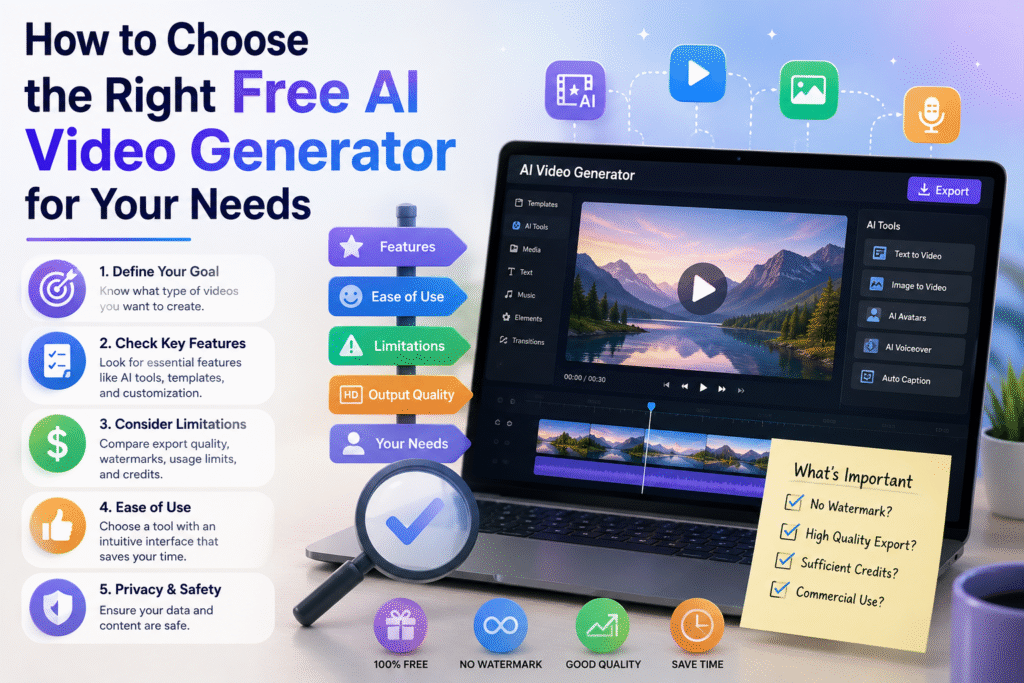
| Your Primary Need | Best Free Tool to Start With |
| Short high-quality clips for social media | Kling AI or Hailuo AI for the best free output quality |
| Complete videos from a written script | InVideo AI for end-to-end script-to-video workflow |
| Animating product photos or illustrations | Pika Labs or Luma Dream Machine for image-to-video |
| AI editing of existing footage | Runway ML for the broadest editing AI toolset |
| Branded marketing and social content | Canva AI for seamless design and video integration |
| Testing the highest quality AI video models | Sora is free tier for the most advanced generation |
| Educational and explainer videos | InVideo AI for built-in voiceover and template library |
| Creative and stylized artistic content | Pika Labs for style flexibility and creative effects |
Conclusion:
The AI video generation landscape in 2026 offers something that was genuinely impossible just a few years ago: professional-quality video creation at zero cost. The tools exist. The free tiers are meaningful. The quality is real. The only remaining barrier is knowing which tools to use and how to use them well.
This guide has given you both. You now know the best free AI video generators available today, what each one does best, how their free tiers compare, and how to build a multi-tool workflow that maximizes your free credit allocation across platforms. You know how to write stronger prompts, how to edit AI output into polished finished content, and what to watch for in terms of watermarks, commercial licensing, and resolution limitations.
The creators, businesses, and educators who are building with these tools right now are developing skills and producing content that puts them ahead of those who are still waiting for the perfect moment to start. The tools are not going to get simpler to start with than they are today. The free tiers are not going to be more generous than they are right now. The quality is only going to keep improving, which means the content you produce today will look dated next year.
Start today. Type a prompt. Generate a clip. Edit it. Publish it. Learn what the tool does well and what it does not. Then refine, repeat, and build. The learning curve is genuinely short, and the output quality is genuinely impressive. Free AI video creation is not a future possibility. It is a present reality that is available to you right now.
Frequently Asked Questions About Free AI Video Generators
What is the best free AI video generator in 2026?
The best free AI video generator in 2026 depends on your specific use case. For pure video generation quality, Kling AI and Hailuo AI consistently produce the best output on their free tiers. For complete videos from scripts, InVideo AI leads the free options. For realistic footage and natural motion, Luma Dream Machine is a strong choice. For the most advanced generation technology available on a free plan, OpenAI’s Sora free access tier is worth trying. Most serious creators use two or three tools in combination to maximize what their combined free credits can produce.
Can I use free AI video generators for commercial purposes?
It depends on the specific platform and its terms of service. Some free AI video tools grant full commercial rights to generated content regardless of plan level. Others restrict commercial use to paid subscribers. Always check the current terms of service on the platform’s official website before using free-tier content for commercial projects, client work, or monetized publishing. Licensing terms change frequently and vary significantly between providers.
How long can videos be on free AI video generator plans?
Most free tiers in 2026 limit individual-generated clip lengths to between three and fifteen seconds. Kling AI and Hailuo AI typically offer up to ten seconds per clip on their free plans. Runway ML and Luma Dream Machine offer around five to sixteen seconds. Script-to-video tools like InVideo AI can generate complete, longer videos on free plans because they assemble stock footage rather than generating each frame from scratch, which is computationally less intensive.
Do free AI video generators add watermarks?
Watermarking policies vary by platform. Some free tiers add visible watermarks to all generated videos. Others offer watermark-free output on free plans as a competitive differentiator. Hailuo AI and Kling AI have been noted for relatively minimal watermarking on free outputs compared to some competitors. Always check the current watermarking policy before generating content you intend to publish, as these policies change frequently.
How do AI video generators work?
AI video generators use large generative models trained on extensive datasets of video, image, and text content. When you provide a text prompt, the model draws on patterns learned from its training data to generate a sequence of video frames that match the description. Image-to-video models use a similar process, using the input image as a visual anchor and generating motion and additional frames around it. The AI does not retrieve or copy existing video. It generates entirely new visual content based on learned patterns and your specific input.
Are free AI video generators good enough for professional use?
For many professional applications in 2026, yes. Short clips for social media advertising, product showcase videos, educational content, and supplementary visual material for presentations are all areas where free AI video tools produce output that meets professional standards. For cinematic production, broadcast media, and large-format display contexts, free-tier resolution and length limitations may be constraining. The honest answer is that the quality ceiling of free AI video tools has risen dramatically and continues to rise. What required a paid subscription six months ago is often available for free today.